With all the online and offline reading I’ve been doing, I have been discovering all sorts of things – and really enjoyed learning about Furoshiki. Delightful idea for christmas and gift wrapping don’t you think? But for now, imagine enjoying a few bottles of wine that we’ve brought along furoshiki style!
It never stops – the goodness to be found online via social networking – news, information, ideas, collaboration projects, tools, tips & tricks, articles, images, videos, big blogs, little blogs, micro blogs and more.
I’m thrilled to be a participant in this web world, and to be an educator able to work closely with the adults of the future. I’m looking foward to the adventure that will be 2008.
But I’m still in fun mode – it’s still holiday time.
So I’ve played with my banner a few times – currently favour the beach theme for an aussie summer!
I’ve tossed ideas around for what geeky things I should do in 2008.
Another addition to the suit of Web 2.0 tools customized with advantages for K-12 educators. We’ve already got Wikispaces, VoiceThreads, WetPaint Wiki, and Ning.
This is Cool! if it remains open for sharing – no strings attached.
I did a search amongst the repository and found some nice PageCasts, e.g. Middle School Literacy and Harry Potter Feeds, as example. There is a huge long list of Flakes (widgets) you can add to customise your PageCast..
The Pageflakes team explains:
You can customize this page by adding and deleting Flakes (Widgets). Click the yellow button at the top right corner to:
browse the Educational Gallery
change the layout
customize your theme
share and publish your page
By default, all your pages are private. To publish a page or to share it with your colleagues please click on “Make Pagecast”. Of course you can have as many pages (tabs) as you want.
Why not setup a private page to start with? And when you’re ready, you may create a public Pagecast (check out our Pagecast Gallery) or a group Pagecast (shared page) for you and your colleagues – great for sharing notes, news and documents.
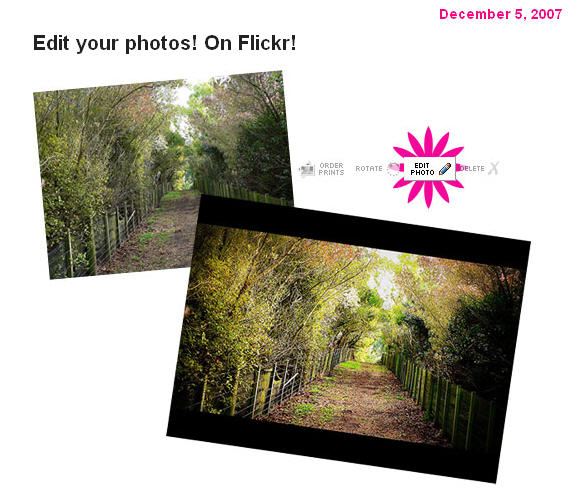
Picnik’s awesome photo editing tools are now only a click away. If you’ve ever wanted to deal with the dreaded red eye or crop a photo just so, click on the new “edit photo” icon located above one of your photos and get started.
The Picnik/Flickr collaboration works similarly to other 3rd party services who’ve built additional tools on top of the Flickr API: You’ll need to pass through the step of giving the Picnik service permission to edit and save your photos… It’s a little bit like you’re “installing” Picnik on your Flickr account, but with nothing to download.
I rather like having access to this – especially when I am not always working on my own computer with my own suite of favourite tools. It’s all about being able to work quickly, efficiently, and ‘on the fly’ whenever and wherever – isn’t it?
Images are an important part of the creative side of any teacher’s work.
We need to make use of good image sources that are good, free, and easy to search through. The trick is to know what sources to recommend to students.
It’s not just about copyright – its about being practical, and showing students the wonderful world of possibilities beyond Google images or taking anything they find that is not actually in the public domain – a vital point as more students and teachers move into online environments of blogs, wikis and more. Including images with postings enriches the experience for the reader and can also help to illustrate or support the writer’s viewpoint.
FlickrCC – my top favourite – and Australian too. This tool searches Creative Commons images from Flickr – no need to use the Flickr advanced search option (though you can do that too). What I love about it is the way it displays a large selection in one view, and the way it randomly chooses a different word to display images each time you visit. That has thrown up some real favourites for me too. FlickrCC lets you edit images right away – though I don’t make use of that function.Flickr itself is free, though you will have to register if you want to upload and edit your own images.
Catch something really amazing – watch the world in action at FlickrVision! Here you will see the images as they are being uploaded to Flickr – superimposed on a map of the world (classic view) or a rotating globe (3D view).
Others worth a try:
Bigfoto.com offers pictures from around the world, including America, Asia, Europe, Africa, and Pacific.
EveryStockPhoto is a search engine for creative commons photos, located in Vancouver, BC. They aim to be a community for designers, developers, photographers and other media publishers who want better, easier access to license-specific media on the web. This is a single integrated search, allowing users to bookmark their photos with private and public tags, and increasingly we will be offering advanced searching options, rating systems and other tools.
FreeDigitalPhotos.net has over 2000 free images that you can use in commercial and noncommercial work. You are not allowed to sell, redistribute, or claim these images as your own. You can browse by category or search for exactly what you need.
FreeMediaGoo.com has a large collection of images, audio, textures, and other visual mediums that you can use for free with some restrictions. You do not even have to credit the images. The site also features some amazing digital images if you are looking for something different.
FreeFoto.com says it is the largest collection of free photographs on the Internet (link back and attribution required).
FreePhotosBank.com allows users to have non-exclusive, non-transferable license to images. You can search for photos, see which photos are the most popular, and which ones have the highest ratings or the most downloads.
Fotogenika.net has photos for free download for personal, educational, and nonprofit use. The site is well organized, and it includes categories such as architecture, animals, people, and textures.
The Geo-Images Project attempts to make images (mostly photographs) that are useful in teaching geography more widely available. Navigate via map points on the globe, and capture images around common themes. Love the one on transport! and community is cool too!
MorgueFile.com offers stock photographs in high resolution digital. With over 55,000 images, divided into several categories, they are sure to have something you can use. The thumbnails are small, but your search results display quickly, and the photos are of top quality. (The term “morgue file” is popular in the newspaper business to describe the file that holds past issues flats. Although the term has been used by illustrators, comic book artist, designers and teachers as well The purpose of this site is to provide free image reference material for use in all creative pursuits. This is the world wide web’s morgue file)
Pics4Learning collection is intended to provide copyright friendly images for use by students and teachers in an educational setting. Lesson plans also included.
Stock Exchange offers high quality images taken around the world by amateur photographers. If you have an interest in photography, you can even submit your own pictures. There are various searching options and over 100,000 images. The photographers establish the terms, so read the fine print, but most pictures can be reused immediately.
TurboPhoto provides free stock images from 10 categories all of which are in the public domain.
UVic’s Language Teaching Library consists of about 3000 images useful in the teaching of basic vocabulary in a variety of languages. Its purpose is to provide a set of those graphics most basic and useful for low-level language-teaching, and at the same time, to make them as easily searchable as possible. Transparent an matte images included.
Riya – Visual Search provides royalty free images. Riya contains images of People and objects. Each of these also contain subcategories.
Konrad Glogowski (Konrad March) put together a short video of his virtual meet-up in Second Life with pre-service teachers from Brigham Young University. November 19, 2007. Amongst many ideas, Konrad shows us how we have to redefine our “teacherly voice”. He writes a great deal more about his Conversation with Pre-Service Teachers, and student-teacher relationships and technology.
You will agree with his statement that –
Needless to say, as the new technologies open up new vistas for exploration and personal engagement, educators struggle with how they can best meet these traditional expectations and adapt their practice to suit the new reality of a more conversational and participatory approach to learning brought about by the new tools of web 2.0.
We can learn a great deal from the work that Konrad is doing. Though I haven’t had much time to exchange ideas with Konrad, he is a fellow resident on the island of Jokaydia, where Heyjude Jenns (me) and Slammed Aayeb ( Dean Groom ) from Parramatta Marist High School are testing the future possibilities. Jo Kay and Sean Fitzgerald were involved in Konrad’s session too! Learn more about there work at the Second Life in Education wiki. (Good on you aussie educators!)
It is our aim to investivate just how these future environments will shape (or is it re-shape?) our ‘teacherly voice’ and learning environments – a clear and exciting focus for 2008.
Covers all the obvious things like integrating your public library catalogue into your own computer; online booksellers; notifications for overdue books; building bibliographies; book downloads etc; as well as cheeky things like an ‘invisible bookshelf’!
So my delay in writing gives you the benefit of the additional information included in the comments. Perhaps you have other recommendations to add to the Book Hacks collation to keep this useful compilation alive.
I get the chance to do many exciting things within my work – and each year brings exciting new challenges. Last year it was Web 2.0. This year it is virtual learning!
Some of our teachers have been involved in the NSW Learnscope project. This has been a great inspiration, and exciting because it has opened new doors and new opportunities. Melinda and Dean regularly write about the project. The Learnscope eLearning2007 conference was held 1/2 November in Sydney, and some 35 teams have taken a journey into using Web2.0 and Virtual Learning – each with it’s own focus. The details of the teams and their projects are available on the Wiki.
Dean wrote some great comments about this event and what he’s learned this year. He seriously challenges our ideas about Web 2.0, because he has challenged his own.
Has it worked – hell yeah. The students achieve more in less time and the quality of the work is excellent – they love a challenge and rise to it again and again. Will I go back? No.
Dean and I have taken up a small residence each in Jokaydia (an Australian education island managed by Jo Kay), so as to fast-track our knowledge of learning possibilities in SecondLife. This is hard going right now, as we are working late at night meeting with educators from Australia and around the world – all committed to moving learning into the 21st century – as the kids understand it!
If you’d like to explore Jokaydia with its the education facilities, then drop in via my place at Heyjude Hall. Thanks to Dean for the design of the sign!
I haven’t got anything ‘happening’ yet, but membership of Jokaydia means I can learn, share, and use the facilities on the island, as well as provide information at my own residence. Dean will also be putting up a great showcase of teaching ideas from his classroom at his residence.
Most importantly, Dean will be linking from those ideas directly into Skoolaborate and the superb initiatives underway there. Skoolaborate is a serious education initiative taking place in the Teen Grid, and which will (I believe) show us the real 21st century learning futures of our kids! All thanks to our own Sydney master of innovation, Westley Field. Good one!
I’ve added a few videos about Second Life. The last one, Seriously Engaging from New Media Consortium, was first seen by me ‘in world’ during the eLearning07 conference, after being taken on a tour of the fantastic virtual NMC facilities by that famous dog CDB Barkely, whom I wrote about recently.
Introduction to Second Life
Educational Uses of Second Life
History of Global Kids in Teen Second Life
National Media Consortia Campus: Seriously Engaging
Following on from my last post, I’m just going to pass on an ‘alert’, because I know from some recent workshops that some have missed out on these.
Thinking of creating a wiki? Have you chosen to use Wikispaces? Then make sure that you join up using the K-12 Teacher option, which you will find at the bottom of the wikispace joining page in small print.
Joining this way provides all the features and benefits that normally cost $50/year – for free. No fine print, no usage limits, no advertising, no catches.
If you are thinking of using the rather excellent VoiceThread tool, then there is now a good education option here too. The features built into VoiceThread are pretty comprehensive, particularly with the latest version.
At the bottom of the page, click on About, and then click on Pro on the About page. Here you will find all the pricing for the professional account, and a small line that explains that VoiceThread is offering a special account for K-12 classroom educators, click here for more info.
Open your VoiceThread account. Then go to upgrade the account – Go Pro! Be sure to look for K-12 Educators click here! because that will get you the free account.
Not sure about VoiceThread, and how to use it? Let Chris Betcher explain!
The opportunity to hear Stephen Heppell again in a recent Keynote session was a winner for me (albeit via video)! He has long been a leader of learning, inspiring innovators the world over (including my own Director Greg Whitby) to move forward in response to the urgent needs of 21st century learning. I have had the pleasure of seeing Stephen ‘live’ for a conference Keynote for the International Association of School Librarianship in HongKong back in 2005. A rare treat for those of us from Australia.
Stephen mentions his mobile phone in this Scottish keynote. I remember spending a pleasant evening at the same IASL conference dinner with him….. and I remember a guy full of fun, and down-to-earth enthusiasm. Stephen used his mobile phone to help me do quick calculations during a fund raising auction at the conference dinner, and generally spent heaps of time talking with us about what he can do and what he will be able to do in the future with his phone! I love listening to Stephen 🙂
It’s a great way to revisit the rich resource that each keynote address provides. You can right-click (or ctrl-click on a Mac) each of the links below to download these to your computer, and drag them to your iPod or into iTunes:Three of them are of particular interest to me:
Stephen Heppell explores the consequences of technology and change and reiterates that learning will get better and better, with a transparency in understanding, and with downsizing of schools and schooling. He talks of small schools at the end of each road addressing the personalized learning of students – genuinely responding to what I heard about ‘individuation’ from Yoram Harpaz.
He explains that the future is ‘massively about teamwork’ and collaboration. It is about stuff that is free, and people reporting, and huge amounts of real-time data helping us make judgments about what we should do and what we shouldn’t do. He asks ‘where are we with real-time data’? What are we doing with our mobile phones? etc. What we need is to allow pupil-centric approaches to learning to take over – technology empowering this all the way.
For Stephen ‘identity’ and ‘time’ are critical. Real time use of technology is extraordinary and evolving in amazing ways. In this context, doing the job of teaching is spectacularly complex and getting harder every day.One thing that is clear is that Stephen has moved well beyond the notion of system schooling, redesigning schooling, top-down structure etc. He talks about a learning world built from the bottom up.We’re a long way off from what we need – or are we?

 But I’m still in fun mode – it’s still holiday time.

 Images are an important part of the creative side of any teacher’s work.
 This is one that I have been meaning to post about for absolutely ages….thank goodness I was not quick and efficient this time 🙂


 right-click (or ctrl-click on a Mac) each of the links below to download these to your computer, and drag them to your iPod or into iTunes:Three of them are of particular interest to me:
 judyoconnell.com