Fun with Google Blog Search

googleblogsearch.jpgInspired by Classroom 2.0 at Ning! I decided to play around with Google Blog search, and created myself 3 feeds – School 2.0, Learning 2.0 and Library 2.0. I decided to subscribe to these with a daily email alert, and to plug these three into my blog right here for others to see and ‘play’ around with. Read the highlighted blog entries, or click on the RSS icon to go straight to the google feed! Neat!

Using this I can create a feed for a specific blog, using the Advanced Blog Search. Then I can subscribe to this by email, or pick up the RSS or Atom feed.  I could also combine some blogs [Not that I am doing this – but what this shows is the variety of options available to us once we go looking!].

Well, just a bit of fun, while I focus on administrivia at my desk, before Term 2 begins.

How many other things could you do with this RSS trick from GoogleBlog Search?

rsspunk.jpg

Design, Technology & Information Architecture

Information design in Web 2.0 is simple, it is social, and it embraces alternate forms of navigation….. The design of today’s Web applications is being led by a principle of simplicity….. There has emerged on the Web a trend towards socializing things which are not inherently social such as books, photos, videos, and text such as news articles, papers, and posts….. In addition to websites which socialize media and applications, there are websites which are social for social’s sake. These websites are all about connecting people and building community. They are the social networking websites such as the MySpace, Gather, Facebook, and Ning networks.

A comprehensive post from Ellysa Kroski over at Infotangle, based on her upcoming conference presentation Computers in Libraries 2007 conference on Monday, April 16th.

The video below from ZDnet, which covers Mashups, provides another part of the story – an explanation of the extensive influence of APIs in creating the flexibility of Web 2.0.

[‘Caught’ on Library20.ning, with a full post at InfoTangle.]

What is a Mash-up

TeacherTube – video in education

Check out TeacherTube. If you want to find out what’s going on in the TeacherTube community, then jump straight across to the TeacherTube blog launched in March. TeacherTube is the YouTube of educators, and recently it launched a channel for student-created videos. You can find loads of resources that have been uploaded by teachers from around the world. techtips.jpg

For instance, the TechTips ScreenCast Episode 5: Collaborative Research provides information on how Del.icio.us social bookmarking has been used for a student research project. The result is a website aggregating the research results of the very best websites on Mesopotamia that students had found, with descriptive phrases added to each bookmarked site.

From Jodie at TeacherTube:

Thanks go out to TeacherTube community member Anne Bubnic (http://abubnic.blogspot.com/) for pointing us to the current research. The following article references are posted on the The California Technology Assistance Project (CTAP) Region IV math project site:

Scientific Research Indicates that Using Video in the Classroom Improves Learning http://www.libraryvideo.com/articles/article18.asp

Using Video in the Classroom – There is substantial research promoting the use of video in the classroom as a dynamic resource for supporting curricula. http://www.libraryvideo.com/articles/article13.asp

Video Goes to School – a 3-part series at http://www.eschoolnews.com/news/showStory.cfm?ArticleID=5597

KQED – using video effectively – http://www.kqed.org/topics/education/educators/videoclassroom/effective.jsp

Why It Works – a series of papers & research studies from United Streaming. http://www.unitedstreaming.com/home/why.cfm?id=3

The research confirms the power of video in teaching and learning. But TeacherTube users, we want to hear specific examples of how you are using video. Please share your success stories!

Have you joined your friends in Ning! yet?

Recently one of my school colleagues, Jan, wrote about Ning on our blog Bibliosphere News – alerting all of a new ‘MySpace-like’ environment that is being explored by educators. As our schools are particularly interested in emerging Web 2.0 tools, she encouraged us to…

Have a look at Steve Hargadon’s School 2.0 social network and see a social network in the making. He’s using Ning, a social network builder, and then look at Bill Drew’s very active Library 2.0 network (includes school libraries but not confined to education).

Certainly Library 2.0 has a great pool of members, (up to 850 the other day) and it will be interesting to see how this develops, and what it offers that is different to blogs and blogging. Like all social networking sites, Ning incorporates flexible ways of communicating and sharing information – easily! I can communicate with my friends, keep track of a number of Ning networks, and use it to create projects of my own.

It is worthwhile checking out Library2.0, Classroom2.0, School2.0 and SecondLife Librarians which is just starting up. There are others too, and (as usual) you can easily find networks of interest via the spiderweb of networks of your friends! (I must say I am not running a seperate blog in each of these – and one of the things I would like is the flexibility to link my blog from each of my networks if I wanted to?)

I really like the use of Ning by the StopCyberbullying network. A beautifully crafted use of Web 2.0 tools to collaborate on this important topic. Great use of Feed Digest to provide the body of content from all the resources that members of the Network have identified as valuable on this topic.

I have already planned to use Ning for a Learnscope project – which will provide the collaborative professional learning environment for teachers involved in VTE Information Technology at Year 11.

LearnScope focuses on work-based staff development. The beauty of LearnScope is that it enables participants to design what, where, when and how their learning will take place during the life of the project (6 months June – November). LearnScope moves beyond traditional expert-centred professional development models to focus on relevant, participant-driven opportunities.

The flexibility of Ning to allow each of the teachers to maintain a blog and share the their own reflections in this environment is a powerful option for this project. In addition, it is easy to share video and photo files, links and other files; embedd other Web 2.0 API such as bookmark tag clouds, clusty search cloud, Google calendar, or whatever; have good threaded discussion in the Forum; have quick comments with chatter……and more! This has got to be a great environment for expert-centred virtual, 21st century professional development.

But as the spruker says  ….  that’s not all!

The one thing I was missing was a wiki…not that it is hard to create and link to a wiki as they have done in Classroom2.0 linking to Classroom 2.0 Wiki.

So the email from BillDrew@Library20.ning (yes, you get an email account as well) was most welcome:

Coming in June, the network will have a wiki component added to it. It is currently in development by Ning programmers. I will add a feature on the main page to spotlight a service or a new tool such as javascripts. Please send me items and ideas for such a feature.

Catch yourself some good movies added to Ning via TeacherTube or FlipShare.

Building an Online Community

Sheep may Safely Graze

Go meet someone new in Ning! today!

That 2020 Vision again!

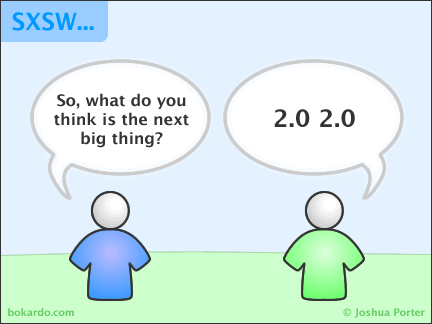
A while back I wrote about 2020 vision, and future directions. I wanted to share two graphics – one for the fun of it, the other for the ideas it raises.

Comic 2.0 2.0


Semantics of Information Connections and Social Connections.


Their space: Education for the Digital Generation

From Scotland via Derek Robertson at Hotmilkydrink:

On my way through to Edinburgh this morning I decided to listen to the latest edition of the BBC’s Digital Planet podcast. This is a really good show that never fails to throw up something of interest and relevance to me in my professional and personal dealing with technology.

The first article featured a new research paper from DEMOS called Their Space: Education for the Digital Generation. It proved to be quite an enlightening listen because they actually had a digital native on the programme! This 15 year old girl talked about how she and her friends used ICT in an invisible way in their lives. The only time it became overtly visible she claims was when teachers, (due to government regulations no doubt she mutters under her breath) told pupils that ‘this is a mouse’ or ‘save your file to the appropriate folder’!!! The contempt was tangible I tell you.

The DEMOS paper draws on qualitative research with children and polling of parents to counter the myths obscuring the true value of digital media. Some quotes from the Executive Summary of this 81 page document gives an indication of the content:

  1. In an economy driven by knowledge rather than manufacturing, employers are already valuing very different skills, such as creativity, communication, presentation skills and team-building.
  2. Schools are at the front line of this change and need to think about how they can prepare young people for the future workplace.
  3. Schools need to recognise the new digital divide – one of access to knowledge rather than hardware – and start to redress some of the existing imbalances.
  4. Students are changing the society they live in along the progressive lines that are built into the technology they use everyday – of networks,
    collaboration, co-production and participation. The change in
    behaviour has already happened.We have to get used to it, accept that the flow of knowledge moves both ways and do our best to make sure that no one is left behind.


Technorati Tags: , , , , ,

Student opinions on Social Networking

As a followup from my last post on MySpace, I recommend a visit to Vicki Davis – Edublog Award winner for Best Wiki with her Flat Classroom Project wiki. Vicki leads in Web 2.0 thinking.

On her Westwood School Wiki you will find a comprehensive virtual survey of her 9th and 10th grade classes on MySpace and social networking. If you haven’t got a list of your own for discussions with your students, Vicki’s list provides a great starting point.

Vicki’s Westwood Wikispace was listed as December’s Space of the Month by Wikispaces.

Catch Vicki at Del.ici.ous as brightideasguru, or on her Cool Cat Teacher blog.

Technorati Tags: , , , ,

MySpace connected generation

Media reports have emerged about four families whose daughters were sexually assaulted by predators they met on the popular internet social network MySpace. They sued owner News Corp this week for negligence and fraud, the lawyers representing the families said in a statement.

At the same time, the latest ISTE SIG News for January lets us know that ISTE is in Myspace, reaching out to the connected generation.

This juxtaposition is a critical reminder of the need to establish and promote good online culture and behaviours. Technology educators realise that ‘the times, they are a changing’! and as Suzanne says

Wonderful! ISTE is on myspace! This will be a great resource for educators who check their myspace as often as they check their email.

While I admit to not being a regular user of MySpace yet, I know that Australian educators are rapidly moving into online places and spaces. Much has been written about these online issues, so we know that we have our work cut out for us in 2007 to improve our understanding and usage of online spaces.

The MySpace safety guide for parents from Teen Magazine is a helpful handout. As far back as March 2006 Stephanie summed up by saying:

Let’s be honest about what MySpace really is: It’s an online networking tool, orginally developed for the self-promotion of unsigned musicians and bands. There is nothing inherently evil or dangerous about MySpace.

However, like many online tools, it can be abused, and yes, there is danger when inexperienced web users like children and teenagers use a networking or communications tool with complete trust and little scrutiny of who they are communicating with.

My Space is a busy place! According to SirsiDynix OneSource June 2006, it is busier than Google, with 150,000 accounts being created daily. In the same article Stephen Abram asks important questions about the potential of MySpace and other social networking places.

MySpace can foster the learning of new literacies, and present opportunities for self-expression and friendship building. Our students are global citizens who are becoming smarter about new sources of information. What does it mean to be a good global citizen? Amongst other things, it means learning safe and ethical behaviours.

In the end, by being responsible adults on line, educators can act as role models for appropriate online behavior, providing a positive presence online for kids in their classrooms.

ISTE shows us one way!

I know our students are ‘digitally mobile’ (some would say fickle) and I haven’t had a personal need to get into MySpace or Beebo or any other online social networking homebase yet. That will come. The issue for me is not so much about what we use, but more about creating opportunities for learning (and responding) within the Web 2.0 world of our students.

Choose your tool(s) and get on with it 🙂

PS. Thanks to ISTE for listing HeyJude in
Our Top Ten Favorite Ed Tech Blogs for January

Technorati Tags: , , , , ,

Digital Identity Mapping

Digital Identity Mapping

Originally uploaded by fredcavazza.

This is a very nice visual image of the shift in our social environment – which now embraces a combination of online tools for every facet of our personal life..

Google – altruism or what?

I had to follow up my last post, prompted by a friend, to comment on the constant rollout of stuff from Google. I’m a fan on the one hand, and then I worry on the other. Google’s technology playground, GoogleLabs, is seemingly always cooking up cool new things. The graduates of GoogleLabs soon find a place in the digital mainstream. I liked Google Desktop, for a while, then gave up a few months ago as in reality I do not work on only one computer and not enought stuff transfered – so Desktop had too many limitations. Even the indexing fails at times! I have of course dabbled with other Google goodies, and make good use of Picassa. And I am curious to see how Google Suggest shapes up. It’s fascinating to watch the hits – worth showing teachers and students.

At the back of my mind, however, is the Googlification of all things online as posed by that great flash video EPIC2015. Was 2004 really the year everything began? Can’t you just see all these Google things leading to the Evolving Personalised Information Construct?

Regardless, a Google product that has been getting some ‘press’ in the blogosphere is The Literacy Project.

Ira at SpecEdChange says ” Google has pulled together a vast collection of literacy resources into an on-line Literacy Project that can help educators assemble books, information, videos, book groups, blogs, and much more.

Take a look around, you’ll find fascinating things that may spark all sorts of classroom ideas. There are easy to follow directions for creating tech-enhanced on-line book groups, developing school-wide blogs, or for adding your own school literacy videos to this project”.

Ho Hum. I’m going to wait to see what teachers in schools can do with this.

Tom Hoffman in Emerging Technologies quoted Andy Carvin who comes down a bit on Google:

My guess is that other educational bloggers will have similar reactions. Not unlike the Google Literacy project launched the previous week, Google for Educators seems more like a promotional stunt, lacking in any new resources tailored for educators. Given Google’s superpower strength in the Web 2.0 universe, one might expect them to focus their resources a bit more on developing tools and services that teachers and students could really use.

Tom also complains about advertising – fair enough – but how else will we get lots of apps for free in schools?

In the meantime I do feel that the Google Literacy Project pulls together into one space various tools that we can use in our Web 2.0 learning environment – and from my point of view, having them together in one Project (or portal) makes it much easier to promote to reluctant teachers.

It’s just the quality that’s the issue isn’t it? But I do like fun!! So go try this out now….

From Dean Shareski:

This is just plain good fun. Spell with Flickr was fun but this is really cool. Type any name or phrase and geogreeting finds buildings that will spell your phrase.heyjude.jpg

The page itself actually finds and shows the building locations as it builds your name.