The community will lead – from Stephen Heppell

The opportunity to hear Stephen Heppell again in a recent Keynote session was a winner for me (albeit via video)! He has long been a leader of learning, inspiring innovators the world over (including my own Director Greg Whitby) to move forward in response to the urgent needs of 21st century learning. I have had the pleasure of seeing Stephen ‘live’ for a conference Keynote for the International Association of School Librarianship in HongKong back in 2005. A rare treat for those of us from Australia.

Stephen mentions his mobile phone in this Scottish keynote. I remember spending a pleasant evening at the same IASL conference dinner with him….. and I remember a guy full of fun, and down-to-earth enthusiasm. Stephen used his mobile phone to help me do quick calculations during a fund raising auction at the conference dinner, and generally spent heaps of time talking with us about what he can do and what he will be able to do in the future with his phone! I love listening to Stephen 🙂

Ewan McIntosh alerted us to the keynotes for the Scottish Learning Festival which have been made available now in a version that will play on your video iPod or MP4 player.

It’s a great way to revisit the rich resource that each keynote address provides. You can right-click (or ctrl-click on a Mac) each of the links below to download these to your computer, and drag them to your iPod or into iTunes:Three of them are of particular interest to me:

but I want to focus on the last one for now.

Stephen Heppell explores the consequences of technology and change and reiterates that learning will get better and better, with a transparency in understanding, and with downsizing of schools and schooling. He talks of small schools at the end of each road addressing the personalized learning of students – genuinely responding to what I heard about ‘individuation’ from Yoram Harpaz.

He explains that the future is ‘massively about teamwork’ and collaboration. It is about stuff that is free, and people reporting, and huge amounts of real-time data helping us make judgments about what we should do and what we shouldn’t do. He asks ‘where are we with real-time data’? What are we doing with our mobile phones? etc. What we need is to allow pupil-centric approaches to learning to take over – technology empowering this all the way.

For Stephen ‘identity’ and ‘time’ are critical. Real time use of technology is extraordinary and evolving in amazing ways. In this context, doing the job of teaching is spectacularly complex and getting harder every day.One thing that is clear is that Stephen has moved well beyond the notion of system schooling, redesigning schooling, top-down structure etc. He talks about a learning world built from the bottom up.We’re a long way off from what we need – or are we?

Let Stephen explain.

Photo: School Bell
  • Write your thoughts….or stream that news!!!

    I’ve been playing around with the possibilities offered by tools such as Tumblr. I have to say, I think this little application rocks!

    Yes, I know that some people are using it very effectively as their ‘cut down’ blog, others are using it for creating a compilation of information sources through the power of RSS. Both good and very handy.

    But what about the option of using this as a blogging tools for kids?

    It’s quick, easy to use, and possibly a better starting point for teachers new to the blogging game and great to use for individual projects or themes.

    Obviously this is not as expansive a tool as regular blog platforms – but a cool tool nonetheless. I set up my test at Yellow Submarine. First of all I tested posts, links, images and videos, then set up an RSS feed of my delicious links which stream very nicely into Tumblr.

    Kids can blog really easily with Tumblr, making it ideal for primary age students. And imagine the value of packaging information for students or staff this way for the library, or for anything really. And what a neat way to share information being complied in your delicious links. We should be talking more about the possibilities of this clever little blog tool.

    Tumblr has text, photo, quote, link, chat and video tools. I really like the flexibility of being able to change the name AND url of your Tumblr blog too! Just a few templates to choose from – but for the more experienced, you can custom design your own if you are used to fiddling with the template as we had to do in the original blogger version.

    For anyone thinking of using Tumblr as a way of providing a news feed or updates from the web, you’ll love the “share with Tumblr” widget that you can install on you browser nav bar, or equivalent dashboard widget for your mac. Find something interesting or fun – just hit the button, and quickly send the post to your Tumblr blog. That’s just what I did a couple of seconds ago on my test Tumblr blog Yellow Submarine – and it took less than 30 seconds!

    Now here’s a cool solution for ‘time-poor’ teachers. Well worth experimenting with. Don’t ever say you haven’t got time to run a blog now 🙂

    Photo: Wee Waterfuls

    “Know How” focus on Flickr

    Don’t usually do this, but I would like to draw your attention to an article in the November issue of Netguide (Australia), which has an excellent ‘how to’ article “Share photos online with Flickr“.

    Very comprehensive, very user friendly guide – great for teachers new to the tool who will easily see the educational connection after reading this clear article.

    Links Flickr to blogging, which is an extra bonus compared to the usual ‘do this and then do that’ kind of guide.

    By the way, Netguide is quite inexpensive to subscribe to – a good recommended read if you are not a ‘techie’ but want to stay in touch with technology!

    More information on Flickr at:

    http://del.icio.us/heyjude/flickr

    http://judyoconnell.wordpress.com/tools/ 

    A directory of wonderful things

    For our schools it is time to take a well-earned break with the term 3 holidays now underway. So it’s time for me to have a bit of fun on this blog too before I get back to more serious matters….

    Time to talk about wonderful things…boing boing style …. prompted by my lightweight breakfast reading of the Sun Herald (no, not my choice of paper).

    An article there about a device that creates plates, bowls and other tableware on demand and recycles them (a Star Treck fan like me recognises this!) , produced as a prototype by MIT led me to comment “I bet they got that from boing boing!”

    A little research showed me that Boing Boing listed the story Dishmaker: Printer for Dishes on February 12, which came from Gizmodo, who had linked to this story 12 months earlier at TreeHugger. Well, here’s a video about the earlier prototype…you are looking at the beginning of replicators for us all 🙂

    By the way, boingboing is a weblog of cultural curiosities and interesting technologies, and is listed by Technorati as Number two blog in the world, with Engadget, the number one blog in the world, having replaced boing boing at the top.

    Boing Boing is a ‘beaut’ blog full of eclectic news!

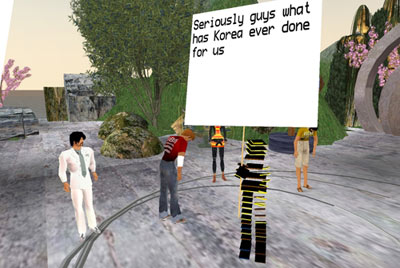
    Today I read about a recent “in-world” labor protest that took place in Second Life. The company in question: IBM. The aggrieved: 1850 avatars, including some bananas and triangles. Link.

    I discovered a beautiful Gallery of Illustrated Endpapers. What are they? Endpapers are the inside covers and facing pages of books. Today, endpapers are almost always blank. But our more sophisticated forebears made good use of endpapers by adding thematic illustrations to them.

    Look at the endpapers here.

    I also found out about a Terry Pratchett DiscWorld reading order guide; thought about the Walk to Rivendell challenge; and saw how mobile technology worked for a reporter in Myanmar who had had his camera confiscated.

    There’s lots more to read on Boing Boing every day – so add it to your RSS reader! Lots of good ideas to provoke discussions in your classrooms.

    Now, settle back and watch another video – Dice Stacking – reported by Boing Boing of course!

  • K12 Online – the conference is coming!

    The 2nd annual K12 Online virtual conference is just about a month away. The 2007 conference is scheduled to be held over two weeks, October 15-19 and October 22-26 of 2007, and will include a preconference keynote during the week of October 8.

    The conference theme is “Playing with Boundaries.”

    Make sure you attend, or attend the conference archive. The event is completely free. Important thinkers and dreamers and practitioners will present. Connect yourself with their visions of how our schools are evolving, how learning is changing.

    The presenters this year have been invited to create short, online videos (published to a website like YouTube or TeacherTube) which will give attendees a better idea of what their presentation will address. These videos provide a fabulous way of deciding which presenters to listen to first! Check the blog out now, and you’ll be in for a treat!

    Stay in touch with the lead-up to the conference by following the K12 Online conference blog, and enjoy!

  • Google docs in Plain English

  • Library Thing…. on WordPress

    We love to customise our online spaces, don’t we?

    librarything.jpg

    After a request for help to find a way to display a book selection in the sidebar on an edublogs wordpress blog, I went hunting. WordPress doesn’t support the Library Thing widget right now, but that’s what we wanted to use.

    Thanks to some code from the Library Thing forum and a bit of fiddling, we ended up with a My Book Collection widget on Danni’s The Butterfly Effect blog.

    It has a static book jacket, and a random feed from the the profile’s catalogue. Basic for now, but does the job. You could do your own edits. Substitute your LibraryThing account name where I have inserted ‘accountname’, and of course your own image from your flickr account.

    Code below:

    <a href=”//www.librarything.com/catalog/accountname”><img src=”http://farm2.static.flickr.com/1415/1401347182_e689c40c0c_o.jpg”&gt;
    <a href=”http://www.librarything.com/catalog/accountname”&gt;
    <img src=”http://www.librarything.com/gwidget/widget.php?
    view=accountname&&width=170&lheight=11;type=random&num=8&hbold=1
    &ac=ac8834&tc=000000&bc=EEEEFF&fsize=8″>
    </a>

  • Is your mobile phone trash?

    The geek girl in me enjoyed reading “Where is your mobile phone manufactured?”

    Wish I’d know this before being landed with a dud phone! Must have been assembled in the Emirates. Luckily my current phone is an original.

    Photo credit: Not Grumpy
  • Passion is the purpose….I knew that!

    If you’re a teacher, especially if you are an ICT teacher ‘doing’ software or programming, then I have to share a ripping good read from Giles with you.

    You know, Giles realised something, that he says is specific to his own circumstance.

    I realised that what he wrote is a ‘must read’ for schoolies!

    We all have to think differently, and infuse our learning purpose with passion and diversity. Go on, read When the Beast is Born, and decide what class or staff meeting you will use this piece for a discussion starter 🙂

    Scratch media lab of your own from MIT

    Thanks to the ICT Guy’s post about their professional learning day with Scratch – Creating Games with Scratch – I have been reminded to look into this great creative tool.

    SCRATCH is a new programming language that makes it easy to create your own interactive stories, animations, games, music, and art — and share your creations on the web.

    Scratch is designed to help young people (ages 8 and up) develop 21st century learning skills. As they create Scratch projects, young people learn important mathematical and computational ideas, while also gaining a deeper understanding of the process of design.

    Scratch is available free of charge, go to Download, and there are support documents available to get you underway.

    Help turn your kids from media consumers into media producers, with their next Scratch project!!