Learning online through CSU – looking for solutions

This is the first week of the new session at Charles Sturt Uni – and my first week dipped into a fully online world of learning for current and future educators.  I was lucky to meet some of them in O week at the barbeque, and was ‘rocked’ by their aspirations and passion about work in libraries in schools and in the community and public sectors. The conversations covered many things – and of course Twitter and Facebook came into it pretty soon.  Of those starting the course many had a Facebook presence, though only a few were twitter followers.  Never mind…the queenslanders got together for a ‘twitter training session’ to get connected and stay tuned.  You know who you are 🙂

This week I began to ‘meet’ my students in four subjects that I am teaching this session.  It’s a time of reflection and re-organisation for me, as I move into the potentially flat-bed delivery of courses that Uni learning managment systems can be.  I’m looking for solutions.

My students in Digital Citizenship in Schools are the ones that I am keen to see what we can do to improve on the way we deliver online courses. After all, understanding digital citizenship assumes a level of interaction with digital content and digital modes of interaction!  Our content is delivered in ‘modules’ and can be quite static text based products. However, there is functionality that allows for online meetings, forums, and shared spaces through Wimba.  The Sakaii platform (latest one is not rolled out yet) does allow embedding of many files, so videos and more can be incorporated – a real plus!

But it’s still not easy to share online learning together, unless we adopt more visual, interactive approaches with our students – who in many cases are teachers or teacher librarians looking for or implementing interactive learning for their students.

So what am I doing with the Digital Citizenship in Schools ETL523 group?  Setting up things that will benefit them, me, you, and model how what we learn today will continue to be part of the learning collaborative that we create.

I’ve created a Diigo group  Digital Citizenship in Schools which not only informs the course work we are engaging with, but becomes a pool of information for anyone, and can continue chugging along.

I’ve created a Facebook Page Digital Citizenship in Schools – with the same mission.

These two plug directly into a blog I have created for the students, as a way of sharing updates in a more interactive way  (not sharing this link yet, as I won’t go live with this for the students until tomorrow).  The feeds from Diigo and Facebook update automatically within the blog too.  The videos I am going to make will also plug into that same blog and update.  So now we will have a nice colourful, hyperlined, information rich  exchange that can be embedded right into our Sakaii system – and bingo – easy, up-to-date communication from me – leaving the forums for the questions, queries, and discussion of the ‘formal’ learning.   We’ll be using a number of other tools too as part of the learning experience.

So a simple little adaptation has created a nice one stop shop in the LMS – that’s actually a composite of many worthy online tools.   I think next time I’ll add a wikispace, now that they have free Wikispaces for the Higher Education.

I’m enjoying this, and really looking forward to working with my students in INF330, INF505, ETL523 and ETL401.  Not sure what adaptations will happen in my other courses yet.  That’s the challenge for Week 2 🙂

Drop the act, and get Dropbox

Luckily, there are plenty of schools around the globe that are ‘up to speed’ with technology change, with good folk who share their knowledge and experiences.

Hello Dropbox – here I come 🙂

What is Dropbox?

Put away your flash drive, and stop emailing yourself files, because once you get Dropbox, the ways you deal with moving, sharing and backing up your files will change forever.  Whether you are sharing things with your family, working on school projects, collaborating with colleagues, or just securing your own work, Dropbox is an amazing tool.

Drop Box it is a service that provides 2GB of free online file storage (with paid upgrades possible for heavy users).

What impresses me the most is the speed at which it backs things up.

Dropbox for Teachers

Jonathan Wylie has put together a Top Tips for Using Dropbox at School, explaining how it works for a busy teacher, expanding on the advantages for teachers. Did you know this includes being able to run a drop box for your students? DROPitTOme is a free service that works with Drop Box to allow people to upload files to your Drop Box account without giving them access to the contents of your Drop Box account.

Essentially though:

  • It’s free
  • It’s convenient
  • It saves you time
  • It synchronises your files across all your computers and devices.

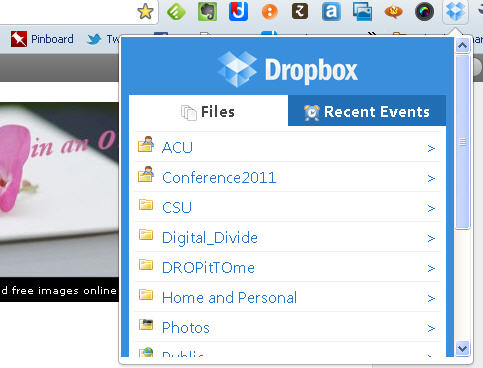
Would you like to quickly access your Dropbox files while you’re browsing or using web apps in Chrome? You’ll need to head over to the DropBox extension page and add Dropbox to your Chrome browser.  You can pick up instructions on how to do this  by reading Access your Dropbox quickly in Google Chrome.

With the ‘Dropbox for Chrome’ extension, you can:

  • Browse all files in your DropBox account
  • Instantly download files from your account
  • View recent events (uploads, downloads, and file modifications)

But essentially, this extension allows you to peek into your dropbox on the fly, without further ado!  Neat!

If you are already using Dropbox, and are wondering what else you could be using it for, here are a few additional reads:

Is Dropbox and Google Docs Integration on the Way? That would be grand – but it seems that we’ll see Dropbox Rewind first. This will let you “hop to your Dropbox at any point in the past.” For its users, this could be the perfect defense against deleting files by accident and never remembering to make backups. Dropbox users can also expect to see file system usage analytics.

If you’re still on holidays and want a challenge – why not take part in the The Inaugural Dropbox Dropquest and win nice things like 50 Gb storage for life!

Finally – a handbook/guide from MakeUseOf:

A guide for newbie social educators

Thanks to the ‘heads up’ from Joyce Valenza over at Neverendingsearch about a useful guide for teachers.

Tools for the 21st Century Teacher, is a wonderful little e-guidebook offering a basic introduction to most things social media and discussion about how they may be effectively integrated into instruction.  Among the many tools covered are Twitter, Diigo, Prezi, Evernote, Wallwisher, Skype.

Better still, Michael Zimmer at Edutechintegration is working on a 2nd edition with more tools. Free to download and share!

Flutter your eyelids at me!

I have no idea what is happening in the 3D industry, other than that I enjoyed watching Avatar in 3D version.  That’s it.

Do 3D glasses really work by opening and shutting at high frequency to allow different input?  I could google this fact, but can’t be bothered 😦 but it does remind me of the trick that an opthamologist friend once told me about – she wore contact lenses to correct her vision. One lense was for long distance, and one for short. The brain did the rest of the work.

So I’m guessing that’s what’s going on when Francois flutters his eyelids with frantic speed. Very dystopian ~ with a touch of cyborg.

A Great RSS Reader

This is an accidental post – but what the heck – might as well share this here as well as on Twitter. I’ve accidentally changed my settings on VodPod, so any videos I collect are automatically sent into my draft folder here. Might be handy or might be a total nuisance!  I’ll work that out later.

In the meantime, if you are new(ish) to blogging or online collecting and curation of resources, you might not have realised that you can gather videos that interest you with this tool. I’ve used Vodpod for quite a few years, and you can see that it is included in the sidebar of my blog too.

Another tool that I have used since being introduced to it a few years back (ISTE 2008 in San Antonio) is Feedly.  I love that it synchronises with Google Reader – so that I always use Feedly, except when I need to dip into other tricks that Google Reader offers.  This video is a fair overview. Take a peek if Feedly is new to you.

I find Feedly to be  wonderful.

QR code infographic

According to Nathan King at QR Code Awareness, mobile devices have changed the way consumers access the Internet as well as the way marketers are trying to reach customers. QR codes – which direct you to a website, phone number, SMS or other call to action when scanned with your smartphone – are showing up everywhere.

Although QR codes and mobile barcodes have been around for several years, the explosion of the smartphone market allowed barcode scanning to grow 700 percent from January 2010 to July 2010.

I’ve started spotting them on the back of  new books that we are buying for students!  I haven’t spotted anyone scanning the QR code as yet 🙂

Free web stuff for your library

I couldn’t resist sharing this presentation from Sarah Houghton-Jan. You know – you really don’t have to have megabucks to squeeze the best out of interactive web spaces – just a co-operative and flexible IT manager!

Bump your next PD!

Have your ever been to a conference and ‘bumped’?  I have – and it was so much fun to quickly share information. Funnily enough this App does not seem to have taken off with educators as you might expect – didn’t bump at ISTE2010 at all! Perhaps I was in the wrong room. But ACEC2010 earlier in the year in Melbourne was very bumpy!

Bump 2.0 is now out for the iPhone, with Twitter and LinkedIn integration. Powerful!

Bump 2.0 has had a major redesign for its iPhone app, changing the look and adding some very important new features, including Twitter and LinkedIn integration, as well as unlimited photo and contact sharing.

Other major new features include a chat function that lets connected users chat after a Bump, as well as calendar feature where you can compare calendars, invite each other, and automatically save to each calendar. Adding one of these new features would be news – putting them all together basically redefines the app.

I’d like to see this being used more amongst people in the education industry.

via The Next Web Apps

Education and Second Life

The Digital and Literacy World of Young Children

A new report from the Pearson Foundation examines how digital media is affecting early literacy around the globe.

How is digital media changing the way young children learn? Could the way young children learn be evolving to meet a new, dynamic digital media format?

Authors Jay Blanchard, a professor at Arizona State University, and Terry Moore ask these and other questions in their new report: “The Digital World of Young Children: Emergent Literacy” (PDF), out this week from the Pearson Foundation.

The white paper was released at the annual Consortium for School Networking (CoSN) International Symposium.

Blanchard and Moore conclude “developmental milestones are changing as today’s children approach learning and literacy in new ways, not thought possible in the past. “

The paper is worth a read, especially for understanding our current context around the  emergent literacy needs of primary-aged students.

(via Spotlight on Digital Media and Learning)