PDF sharing online

What do you do when a graduated student  sends you a pdf (on the weekend), needing it for a reference file for uni accommodation application?

What do you do when you have no scanner or appropriate software on hand – and the silly form is meant for print use only?

You ask your contacts on Twitter for help of course!  I got lots of recommendations, but the one from @sandnsurf was the  one  that won the day.

FillAnyPDF free PDF Editor.

FillAnyPDF.com is a website where you upload your PDF form and link to it so other people can fill it out and sign it online. No software is needed. Any PDF form can be used, even if it’s not “interactive”, so you can get started right away. You can even invite a group to fill out your forms and track the results. Anyone that collects signatures or filled out forms will find FillAnyPDF.com to be a valuable time-saving resource.

I loaded then filled out the form – and then was given a link to either download the edited pdf or a url to send to the student. The link expires in 7 days. Pretty cool!
Open Source ethos

I have been spending a bit of time thinking about The World is Flat by Friedman in preparation for the first Flat Classroom Project in 2010. Amongst other things, I thought about Open Source thinking and flat world communications which I planned to share in the  Keynote kick-off.

Well, you now how it is – I just couldn’t share everything  I wanted to (lots out in the rough cuts), but the ‘finds’ are still inspirational.

You have to be inspired by the powerhouses of  Open Source software and Open Content. There is no doubt in my mind that an Open Source ethos is the best way to collaborate, create, share, and be empowered to inspire future learning.

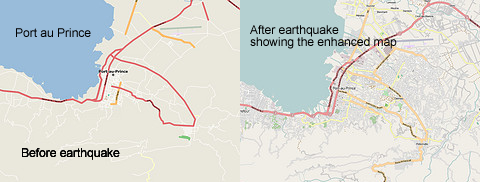
For example, during the crisis in Haiti, the Open Source community did amazing work in Haiti OpenStreetMap to assist aid and rescue workers to do their work and help the relief and reconstruction effort. It was a Flat Classroom Project in action – creating up-to-date  maps of  Port au Prince. Dozens of mappers and developers were able to lend a hand, coordinating on the OSM Haiti WikiProject.

Thanks to Paul Hamilton, I was inspired by yet another amazing example of the power of work taking place using Open Source Software to help people. The development of the  Eyewriter is inspirational. The Eyewriter uses low cost creative technology an free open source software to enable graffiti writers and artists with paralysis to draw using only their eyes.

Vodpod videos no longer available.
posted with vodpod

ePUB an iRevolution?

Overlooked in much of the hype about the iPad announcement earlier in the week was a comment by Steve Jobs in the Keynote presentation where he mentioned that the iBooks app for iPad would take advantage of the popular EPUB format for electronic books.
EPUB is the same format used by the popular Stanza [free, iTunes link] app for iPhone and iPod touch. It’s a free and open standard format created by the International Digital Publishing Forum (IDPF), and it’s designed for reflowable content that can be optimized to whatever device is being used to read a book file.

ebook readers that currently use the format include the Barnes & Noble Nook, the Sony Reader, iRex Digital Reader, and the iRiver Story.

Read more at  All about EPUB, the ebook standard for Apple’s iBookstore.

Does this mean that Apple might be pushing for a robust EPUB standard.

(I do like the Shelfari-look on that screen!)


Climbing up the social ladder …

Two and a half years ago Social Technographics presented a visual analysis of social technology behaviour. Despite the rapid pace of technology adoption, the rungs on the ladder have shown steady growth, with some (like Joiners) growing faster than others (like Creators). In an update –  Social Technographics: Conversationalists get onto the ladder – which includes not just Twitter users, but also people who update social network status to converse (since this activity in Facebook is actually more prevalent than tweeting).

Where do you fit on the ladder?

Social Techno Ladder Mark 2

2010 – A roadmap for the future

Futurist Richard Watson has updated his annual trends and technology timeline for 2010.  What an interesting conversation starter at a meeting looking at technology!

2010-trendsmapfinal1.png

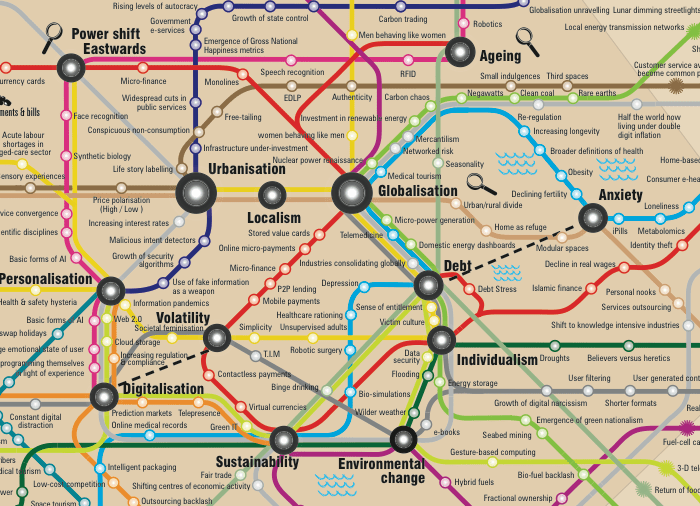
The map has 16 lines representing everything from society & culture to news & media. There are also 5 time zones representing 2010-2050, so everything that falls outside the central zone (zone 1) is obviously a prediction.

The map is published under a Creative Commons Share-A-Like Licence.

Be sure to look at the full A3 sized image to get the full impact! PDF version available here.

(via 2010 Trends – A Roadmap for the Future)

Working at Web Scale

The Web as “humanity connected by technology”. This is the Semantic Web –  the web of linked data, according to Sir Time Berners Lee vision. Tim Berners-Lee spoke  at the World Economic Forum in Davos, Switzerland about the future of the Web and the value of working at “Web Scale”.

The next generation of the Web promises greater opportunity for advancing human intelligence by making us part of the technology system. Social networking is people working together – but they are not using the intelligence of the system. What would it be like if we got the mass of humanity connecting with machines?

(via titticimmino.com )

Unique (and amazing) PDF tool

This is amazing – absolutely amazing!

Nothing more to say really – except it also has a nifty bookmarklet that you can add to your toolbar.  Has website and server tools too!

Google – very social searching

Last year, Google unveiled its Social Search and launched into Labs. The idea is that you would see blog posts and other content from your social network in your search results.

Now, the feature is being rolled out to everyone as a new beta feature of Google.com. As part of the release, Google has also integrated social search into their Image search. You’ll see pictures from photo sharing sites such as Flickr and Picasa.

Posted via web from Heyjude’s posterous

Safe online – fact or fantasy

https://i0.wp.com/www.danpink.com/wp-content/uploads/2010/01/hogwarts-e1264722646117.jpgI came  across two things this week that can help teachers with supporting good use of online spaces.  For some teachers  effective understanding of online spaces and places in terms of good information practice is still a bit of a fantasy tale – like finding Platform 9 3/4 for Hogwarts!

So the following guide is well worthwhile distributing to your school community.

Net Cetera: Chatting With Kids About Being Online,  gives adults practical tips to help kids navigate the online world.  Net Cetera covers what parents and teachers need to know, and issues to raise with kids about living their lives online.

What about the big student magnet  – Google?

Google published its five privacy principles for International Data Privacy Day on the 28th January.  OK, I admit that this is the other side of the coin.

However, it is important to understand exactly what our major online tools consider as important to their product – driven by business forces – as the fact that online tools are extensions of our kids brains means educators have a responsibility to keep in touch and activate the right options for online spaces and places.

Google’s Privacy Principles are:

  1. Use information to provide our users with valuable products and services. Search history informs personalized search, but users can opt-out.
  2. Develop products that reflect strong privacy standards and practices. For example, you can chat on Google Talk “off the record” so the conversation isn’t saved.
  3. Make the collection of personal information transparent. Last year, the Google Dashboard was launched to show you what info Google is collecting on you.
  4. Give users meaningful choices to protect their privacy. You can report privacy issues related to Street View. Google often blurs faces, for example.
  5. Be a responsible steward of the information we hold. Google doesn’t sell data to other companies.

You can view the published web document on Google’s privacy principles here.

(via Google  Search Engine Watch)

Timelines: Sources from history

A new interactive history timeline developed by British Library allows students and teachers to explore collection items chronologically for the first time. www.bl.uk/timeline

Comparing the Peasants’ Revolt with the Punk Revolution or medieval astrology with the Apollo moon landings might appear unconnected at first, but the British Library’s new interactive timeline will allow students to get a sense of change, continuity and chronology when studying historical events.

Bringing together material from the Library’s vast collections and using cutting-edge technology, users will now be able to discover historical connections and create links in an exciting multimedia experience.

(via British Library)