Cuil could be the cool new way to search

CNN reports that an ex-Google team is attempting to take on the Giant with the release of their new search tool named Cuil (pronounced cool, after a character named Finn McCuill in Celtic folklore). Reports to date are not bursting with enthusiasm  – but I think that this just might be worth keeping an eye on for now.

Rather than trying to mimic Google’s method of ranking the quantity and quality of links to Web sites, Cuil’s technology drills into the actual content of a page. And Cuil’s results will be presented in a more magazine-like format instead of just a vertical stack of Web links. Cuil’s results are displayed with more photos spread horizontally across the page and include sidebars that can be clicked on to learn more about topics related to the original search request.

While criticism is easy, it is also important to remember what Google looked like in the beginning – which after all wasn’t all that long ago. I remember when AltaVista was king! and when this new search tool called Google arrived.

So what will become of Cuil?  For now, I like the fact that as soon as you enter a search term, some suggestions come up immediately to refine the term.

Just because Google has become synonymous with search, I like that an exGoogle team is building this tool, because I do think that what Google teams do is creative, imaginative and robust. If they got disenchanted, then they may be just be the developers of the next generation of search tools – or they may not 🙂  time will tell.

I am not sure how good the data being retrieved is.  My usual test of ‘pedagogy’ and ‘information literacy’ produced results that I was happy with, thought very different from Google’s results on the same topic.

I love the Explore by Category option – not a new idea, but it sits beautifully on the page to help prompt thinking and therefore searching!  This is guiding my students rather than sitting them in front of a screen full of millions of links.

Cuil claims not to rely on superficial popularity metrics, but searches for and ranks pages based on their content and relevance.

When we find a page with your keywords, we stay on that page and analyze the rest of its content, its concepts, their inter-relationships and the page’s coherency.

Oh, and it has a ‘safe search’ button – good for making kids take responsibility for their search options.

Plus I can add Cuil to my Firefox search box!

This is new. I’m going to watch this one.  PS. Phil Bradely didn’t give Cuil a wrap up – but I’m thinking we need to see how this develops before making our final judgement.

How well do we know our students?

Quick read of Student Blogging from Michael Rees who is working Web 2.0 into his Web Applications course, a new subject introducing the students to the creation and scripting of interactive web sites and the basic technology behind Web 2.0, was very illuminating.

For their last blogging task he asked the class to nominate three Web 2.0 sites they find useful., I was fascinated (as he was) in the results of his survey.  We should perhaps consider checking with our students a little more often too?

Google images – or bust!

I’m constantly amazed at the lack of direction provided to students about the use, value, purpose and function  images into their work – including the notion of authentic creativity (i.e. ripping off other people’s work and presenting it as your own is not mashup – its trampling on someone’s work).

Well I won’t preach – no point. I see teachers constantly falling for presentation as if it somehow has translated into quality higher order thinking in the heads of students. Doing a google search for images, and dropping it into a powerpoint, and essay, an animoto, a machinima or anything, without some purpose behind it all teaches very little…AND it doesn’t even address visual literacy or creativity either.

So yes, there are places to find images..if that’s all you need.  See Find Free Images Online!

Doing a Google image search is also valid if the image found is demonstrating cognitive understanding in a visual way, and is also referenced back to the source.  For example, a good image from NASA, credited as such, adds value to a student’s compilation of knowledge and understanding of the topic being considered.

Unfortunately, what  I see too often is a pretty picture found, dropped into a title page or text, to ‘make it look good, miss’, not chosen to enhance and support the content being discussed and explored, and certainly not referenced back to the source.

So I suggest some of the following uses for Google image search – ways that support the cognitive engagement with topic and text:

  • If you want to know if a person is a man or a woman and the name doesn’t help, do a search for the name.
  • If you don’t know the meaning of a word, the pictures may help you.
  • Find what’s interesting about a site, by looking at the pictures included. For example: wired.com.
  • Type the name of a painter and turn your search into a randomized art class!
  • Discuss how images have been used in sites for key historical characters, and the message that they portray. e.g. try ‘Hitler’
  • Have some ‘keyword’ fun with Google Image Labeler. See how you go in two minutes, and what keywords you come up with to name your image!
  • Play with Montage-a-Google and focus on visual literacy!

Truth is nothing will stop teachers and students using Google Image Search. It’s easy.It’s here to stay.

Comes back to pedagogy doesn’t it.  Do you want pretty pictures? or do you want to help teach kids creativity, discernment, visual literacy – oh and ethics around the creative arts 🙂

Haiku – in the clouds!

Like all good things, the finest are not always found where you would expect them. The behemouth trade display at NECC mainly gave me a headache rather than inspiration – except for a couple of quiet finds that were buried amongst the usual widgets, gizmos and latest emperor’s new clothes of IT.

So after some delay I am looking back over some of those quiet discoveries.

Today I created my test account for Haiku Learning Management System. Now I am not an advocate of the usual wall-garden variety of LMS being a denizen of Web 2.0 cloud computing 🙂  I understand the reason why schools go down that path. I have yet to see one that equates with the approach that LAMS (Learning Activity Management System)  takes – i.e. supporting the pedagogical side of learning, rather than just the organisation and presentation of a learning materials.  LAMS provides teachers with a highly intuitive visual authoring environment for creating sequences of learning activities that make you THINK about your pedagogy. But that’s another story!

However,  if you must have something, then chose wisely and don’t look for 20th century solutions – focus on the current and future learning platform that IS the web.

This is why the Haiku LMS has instant appeal.  It is as easy to use as any blog, wiki, ning etc  tool you are currently playing with. It does what a good LMS needs to do – allows you to create classes, drop boxes, add attachements – whatever. Choose your own templates for a fun look too!

BUT here’s the BEST part – it already has over 80 Web 2.0 tools ready to embedd – just drag and drop to rearrange your layout!

Absolutely everything that you might want is there. If is isn’t – use the embedd code box to add the latest.  I remember them saying at the NECC stand that as soon as a good tool becomes available they will grab the API and add it to their Web 2.0 kit. Looking at the full set I found all the popular Web 2.0 tools, and some I wasn’t so familiar with and am now off to explore

This is the BEST of cloud computing I have seen for a school-based LMS yet.   The power of this is amazing and wonderful – and just what we should all be doing.

I would love for this to be used at my school.

Photo: Cloud Kicker

Nunc Dimittis

Nunc Dimittis – “Lord, now lettest Thou Thy Servant depart in Peace”.

For my father-in-law, who we bury on Tuesday morning. We will have a sung version at his Requiem Mass, to acknowledge the passing of an influential yet humble and generous man, and to commend him to The Lord.

Bring tacit knowledge to the fore

Google ’s answer to the Wikipedia encyclopedia, Google Knol (short for Knowledge), launched earlier this week.

Knol is a unit of knowledge! or so the logo proclaims. In fact, Knol is a collection of authoritative articles, written by a community of experts and as such Google Knol is positioning itself in direct competition to Wikipedia.

Knol is looking for authors (either singularly or in groups) willing to put their names behind their content on a wide of range of topics, “from scientific concepts, to medical information, from geographical and historical, to entertainment, from product information, to how-to-fix-it instructions.” Google will not edit the content in any way, but, like Wikipedia, readers will have access to community tools that will allow them to submit comments, questions, edits, and additional content — in addition to being able to rate or write a review of a knol.

In addition, Knol authors can share in the revenue generated from the Google Adsense ads on their subject pages.

I’ve read quite a few reviews, reports and comments about Knol.

It’s still in its infancy as a project, so issues about content and quality are still being fixed. However, my favourite take on Knol comes from Richard Gale, who (after giving Knol a drubbing) discusses some positive thoughts about Knol.

In particular he brings into play a discussion about tacit and explicit knowledge.

Huge amounts of information are collected inside a person’s head or on their computer. And it is not accessible to anyone else. Getting this tacit information out, making it explicit so that others can use it, is an important goal of many Web 2.0 tools.

By providing singular authorship, knols allow a more ego-driven approach for making the information explicit than Wikipedia does.

That is, Wikipedia also provides a means for moving tacit information into the explicit realm. But, there is no real sense of authorship, nothing to really plant a flag and say I did this, I am providing this to the world.

Finding ways to transform tacit information into explicit are crucial in today’s world. Wikis can do this. Blogs can do this. And so can knols. Knols will not replace other approaches. They provide a new path for the transformation to occur.

A danger point? – Knols can move us away from an open-source environment to a digital form of the ‘authoritative’ texts that we bought so frantically to support 20th century learning. Knols are about digitizing our global knowledge base and adding value to their interpretation and delivery of knowledge – by paying out some money. That’s publishing – online!

George Seimens (f Knowing Knowledge fame) says:

Google is essentially stating that individual ownership of articles is important. How will knols be listed in Google searches? Will they receive better search returns than Wikipedia articles? A part of me would like to dislike this service (how much more of our soul must we give up to Google?). But the idea is well conceived.

Digital Inspiration provides a Quick Start Guide.

Resources on the site are quite scarce now, as to be expected. But I am watching this development because I see furture e-texts staring me in the face. The anonimity of wikipeidia is its strength and its weakness. I’m tipping that plenty of teachers will love Knol as the content expands.

Knols are citizen reporting. Knols are democratising information access. Knols are here to stay – aren’t thet?

Cool circulation statistics!

Dewey Bubble!

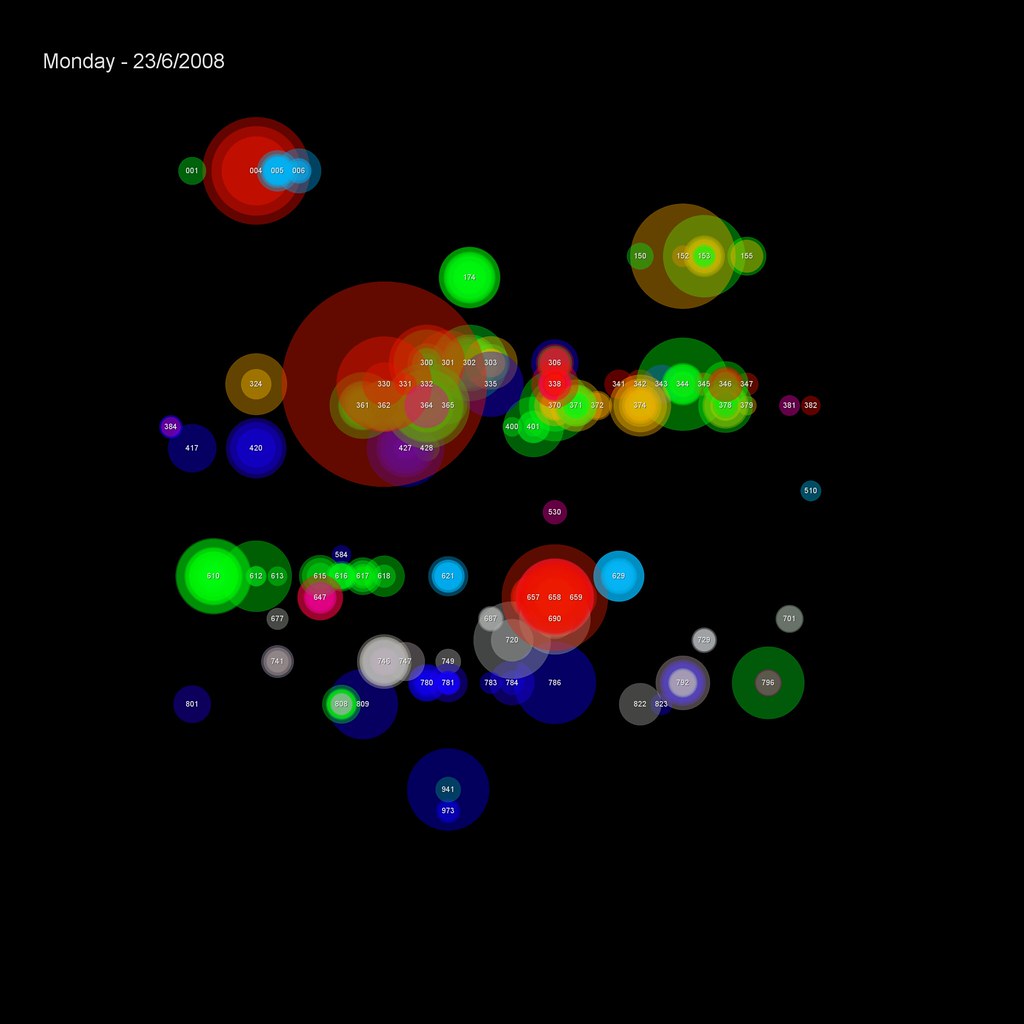
Check out this cool data visualization of book borrowings! Click here to see an enlarged version of circulation statistics displayed as Dewey Blobs 🙂

The transactions are placed on a 32×32 grid based on their Dewey classification (000-999). Each transaction is shown as a semi-transparent circle with two attributes:

1) colour — based on the School the student making the transaction studies in
2) size — based on the popularity of the book (the larger the circle, the more times it’s been borrowed before)

From Dewey Blobs at Dave Pattern’s “self-plagiarism is style”.

Library Program APIs

Information Matrix

At my recent visit to NECC, accompanied by my participation in Remixing for Library 2.5 I mentioned a great interface being promoted here in Australia called LibX. Roy Tennant recently posted a list of library-related APIs that library developers may find useful.

What’s an API exactly you ask? Application Program Interfaces (APIs) are structured methods for one software application to communicate with another. APIs allow programs to interoperate and share data and services in a standard way.

This is why you can embedd videos in your blog, or create a feed of your blog to appear in FaceBook – its about creating Mashups. Check out ZDnets video What is a Mashup?

Only APIs that are deemed to be generally useful are listed by Roy. However, almost any library catalog will have a search API (e.g., Z39.50) and may have others as well depending on the vendor and product. Contact Roy if you have a great API to add to the list.

Some great examples:

  • Google Book Search API – link to items in GBS, and find out about their availability
  • Amazon
  • pewbot (Huddersfield University Library) – “People who borrowed this also borrowed that” service

You see, THIS is the future of information services – Interoperability and flexibility of interfaces.

A very good reason to have a library system that allows you to get involved with API enhancements.

Photo: Favourite tree?

Male bravado?

The Pew Internet Post provides New Numbers for Blogging and Blog Readership. In their spring tracking survery they used two new questioning measurements of blog reading, each of which captures a slightly different set of behaviors.

Our first measure of blog readership uses the present-tense question, “Do you ever read someone else’s online journal or blog?”. In total, 33% of internet users (the equivalent of 24% of all adults) say they read blogs, with 11% of internet users doing so on a typical day.

Our second blog readership question is based on a slightly different question construction: the past-tense “Have you ever read someone else’s online journal or blog?” This figure is consistently higher than the one discussed above; this is because its wording captures people who once read blogs but now do not for whatever reason. 42% of internet users (representing 32% of all adults) answer this question affirmatively.

Apparently because of the power of questioning, we are seeing a difference between males and females.

male and female internet users are equally likely to say that they do read other people’s blogs (35% for men, 32% for women). However, among internet users men are more likely to say that they have read other people’s blogs (48% vs. 38%). We suspect that this is due to the male-heavy nature of the initial blog readership population–men are generally heavily represented among the early adopters for most.

Oh please! give me a break. Even if there is research that says males are more likely to be early adopters – you can’t just assume this is the cause of the difference in response.

Maybe guys felt easier about saying the they have read other peoples blogs than owning up to not reading blogs …. easy to stretch the truth and make it look as if they’re cool.  Maybe its something else entirely.

Either way – ‘Apparently!‘ wouldn’t be quite legitimate social research analysis would it!

Wetpaint wiki – my patience is totally shot! (with happy end!)

Setting ourselves up for some new things this term (I’ll blog about that next) I did a bit of a ‘will I, won’t I’ excercise with three wiki tools. I like Wikispaces a lot – but the basic interface looks so basic that I wasn’t willing to make the choice to use that tool until I learnt more about customization. For me the exisiting templates are just too ‘home-made’ looking.

My other choice was PBwiki – but I have not used that yet, and in the time I had set aside, I decided not to use that either as it was a totally new wiki platform for me. I will be going back to PBwiki too!

MY BIG MISTAKE

I started a new wiki with both those good wiki companies approved my request for ad-free spaces within 36 hours at the outside, one of them even quicker than that!

What’s my problem? Well as I have said in my tweets – Wetpaint support sucks!

Wetpaint as a wiki tool is quite nice, particularly in the hands of students. Lets face it. If the kids want to build a wiki, then Wetpaint has some template choices that make them feel as if their work is ‘cool’! In other words, it’s more like the kind of choices you get with various blogging platforms.

Nice 🙂

Until you as a teacher decide to jump in there and take advantace of the Ad-Free Education Wikis. 48 hours to have the request processed? Try more than a week and a half and still counting!!! Expect automated replies. Even worse, when you have sent in the requested information in the ‘How To Apply section’, expect to get an email requesting the age of the students! Yes, it’s mentioned in the promotion but not in the information that is needed to apply.

Righto I think..we’re getting close when the email comes asking for the age of the students. Next? another automated reply.

Still no ads removed. We have started teaching with our wiki, which is against my policy entirely.

We even held off for the first lesson waiting for the magic to happen.

I am sure that Jeff Utecht, Wetpaint’s Education Ambassador, (and pro-blogger at The Thinking Stick) is as embarrassed as I am about this whole debacle. Talking to Wetpaint education services is like dealing with call centres – you never know who you are talking to, and when you call back they don’t know you rang before). I’m also wondering – is the company based exclusively in the States? Do they not factor in the fact that we go to school at different times in the Southern Hemisphere?

I had to laugh because my husband’s take on the mess was to ask – Does Jeff get paid to promote Wetpaint? This is a question derived from a business response. He assumes that Jeff would believe in the services he is promoting and would expect it to be efficient – unless of course he is being paid to promote which makes it all a bit more rubbery. I explained that Jeff wouldn’t promote something he didn’t believe in. Must be a business management issue at the moment.

So – Wetpaint take note – if you want to build your business, it would be fabulous if you could be responsive to educators. If we love your platform we will buy into it.

Congratulations to PBWiki and Wikispaces for their extremely prompt response to.

Wetpaint, I very much hope to hear from you soon. As an education consultant I used to promote your product too. I’m embarrased to think that I might have been giving teachers poor advice. I would much prefer to dig into the product and push it to the limits for good use than have to give it up.

Come on Wetpaint – on behalf of all educators let me ask you to speed up your response times.

UPDATE: Less than an hour after this post, Michael Bolognino from Wetpaint has been in touch. See his comment to this post. Thanks Michael. If this problem can be resolved, and if my experience can help streamline things for other educators then it’s a win all around! Perhaps we educators could also help Michael and his team continue to develop a great wiki product for our students to use.

UPDATE TWO: Congratulations and thanks for Michael’s support of educators by resolving this problem less than half a day after I posted this story. The wiki looks fabulous now! I know that things can go wrong But the fact that a blog post reached you Michael and you were kind enough to jump right in and resolve the problem is fabulous. Michael also said that he saw my forlorn tweets of frustration, replied (which I missed being in a different timezone) and assumed the problem had been resolved. A message there too for ed companies. Watch the tweeters 🙂 and don’t forget to send a Direct Message if you need to make contact. I purposefully tweeted the issue early, then vigorously in the last 24 hours before writing this post of frustration. To blog IS to communicate.

UPDATE THREE: Michael remains in contact and is going to do a thorough review of the scripts that they currently use to make sure that they are as accurate and friendly as possible in supporting educators requests. He may also try work with his developers to try to come up with a way to make the ad removal process automated.

A happy and successful solution.

Photo: Elaine’s photostream