Gmail hacks, tips and tricks

Oh, I like this one!

I use Gmail, for lots of reasons – all related to my online professional work, and as an alternative to my work email. Integrates so well with lots of things – in my case, especially well with Google Calendar, Talk and Docs.

Here’s an extensive and very useful list of Gmail Tips, Tricks and Hacks. There are many for your to explore. Lots are new to me …… and my favourite for its simplicity and value in managing my subscriptions is the one below. Sweet!


11. Mute a conversation

Ever found yourself subscribed to a mailing list and the current conversation has nothing to do with you? If you don’t want to unsubscribe, you can easily stop the friendly spam with the Gmail mute function. Select a message in the thread and hit the m key to auto-archive all incoming messages in the conversation. The thread will stay muted until you unmute it; it will also un-mute itself if your address appears in the To or CC box.

Photo: Gmail mailbox

I miss my friends, my conversations

New job, new challenges! Yikes!

My post Core knowledge and creativity for learning 2.0 has generated a bit of discussion – amongst my old friends with whom it is easy to have robust pedagogical conversations about learning in a Web 2.0 world. Read those conversations and you can see how we changed in a couple of years in our own thinking and our own classroom practice. Our students have been the winners.

Michael suggests that I am ‘biting my tongue’. 🙂 You might be right about that! Michael, like all my professional friends and colleagues in the Parramatta Diocese, knows how passionate I am about changing the learning opportunities for our students – bringing our classroom practice in alignment with their Web 2.0 world.

So now I miss my teaching friends a lot – because I have no-one with me yet with whom I can have these challenging pedagogical discussions. You know how it is – back to base one, only it’s worse when you have learnt so much with your friends, and you KNOW that things have to change, and change significantly.

At the end of the day, though, it’s deep knowledge and deep thinking that drives learning – Web 2.0 or otherwise. Engagement, even the engagement of Web 2.0, is only relevant where it promotes and commits our students to being reflective, critical thinkers, able to find and use information effectively and ethically, and able to absorb common and core knowledge in order to build and contribute to human knowledge and understanding. You engage learners in a Web 2.0 world by recognizing their multimodal way of thinking and being – not for the sake of the Web 2.0 gimmick but for the sake of attracting and absorbing the interest of our young learners. Deep thinking has always been around – from Socrates to the 21st century. It’s how we get to encourage deep thinking that has radically changed in our multimedia/multimodal world

Stay with me my old friends, as we continue our fantastic transformation as teachers in a 2.0 world. Come with me my new friends, join me on a glorious journey of rediscovery – because I think that’s what it is…rediscovering deep learning, connected learning, reflective learning, and much more – so much more!

It’s not just about the HSC any more. It’s about powering our students into their global futures in ways that none of us teachers ever experienced as learners. These kids, they’re so lucky – if only we’ll let them fly!

Let’s not forget – we talk about Web 2.0 as if its still something new. These kids – they ARE Web 2.0.

Photos: Valentine’s Day Sucks, Even though things could be better, Our schools are flat

The thing about books and maps

Spent some time working with a couple of Year 8 geography classes today. The work we did – or rather they did – stood in marked contrast to the ‘understanding’ of some teachers and the role of books in the learning of kids these days. They want books – old and new. But the students? what do they want?

Without going into details, the students were working on a research task, in pairs, on a country that they had chosen.

(Yes, I know, that is not a good research task, but stay with me here …)

What struck me were these key points:

Students did not want to or need to use a print atlas.

    Mostly the students jumped onto Google Earth, and found their country and captured that image! Mostly they zoomed in on their country and checked out the terrain, and the cities, and the size of things. Sometimes they checked out the beaches, or how many people they could find. This was not what the teacher had in mind when she said ‘include a map of your country in your presentation’ 🙂 But it was the natural way for the boys to go check out a country.

    Every boy automatically went to Google images for their pics – because they can, and no-one has ever told them otherwise.

    Every boy automatically went to Wikipedia for their information – because they have never had any need to do it differently!

    So you can see, its a bit of a challenge. This is about covering material, not teaching students to think. It’s also about being out of touch with the way students learn in their online world.

    School subjects, taught in isolation, represent the worse of 19th & 20th  century education models transposed into a 21st century environment. The mechanics of teaching information skills are easy when its about creating a learning experience that requires use of every bit of thinking skill a student can muster. But in the context of the lessons today it was a waste of time.

    We can’t blame our curriculum or our students – we have to blame ourselves if our students are unskilled in using a full range of thinking skills to tackle issues straight out of the complex work in which they live.

    Photo: Globe

    The Future of Reputation

    Thanks to Grainne Connole who posted the following link to Del.icio.us – yes, Grainne is in my network!

    THE FUTURE OF REPUTATION:
    GOSSIP, RUMOR, AND PRIVACY ON THE INTERNET

    by Daniel J. Solove
    Yale University Press (2007)


    The full text of The Future of Reputation is now available online for free. Click on the links below to download PDFs of each chapter. The front matter to the book is at the beginning of each chapter.

    If you’re using this book for a book discussion group or for an academic class, click here for discussion questions.


    Sense and order in Web 2.0 – and some!

    For many joining the world of Web 2.0 is still a new adventure, and for those of us working with these new adventurers it is important to be able to step back and start at the beginning. But it is also a wee bit magical to push forward, and look back on your own adventure – and be amazed at the change.

    It was Del.ici.ous that did it for me!! To be so liberated by a single tool never ceases to amaze me – perhaps the most powerful personal web tool of all! For my money it remains the most important one to introduce to all teachers as a way of transforming or shifting their technology use from Web 1.0 to Web 2.0.
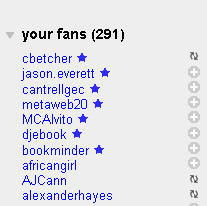
    fans.jpgAlso, the power of the network cannot be underestimated!

    I currently have 145 people in my network, and 291 fans – some of them very new as indicated by the star. Sometimes I know who they are (hi Chris!) and other times I don’t.

    However, there comes a time when you KNOW that you’re no longer a newbie!! You know the way it is ….. you check your Network, and see great bookmarks that others have added. And then you smile, because you added those a LONG time ago. So information comes around, goes around, and gets shared at all different points of the sequence of people’s personal learning journey in Web 2.0.

    Del.icio.us still powers the web for me, though how I use it hasn’t much changed since I started social bookmarking 18 months ago. In fact, I hadn’t come across much else new in the world of Del.icio.us until today.

    Research Buzz reported Del.icio.us Spy, and I took a look.

    deliciousspy.jpg

    That blew my socks off!! Del.icio.us Spy, at http://www.ajaxonomy.com/deliciousspy/ , shows you bookmarks as they’re being added to del.icio.us, along with a screen shot and occasionally a little context.

    If you don’t want to see every last bookmark being added, you can also filter by tag. If you happen to choose a tag that doesn’t get updated very often, you can have the site play a sound for you every time it updates. And finally, there’s a pause button if you see some links that you want to investigate before they scroll off the screen.

    Oh, and as the links fly onto the screen, you can simply hit the Save for Later button, and then chill out and browse through the links you’ve saved – though you need to do this before the end of your session.

    I found some cool stuff that I added to my Del.icio.us account – thus adding to the world pool of ever growing links. What a very different Web 2.0 world it is 🙂

    Meme – Passion Quilt

    Oh no!! here comes another meme 🙂

    Thanks to Joyce Valenza and Dianne Cordell I have been tagged to join in the Passion Quilt meme. Usually I don’t like memes, but this time I couldn’t resist as I will be meeting up with these two fabulous Teacher Librarians at ISTE’s conference in San Antonio later in the year.

    So what is my passion? what image will I add to the quilt?  Here ’tis!

    Refocus your mind! Recharge your energy! [R]evolution Web 2.0.


    My Picture

    In this picture simplicity and peace are juxtaposed with Web 2.0 in order to highlight a changing mind or vision in learning. I like the picture because it shows that it is not about the rush of technology that mandates Web 2.0 – rather the mindshift that embraces learning as a multimodal conversation in our Web 2.0 world.
    My Passion
    I am passionate about lifelong learning, for students of all ages.

    You’ve been tagged:
    I’m passing this meme on to five like-minded teachers and/or tech savvy librarians:

    Frances Manning HFS Conversations Teacher Librarian in Sydney

    Jo McLeay The Open Classroom Teacher in Melbourne

    Kathryn Greenhill Librarian’s matter Librarian in Perth (Australia)

    Ewan McIntosh Edu.blogs.com Teacher consultant in Scotland

    John Connell Passionate friend of teachers and librarians. Hails from Scotland, works in the world!!

    Meme: Passion Quilt

    The rules are simple.
    1. Think about what you are passionate about teaching your students.
    2. Post a picture from a source like FlickrCC or Flickr Creative Commons or make/take your own that captures what YOU are most passionate about for kids to learn about…and give your picture a short title.
    3. Title your blog post “Meme: Passion Quilt” and link back to this blog entry.
    4. Include links to 5 folks in your professional learning network or whom you follow on Twitter/Pownce.

    Google for newbie Web 2.0 teachers

    I like to point out obvious tools to teachers to discover – and challenge their thinking about Web platform tools. So here’s a little reminder to keep an eye out for good Google tools.

    Too many teachers know about ‘googling‘, but don’t know enough about what else is worth using for Google tools.

    googlemore.jpgSo remember, when you go to do a Google search, look up at the top left-hand corner and discover a few other tools – the magic one to follow is the little word “more“.

    Most teachers are already know about images, maps, Gmal…but more?

    Yes, there are a few other very useful goodies. But then what about “even more“?

    That’s a page that all smart 21C teachers should visit and come to grips with! Not necessarily to use them…but to be aware of what these represent..the required pervasiveness of Web 2.0 tools in our daily educational practice.

    Check out Google Notebook, and Google Scholar – if you haven’t already done so. There are many Google tools that deserve attention and discussion. How could we use them? What other ‘brand’ tools might be a better choice? What are the tips for good pedagogical integration?

    What you’ll also notice on the full listing page is that sometimes a new tool appears with the label New! right next to it. Google Notebook has that right now.

    Did you know that this doesn’t really mean ‘totally new‘ but rather that the tool is no longer in beta phase?

    Indeed!

    Google Labs are the place where the up-and-coming tools can be found. Checking out Google Labs is a great way for teachers to find out about some of the future trends.

    I wanted to highlight this information about Google because Google is everywhere – especially where teachers haven’t moved beyond the “go and do some research on the internet” phase of online instruction.

    Google is more than a search tool or email facility. Know what else Google actually is, and then develop a good sense of discernment – so that you can determine whether a Google tool or another tool is the best for your particular learning and teaching need!

    That’s a fun series of PD sessions for you to try out?

    Hmmm, might do that myself later in the year too 🙂

    Core knowledge and creativity for Learning 2.0

    Today was interesting! I met two year 11 Chemistry classes and spent a little time opening up the options of choosing a Web 2.0 tool to produce part of their assessment task. These students have by and large been operating in a Web 1.0 world for school learning – but of course are operating in a Web 2.0 world of social networking with the usual MySpace, Facebook or Bebo.

    The challenge for them was to think about creativity and the learning process, and if they dared, to step out of their usual comfort zone and into Web 2.0.

    Why did we want to do this? Well the issue is this – that critical thinking skills cannot be learned in the abstract. They always pertain to concrete knowledge of subject matter. But by the same token, absorbing and ‘learning’ some concrete subject knowledge does not necessarily lead to critical thinking or creativity. Learning is a delicate pattern of interconnections!

    If you sit boys in rows, if you always ask them to write an essay, produce a poster, deliver a talk, or make a powerpoint then without a doubt the capacity for independent learning or flexible collaborative learning that is deeply reflective just ‘ain’t gonna happen’ easily.

    It’s true – we threw these boys in the deep end with a big challenge. Sorry boys!

    …….. and I watched some of them run right back to safe shores, others forgot how to paddle or swim and splashed and floundered around (hiding their confusion behind boyish bravado), and others got right in and swam to the new shore across the bay. A few quiet ones spent a lot of time exploring the tools, checking the parameters and began to talk about the nature of learning this way.

    We’ll be happy if we see a few wikis, maybe a blog or two, or maybe even a voicethread. This was just an experiment. No student will be advantaged or disadvantaged for either choosing or not choosing a Web 2.0 option. All we hoped for was that for some boys – the naturally curious and creative ones – the opportunity to use a Web 2.0 tool just might make the learning experience fundamentally creative, collaborative, and fun!

    I’ve added a new TAB to the blog for the students called Student Tools – Let them fly!

    So back to the beginning of the lesson.

    What DOES this video prompt YOU to think about creativity and learning?

    After all, an escalator can never break. It can only become stairs. Have we nullified the capacity of our students to be creative in the very ordinary yet essential daily processes of learning? That’s the message the video gives to me 🙂

    Photo: One small piece of machinery

    Mini-legends 08 – sweet stuff

    You’ve got to love blogging and the Web 2.0 platform! Today I ‘met’ my mini-legend called Zelda. How did I do this?

    Well, Al Upton is at it again – a new group of kids, a new set of wonderful learning experiences.

    Al Upton and the miniLegends 08 are going to be interacting with the world through a unique mentoring program.

    Al says:

    If you’re an educational blogger of any kind (or visitor) and would like to ‘mentor a mini’ then please leave a comment on THIS page saying who you would like to be connected with. The idea is to drop into their blogs from time to time throughout the year and leave a positive comment .

    Very simple … why not join in this educational adventure with the miniLegends of 08? They are after mentors for all students from as many different countries as possible. They are adding additional mentors, so there is still time for you to share a miniLegend with an international friend.

    Photo: Sweet Stuff


    A curious intellect

    Curiosity is at the heart of our educational endeavour. For me curiosity has been the driving force of my life – it really has. Right back at school (yes, that was a long time ago!) I clearly remember standing in line waiting to go to my Year 10 English class (yes, we lined up then) reading a book on psychology – a new topic I had discovered. My English teacher Mrs Ferguson (yikes, we didn’t like her much) simply looked at the book and stated “you have a curious intellect”. Was that a compliment or a criticism? I was never quite sure, but I never forgot that moment. Somehow my burning curiosity rated a mention!

    What I now know is that as a teacher I have to take pride in curiosity and creativity, and to harness that natural enthusiasm through creating new opportunities for learning.

    I’ve lived with curiosity all my life – and I’m sure you have too! It’s gotten me into mischief more times than I like to admit. It’s gotten me into strife more times than I like to admit. But I love it nonetheless 🙂

    Seth Godin‘s short video about curiosity hit home for me the importance of curiosity. He says:

    For 7, 10, 15 years of school, you are required to not be curious. Over and over and over again, the curious are punished.

    Scott McLeod at Dangerously Irrelevant recommends that every educator (and other change agents) should see Seth’s speech at TED.