The creative edge

Creativity and innovation go hand in hand with a Mac. At the recent forum in Sydney with Will Richardson, it was clear to see that all the innovators there were fused to a Mac for creating their message and actualizing their inspiration. In fact, it got so people actually apologized for having a PC 🙂

Mac in front belongs to Chris Betcher (who’s taking the pic), next up, myself, Will Richardson and Westley Field, and in the background is Dean Groom.

Tells a story doesn’t it…bloggers, innovators, champions of change, creators of 21st century learning. Using a MAC of course!

Yahoo for Teachers

Something new to try out! Will this be one to watch? Like a Web 2.0 content management system – for your school, between schools, between you colleagues, and just sharing. Will this solve some problems for schools, or just create new ones? Check the Yahoo Teachers info page and register for your own beta invitation.

  • Top 100 Tools for Learning Activity

    Between January and March 2008 the Centre for Learning & Performance Technologies(C4LPT) invited learning professionals to share their Top 10 Tools for Learning – both for their own personal learning/productivity as well as for creating learning for others. 155 learning professionals contributed their Top 10 Tools. You can find the links to their individual Top 10 favourite Tools lists at www.c4lpt.co.uk/recommended/

    The Analysis of top 100 Tools  provides plenty of food for thought.

    In total over 460 different tools were named, but from these Top 10 Tools lists we compiled a list of the Top 100 Tools for Learning Spring 2008. 109 Tools were mentioned 3 or more times and an additional 34 tools were mentioned twice.

    The list appears on pages 3-10 of this document and also online at www.c4lpt.co.uk/recommended/top100.html

    I’ve provided a copy of the document (top100s08) to all my staff! Or you may prefer to provide the Summary PDF link.

    Facebook Chat – more talking!

    Logged into Facebook after coming home from the movies, to discover that my Facebook had acquired a Chat function.

    Yet another thing to think about and integrate into my online communications and organisational tools.

    Actually, I use Facebook quite a bit one way or another – not for the silly game things, but more as a way of quickly staying in touch, and organising meetings, events etc. Using standard email just doesn’t seem to ‘cut it’ for everything anymore.

    Let’s see how it all pans out.

    Facebook says:

    We’ll be rolling this out slowly going forward, but fairly soon you’ll notice our new Chat bar at the bottom of your browser—no installation or assembly required. From this bar you can view your list of online friends and open conversations with any or all of them. There’s no need to setup a “buddy list.” Unlike the Wall or Inbox, the messages are delivered and displayed to your friend as soon as they’re sent, so you should expect a response right away and without any page loading.

    We’re working on pulling other features of the site into the real- time Chat world. Your notifications will now arrive in the Chat bar, and while chatting you’ll see your friend’s Mini-Feed activity thrown into the conversation, as it occurs.

    Chat is by no means a new concept, as instant messaging systems have been around for over a decade. But just as other features on Facebook have allowed friends to communicate more efficiently than before, we hope Facebook Chat will make it easier to connect instantly

    So I’m looking forward to my first chat 🙂 with this new tool.

    Mimobot – what drives your flash!

    I’m currently on school holidays which means time to do fun things online as well as offline – in between ongoing commitments to school or my professional associations.

    Watching twitter, I saw this post from Amy,
    a librarian tweet friend, writing about funky Art Toy USB flash drives.

    Mimobot ArtLeading the creative revolution in personal electronic accessories and functional designer toys, These toy USB Flash Drives are little friendly data fiends available in 512MB up to 4GB capacities, that hold all your essential data (tunes, pics, etc.). They come preloaded with removable bonus content like games, music, and animations!

    Well off I went, and checked it out!

    Yes, my fun holiday purchase coming right up! Couldn’t get the Star Wars ones that I wanted, so settled for Owlbert – ’cause, well, I am a librarian (as well as a teacher geek).

    Check the video – very cute! Hope FedEx is fast 🙂

    Read, read, read with your mobile phone

    I’m way behind in reading my RSS feeds – which makes me very glad that RSS actually exists! Imagine if I still had to save all the magazines, books, journals, and newspapers to read when I had time …. like we did in the old days.

    Actually, I have to get smarter about ways to keep up with my reading 🙂

    Why? because no matter what they say, we are still enjoy reading for relaxation, reading for information, reading for knowledge, reading for…well, lots of things.

    I’ve always kept an eye on the various electronic readers that are around, like the Amazon Kindle, but have never actually gotten into reading with those gadgets. I like my books and journals and magazines. But I also like my technology!

    One of my favourite pieces of small technology is my mobile phone. You know how it is! Communicate, track events, take pictures, even manage your online connections. I don’t moblog, or sent images or videos online just because that costs ‘big bickies’ here in Australia. I do treat myself to a “tweet” or two (write a post on Twitter), and weather or sport updates. My other favorite piece of small technology is my iPod. This is great for music, podcasts, even videos.

    BUT my totally constant companion is my mobile phone. Don’t always have my iPod handy. So thanks to a post at aRKive, I’ve discovered a cool new application for my mobile from BooksInMyPhone.

    Now I can have Classic books to read on my mobile phone. Convenient (sort of), with hundreds of titles to choose from. Now I can an ebook with me all the time!!

    Granted my mobile screen is tiny – but I can increase the font size to make it more readable. The thing is (like all technology improvements) the screens on our phones are getting bigger as on the iPhone. I’m happy with my newly acquired ebooks – so many times I have been caught out with time to kill and wished I had something to read. Now I have! My mobile now has some Twain, Checkov, Elliot, Tolstoy and Shakespeare on hand – just for fun!

    Whither literacy?

    Studying classic books at school? Well, perhaps we should get students to grab a copy to their mobile – maybe the different medium will appeal to them.

    Somehow this fits with the success of books being published to mobile phones – a trend so popular in Japan.

    ….. it is Rin’s rather less challenging Moshimo Kimiga (If You …), a 142-page hardback book about a high-school romance, that has caused the bigger fuss.

    “I typed it all on my mobile phone,” Rin explains matter-of-factly over the same device. “I started writing novels on my mobile when I was in junior high school and I got really quick with my thumbs, so after a while it didn’t take so long. I never planned to be a novelist, if that’s what you’d call me, so I’m still quite shocked at how successful it’s turned out.”

    So successful that one volume of her book, which began its life in a series of instalments uploaded to an internet site and sent out to the phones of thousands of young subscribers, has sold more than 420,000 copies since it was converted into hardcopy format in January.

    In just a few years, mobile phone novels – or keitai shousetsu – have become a publishing phenomenon in Japan, turning middle-of-the-road publishing houses into major concerns and making their authors a small fortune in the process.

    Image: Recycling small book, great story

    Gmail hacks, tips and tricks

    Oh, I like this one!

    I use Gmail, for lots of reasons – all related to my online professional work, and as an alternative to my work email. Integrates so well with lots of things – in my case, especially well with Google Calendar, Talk and Docs.

    Here’s an extensive and very useful list of Gmail Tips, Tricks and Hacks. There are many for your to explore. Lots are new to me …… and my favourite for its simplicity and value in managing my subscriptions is the one below. Sweet!


    11. Mute a conversation

    Ever found yourself subscribed to a mailing list and the current conversation has nothing to do with you? If you don’t want to unsubscribe, you can easily stop the friendly spam with the Gmail mute function. Select a message in the thread and hit the m key to auto-archive all incoming messages in the conversation. The thread will stay muted until you unmute it; it will also un-mute itself if your address appears in the To or CC box.

    Photo: Gmail mailbox

    Google docs … at it again!

    googledocs.jpg

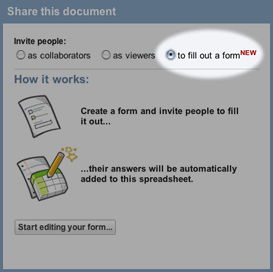
    From Arthus on Twitter came the news that Google Docs now brings us forms!

    Create a form in a Google Docs spreadsheet and send it out to anyone with an email address. They won’t need to sign in, and they can respond directly from the email message or from an automatically generated web page. Creating the form is easy: start with a spreadsheet to get the form, or start by creating the form and you’ll get the spreadsheet automatically.

    Responses are automatically added to your spreadsheet!

  • Creativity on the cheap with WiiMote

    In a few weeks a new member of staff will join the Resource Centre team at St Josephs. Amongst other things Joan Denahy has been working with Web 2.0 tools with her staff, so I’m looking forward to her joining the team. Andy, Simon and Richard, members of the Resource Centre team, spent some time this week exploring Web 2.0 tools with me. This post is really for you 🙂

    You’ll enjoy this one, on WiiMote, not new, but lots of fun! … which also reminds me – my friend Dean Groom should be building this for us to see!

    Network fatigue and the remixable web

    That’s what it’s all about …. lets keep an eye on these developments!

    The DataPortability technical blueprint uses OpenID to provide decentralized identity. OpenID 2.0 Attribute Exchange (AX) is utilised for discovery of user service details. XRDS/YADIS are utilised to provide the details of the various services a user employs.

    As users, our identity, photos, videos and other forms of personal data should be discoverable by, and shared between our chosen (and trusted) tools or vendors. We need a DHCP for Identity. A distributed File System for data. The technologies already exist, we simply need a complete reference design to put the pieces together.