Learning to Learn – a new start for 2011

Thanks to Dean Shareski for this timely video, especially for educators in the southern hemisphere!  Next week our schools in Australia will begin the new academic year – many with staff meetings, and professional activities to motivate, and in many cases to talk about technology. What a perfect video to include.

Instead of going the way of the textbook I would go the way of technology. It’s almost like I have to unteach everything they’ve been taught. And then  I don’t even feel we’ve reach the spot where we’ve done that. You have to de-program and then start all over again. If we started teaching this earlier, this would be so natural to them, that there wouldn’t be all those barriers. They would know how to communicate. They would know how to talk to each other. They would know how to learn. They would know how to co-operate and give feedback. But I find that they do not even know how to do that.

Drop the act, and get Dropbox

Luckily, there are plenty of schools around the globe that are ‘up to speed’ with technology change, with good folk who share their knowledge and experiences.

Hello Dropbox – here I come 🙂

What is Dropbox?

Put away your flash drive, and stop emailing yourself files, because once you get Dropbox, the ways you deal with moving, sharing and backing up your files will change forever.  Whether you are sharing things with your family, working on school projects, collaborating with colleagues, or just securing your own work, Dropbox is an amazing tool.

Drop Box it is a service that provides 2GB of free online file storage (with paid upgrades possible for heavy users).

What impresses me the most is the speed at which it backs things up.

Dropbox for Teachers

Jonathan Wylie has put together a Top Tips for Using Dropbox at School, explaining how it works for a busy teacher, expanding on the advantages for teachers. Did you know this includes being able to run a drop box for your students? DROPitTOme is a free service that works with Drop Box to allow people to upload files to your Drop Box account without giving them access to the contents of your Drop Box account.

Essentially though:

  • It’s free
  • It’s convenient
  • It saves you time
  • It synchronises your files across all your computers and devices.

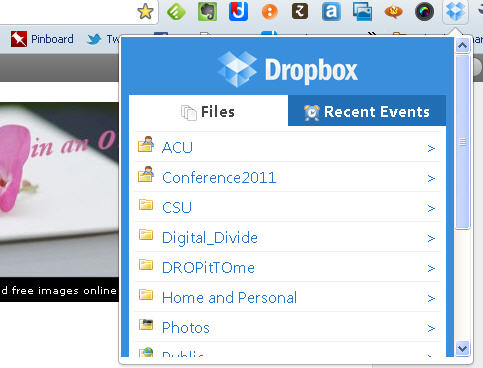
Would you like to quickly access your Dropbox files while you’re browsing or using web apps in Chrome? You’ll need to head over to the DropBox extension page and add Dropbox to your Chrome browser.  You can pick up instructions on how to do this  by reading Access your Dropbox quickly in Google Chrome.

With the ‘Dropbox for Chrome’ extension, you can:

  • Browse all files in your DropBox account
  • Instantly download files from your account
  • View recent events (uploads, downloads, and file modifications)

But essentially, this extension allows you to peek into your dropbox on the fly, without further ado!  Neat!

If you are already using Dropbox, and are wondering what else you could be using it for, here are a few additional reads:

Is Dropbox and Google Docs Integration on the Way? That would be grand – but it seems that we’ll see Dropbox Rewind first. This will let you “hop to your Dropbox at any point in the past.” For its users, this could be the perfect defense against deleting files by accident and never remembering to make backups. Dropbox users can also expect to see file system usage analytics.

If you’re still on holidays and want a challenge – why not take part in the The Inaugural Dropbox Dropquest and win nice things like 50 Gb storage for life!

Finally – a handbook/guide from MakeUseOf:

A guide for newbie social educators

Thanks to the ‘heads up’ from Joyce Valenza over at Neverendingsearch about a useful guide for teachers.

Tools for the 21st Century Teacher, is a wonderful little e-guidebook offering a basic introduction to most things social media and discussion about how they may be effectively integrated into instruction.  Among the many tools covered are Twitter, Diigo, Prezi, Evernote, Wallwisher, Skype.

Better still, Michael Zimmer at Edutechintegration is working on a 2nd edition with more tools. Free to download and share!

Flutter your eyelids at me!

I have no idea what is happening in the 3D industry, other than that I enjoyed watching Avatar in 3D version.  That’s it.

Do 3D glasses really work by opening and shutting at high frequency to allow different input?  I could google this fact, but can’t be bothered 😦 but it does remind me of the trick that an opthamologist friend once told me about – she wore contact lenses to correct her vision. One lense was for long distance, and one for short. The brain did the rest of the work.

So I’m guessing that’s what’s going on when Francois flutters his eyelids with frantic speed. Very dystopian ~ with a touch of cyborg.

Crystal ball gazing 2011 for Heyjude

This time of year there are so many articles and comments with predictions for the year, so I am not going to add to the collection – well not in general terms anyway 🙂

If I could crystal ball gaze what 2011 will bring in my own professional work and learning experiences, I’d be happy. Really I would.

A few challenges that are staring me in the face will require my undivided attention, starting with this blog, my online tools, and my daily organisation of networked discussions.

What should my focus be, as I transition into the working world of a university academic?

Here is a bit of crystal-gazing:~

  • Be sure not to allow my head, thoughts, ideas ricochet endlessly like balls in a pinball machine.  Put time limits on myself, and set realistic goals!
  • Tidy up my online places, repositories, tools and then undertake a review of what I do and how I do it.
  • Work out what I want to share, and why?
  • Work out how I want to share!
  • Commit to solid professional reading, and participate in professional exchange.
  • Communicate with and work with people in my PLN to add value to my own work, and to stretch my own ideas beyond my current capabilities.
  • Share whatever knowledge and experience I can  through workshops, seminars, presentations, school-based work etc so that we continue to grow in our knowledge connections.
  • Push back into my professional community through collaborating, writing and presenting.

Sounds easy really!

Not so … it all takes time and grunt.

Currently my head really does feel like a pinball machine, with too many thoughts,worries, ideas, and work requirements competing for my attention. I’ve just completed some research assistant work for a colleague in the School of Educational Leadership at ACU, which I’m dovetailing with some course revision (before my official start at CSU) for one of the courses I will be teaching. I’m heading off for a day-long Committee meeting related to the  ASLA XXII Biennial Conference 2011.  I’m hoping to find time to get my head into Connectivism and Connective Knowledge 2011, with Stephen Downes and George Seimens.  I’m looking at my list of articles that I have promised to write. I’m totting up the upcoming presentations that I’ve also committed to for 2011.  I’m checking out the courses I’ll be teaching – all new to me, and nothing like my work in schools. I’m groaning … and wondering what to attack next, and how to improve things. Don’t get me wrong – it’s exciting but it’s also mind-bogglingly different.

I KNOW there are plenty of people who achieve more than I can ever hope to manage – so at least I want to figure out how to help learning within my PLN.

But at the end of the day I’m a  creature of habit, and it takes self-imposed changes to keep that focus. Like Jenny, I’ve done some blog renovation – though this year I did not change the banner.  When I started this blog back in 2006, it looked and felt different! I added some social buttons – to streamline the ‘look’ somewhat. Imagine that – we didn’t have all these tools back in 2006!

So what will I use this blog for in 2011?

  • I think that I will continue to do information dissemination – though not in the way I did back in 2006. I regularly share information via Twitter, Facebook,  Diigo, Delicious, with other tools sneaking in at times too – something that wasn’t possible back in 2006. What this means is that  my blog focus is adapting from the original 2006 focus.
  • In addition to writing about things that grab my interest, I think that I will also communicate with ‘new’ education and library professionals – some who may be taking my courses, or who may just needing a helping hand into the networked learning world.
  • Perhaps I will reflect on what I find in my new role, and the broader issues from a perspective beyond schools.
  • I’m not a clever reporter, so I think I will leave that to others.

Have I forgotten anything?

I’m looking for really new ways of looking at all this.  Like the tiny apartment that transforms into 24 rooms – I want to find out how to be more efficient with my work world in 2011.

QuietWrite is worth a mention

I was intrigued by a few recent references on Twitter and by bloggers of  a new tool called Quietwrite.  So I’ve jumped on over, and taken a test drive.

This is definitely a distraction-free online editor, allowing  you to concentrate on your writing, rather than wrangling with a blog interface. Easy to use, and  quick to get on with it.

Larry Ferlazzo explains:

Quiet Write is a new and simple application that lets you write online in a no-frills environment and then publish your work and are given a unique url for your creation. Registration is equally as simple — your email and a password. Unfortunately, unlike other somewhat similar apps, you can’t add images to your page.

It’s no “great shakes,” but it could be another option for a super-easy place for students to publish their work online with no hassle.

Quietwrite offers:

  • Focus on writing
  • work is automatically saved as you write, so you’ll never lose a thing.
  • Start a simple no-frills  blog in seconds and share your writings (use it for conference/meeting notes as well)
  • Edit what you write on an iPad
  • Export writings to your WordPress blog

Now hang on – that last point is a nice feature!  Here’s what this means:

Quietwrite offers peaceful WordPress integration: Link your QuietWrite account to your WordPress blog. This will allow you to easily export any of your writings to your WordPress blog, whether it be on wordpress.com or on your self hosted domain. We’re sure that our editor will be a delightful addition to your WordPress workflow, allowing you to concentrate on fleshing out your blog posts, and then quickly exporting it to your blog.  A  peaceful place for people to write anything, for anywhere. That includes blog posts, books, articles, or that sci-fi novel that you’ve been putting off.

I’m liking the sound of this new-fangled toy 🙂

A Great RSS Reader

This is an accidental post – but what the heck – might as well share this here as well as on Twitter. I’ve accidentally changed my settings on VodPod, so any videos I collect are automatically sent into my draft folder here. Might be handy or might be a total nuisance!  I’ll work that out later.

In the meantime, if you are new(ish) to blogging or online collecting and curation of resources, you might not have realised that you can gather videos that interest you with this tool. I’ve used Vodpod for quite a few years, and you can see that it is included in the sidebar of my blog too.

Another tool that I have used since being introduced to it a few years back (ISTE 2008 in San Antonio) is Feedly.  I love that it synchronises with Google Reader – so that I always use Feedly, except when I need to dip into other tricks that Google Reader offers.  This video is a fair overview. Take a peek if Feedly is new to you.

I find Feedly to be  wonderful.

Slipping into change

Here we are in 2011, and as usual a new year brings with it surprises and the opportunities for change. I have been very busy one way or another preparing for some personal change as I get myself ready for  full-time work as Lecturer in the Faculty of Education at Charles Sturt University.

You know it’s really happening when you receive a proof of your business card – which will be ready for me to collect when I travel down to Wagga Wagga in February (though I will be based in Sydney most of the time).

I am a little nervous, but also excited about this change. I know I will really enjoy the opportunity to spend more time engaging at a professional level with people involved in the information profession in education, school, community and service sectors.

I have some outstanding colleagues in the field, both within Charles Sturt University, and at other universities here in Australia and worldwide.  I can’t wait to interact with them, and learn from their wisdom and experience.

I want to mention four of them (there ARE many others!), as they have been involved in key stages  towards this new venture of mine.

Michael Stephens at Tame the Web has been an inspiration  for many years (he also wrote the Forward for Connect, Communicate, Collaborate), and an awesome role model for a new lecturer in this discipline 🙂  Thanks Michael!

Some time along the way, I met James Herring from Dunbar Scotland who  now teaches  at  CSU. He got me involved in some adjunct work in Teacher Librarianship.

I have also been encouraged by Lyn Hay, especially in exploration of teaching to library students in virtual worlds and uses of social networking for learning.

Of course, Kathryn Greenhill never stops inspiring me!  No sooner had I started blogging, than she was there to encourage. Her work continues to drive the future directions of information knowledge work, and since she is also now working as an Associate Lecturer in Information Studies  at  Curtin University there’ll be virtually nothing to stop us!  (well, she is in Western Australia, and I’m in Sydney)

So there it is!  New directions, and new challenges for 2011.  I have travelled such a journey in my own career – from typing catalogue cards in the Rare Book Library at the University of Sydney (my first ever library job- see the gorgeous Book of Hours that came into the collection when I was there )  – to teaching and learning with new and evolving information professionals.

From a world of books to a world transmedia and transliteracy  – who could ask for more?

I’ll be teaching the following subjects:  Services to Children and Young Adults;  Digital Citizenship in Schools;  and  Teacher Librarianship.

I’m also going to be  involved in a number of workshops, conference presentations, and more.  It is a great opportunity to be able to share ideas, knowledge, experience, and be involved in planning and development of knowledge services and information curation in real and virtual/online environments.  It’s just awesome to have these bookings in my professional calendar already!

What can I say??  It’s astounding how much change has taken place – and I love every minute of it!!

Greetings to all!

It’s been an amazing year – so much to say, and so little time to say it …

Thank you for a great year everyone. Without you all contributing, sharing, and collaborating as part of the great professional learning community that we have all become – 2010 would have been just another year.

But things are never boring – and there’s hardly enough time to reflect and learn. Lucky that 2011 is just around the corner!

Best wishes to you all…..


Google’s new search features …

This presentation by Karen Blakeman was given at the Online Information exhibition, Olympia, London,  1st December 2010.  It focuses on the new search features and options launched by Google this year and Google’s personalisation of results.

This is one for teachers and librarians to check out in more detail!