PageFlakes – teacher edition!

Another addition to the suit of Web 2.0 tools customized with advantages for K-12 educators. We’ve already got Wikispaces, VoiceThreads, WetPaint Wiki, and Ning.

pageflakes.jpg

Another tool I regularly promote is PageFlakes , which now has PageFlakes Teacher Edition – with a nice specialist education focus.

This is Cool! if it remains open for sharing – no strings attached.

I did a search amongst the repository and found some nice PageCasts, e.g. Middle School Literacy and Harry Potter Feeds, as example. There is a huge long list of Flakes (widgets) you can add to customise your PageCast..

The Pageflakes team explains:

You can customize this page by adding and deleting Flakes (Widgets). Click the yellow button at the top right corner to:

  • browse the Educational Gallery
  • change the layout
  • customize your theme
  • share and publish your page

By default, all your pages are private. To publish a page or to share it with your colleagues please click on “Make Pagecast”. Of course you can have as many pages (tabs) as you want.

Why not setup a private page to start with? And when you’re ready, you may create a public Pagecast (check out our Pagecast Gallery) or a group Pagecast (shared page) for you and your colleagues – great for sharing notes, news and documents.

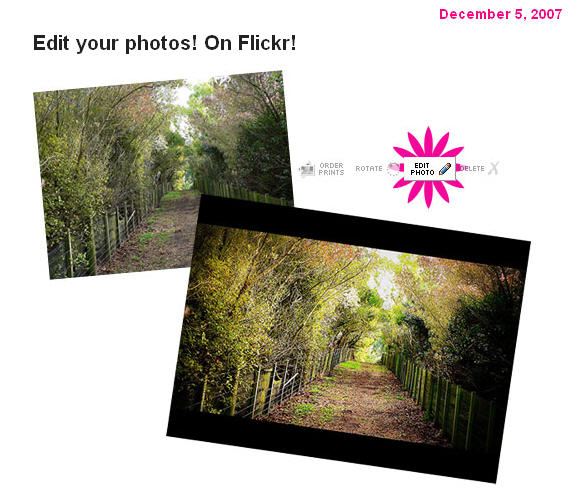
  • Wow! Edit your photos on Flickr

    Picnik’s awesome photo editing tools are now only a click away. If you’ve ever wanted to deal with the dreaded red eye or crop a photo just so, click on the new “edit photo” icon located above one of your photos and get started.

    The Picnik/Flickr collaboration works similarly to other 3rd party services who’ve built additional tools on top of the Flickr API: You’ll need to pass through the step of giving the Picnik service permission to edit and save your photos… It’s a little bit like you’re “installing” Picnik on your Flickr account, but with nothing to download.

    I rather like having access to this – especially when I am not always working on my own computer with my own suite of favourite tools. It’s all about being able to work quickly, efficiently, and ‘on the fly’ whenever and wherever – isn’t it?

    Rock on Web 2.0!

    picknik.jpg

  • Blogs in plain English

    Digital Natives explain!

    What is a digital native? How does the generational divide impact the legal, societal, and educational realms?

    Great questions being answered – or at least explored in depth – through the research lead up to publication of a new book. There is some tremendously helpful feedback on the draft v.0.9 of the forthcoming book Born Digital (Basic Books, German translation with Hanser) from tertiary students at Harvard and St. Gallen Law School, which is very worth while reading.

    Discussing Born Digital with European Students, gives insights into Digital Natives ideas about the opportunities, challenges, and most promising approaches in digital technologies when asked three discussion questions:

    First, what do you think is the greatest opportunity for Digital Natives when it comes to digital technologies? Second, what are you most concerned about when thinking about the future of the Internet? Third, what approach – generically speaking – seems best suited to address the challenges you’ve identified?

    Join them in the discussion if you like, or check out their project wiki , their new DN blog, follow them on Twitter, or join their Facebook group.

    Here are the student’s thoughts in brief:

    Greatest opportunities:

    • Democratizing effect of the net: DN can build their own businesses without huge upfront investments (Rene, Switzerland)
    • ICT enables networking among people across boundaries (Catrine, Switzerland)
    • Encourages communication among DNs (Pierre-Antoine, France)
    • Increased availability of all kind of information, allows fast development and sharing ideas among DNs (Jonas, Germany)
    • Availability of information, DN can go online and find everything they’re looking for; this shapes, e.g., the way DNs do research; as a result, world becomes a smaller place, more common denominators in terms of shared knowledge and culture (Melinda, Switzerland)
    • Efficiency gains in all areas, including speed of access, spread of ideas, … (Eugene, Singapore)

    Greatest challenges, long-term:

    • Problem of losing one’s identity – losing cultural identity in the sea of diversity (Eugene, Singapore)
    • Dependency on technology and helplessness when not having the technology available; DNs are becoming dependent on technology and lose ability to differentiate b/w reality and virtuality; other key challenge: bullying (Melinda, Switzerland)
    • Who will get access to the digital world – only the wealthy kids in the West or others, too? Digital divide as a key problem (Jonas, Germany)
    • Addiction: DNs are always online and depend so much on Internet that it maz lead to addictive behavior (Pierre-Antoine, France)
    • DNs can’t distinguish between offline and online world, they can’t keep, e.g. online and offline identities separate (Catrine, Switzerland)
    • Notion of friendship changes; DNs might forget about their friends in the immediate neighborhood and focus solely on the virtual (Rene, Switzerland)

    Most promising approaches:

    • Teach digital natives how to use social networks and communicate with each other; law, in general, is not a good mode of regulation in cyberspace (Rene, Switzerland)
    • Technology may often provide a solution in response to a technologically-created problem like, e.g., privacy intrusion (Catrine, Switzerland)
    • Don’t regulate too much, otherwise people won’t feel responsible anymore; education is key, help people to understand that it’s their own responsibility (Pierre-Antoine, France)
    • The laws that are currently in place suffice (except in special circumstances); learning is key, but who shall be the teacher (since today’s teachers are not DNs)? (Jonas, Germany)
    • Generic legal rules are often not the right tool, problems change too fast; instead, kids need general understanding of how to handle technology; goal could be to strengthen their personality in the offline world so that they can transfer their confidence, but also skills to the online world (Melinda, Switzerland)
    • Technology will most likely help DNs to solve many of the problems we face today; education is the basis, but focus needs to be on the question how to put education from theory into practice (Eugene, Singapore)

    From the blog Law and Information: obtaining a better understanding of the information society and law’s role in it.

    Technology-rich learning spaces

    Recently I had the opportunity to both attend and take part in the 2nd International LAMS conference with my own presentation on School libraries for 21st century learning.

    What I found particularly exciting was the opportunity to learn something about the design considerations for planning new libraries, the innovations in furniture and fittings, the re-conceptualization of learning priorities, the understanding of learning needs, and much more.

    Thanks to the presentation by Maxine Brodie, Maquarie University Librarian, I have a number of very useful leads to add to my personal knowledge-base about learning and libraries in 21C.

    Two of particular interest are:

    1. Scott Bennett from North America and the Library Space Planning site.
    2. Joint Information Systems Council (JISC) from the United Kingdom and their Planning and Designing Technology-Rich Learning Spaces

    A wealth of information, case studies, research, photo evidence etc is available at each site. Even just trawling the JISC Flickr photos provides inspiration, before getting into more detail!

    Some key questions were offered for our consideration – from Scott Bennet – which can equally be applied to school libraries as to tertiary settings since we all understand that:

    Space designs that acknowledge the social dimension of . . . learning behaviors and that enable students to manage socializing in ways that are positive for learning are likely to encourage more time on task and more productive studying, and thereby yield a better return on the investment in physical learning spaces.

    Question 1.

    What is it about the learning that will happen in this space that compels us to build a bricks and mortar learning space rather than rely on a virtual one?

    Question 2.

    How might this space be designed to encourage students to spend more time studying and studying more productively?

    Question 3.

    For what position on the spectrum from isolated study to collaborative study should this learning space be designed?

    Question 4.

    How will claims to authority over knowledge be managed by the design of this space? What will this space affirm about the nature of knowledge?

    Question 5.

    Should this space be designed to encourage student/teacher exchanges outside the classroom?

    Question 6.

    How might this space enrich educational experiences?

    There are many insights to these questions to be learned from the two resources, as well as from collaborative discussions about these issues amongst us all.

    The key for me is the Planning Context – this context will drive the creation of new 21C Library/Resource centres.

    Our facilities will

    …….need to move from being collection-centred to being learner-centred

    ……in order to support research, learning and personal development in a new networked environment.

    Bennett, S. (2007) ‘First questions for designing higher education learning spaces’ Journal of Academic Librarianship (33)1, pp. 14-26.

    Photos: JISC InfoNet’s photostream

  • Introduction to Second Life – Edublog awards

    I’d like to share this great overview of Second Life from Jo Kay and Sean Fitzgerald once again, and recommend their wiki Second Life in Education. Both Jokaydia Island and the wiki have been nominated for an Edublog award.

    I have joined Jokaydia in this great Second Life adventure – how else can I develop my understandings so as to nurture the learning opportunities for my students in classroom and library learning environments? 🙂

    Thanks to Jo and Sean for their great mentorship in this field!

    Introduction to Second Life

  • Here comes everybody!

    The grand thing about Web 2.0 and social networking is the opportunities for both serendipity and synergy in the process of networking and collaboration.

    Today I read with interest Beth Kanter’s (from Cambodia) notes about building your network strategically. Beth is writing an article and threw some thinking up on her Facebook notes. She starts by saying that

    Doing “outreach” or adding new friends to your network is a critical part of the work flow. To reap the benefits a using a social networking, you need to build your network, although as some experts say it is a matter of quality, not quantity. You want to avoid random outreach, but remember since outreach can be open-ended and there are opportunities for distractions. Remember to know when to stop.

    While Beth is looking at marketing in the non-profit sector her comments were of interest to educators – Vicki Davis (Southern Georgia, our coolcatteacher!) added a note saying

    In school we tell everyone,”Never add a friend of a friend, only add people you know,” and many of us are building our network in this way. Aren’t kids who add friends of a friend learning valuable networking skills? It is important to remember this, but also that we are creating a vast disconnect between what we tell students and what is going to make them successful in the future!

    So here we had just one of our many dilemmas in education being effectively highlighted and discussed, right in a social networking space, accessible only amongst ‘friends’.

    It didn’t stop there. I also had a message from Ken Carroll (Shanghai & Dublin) about the launch of his new blog Ken Carroll on Learning. Here we have Ken, and astute businessman, doing exactly as Beth advises – using friends networks to reflect and share, manage and promote.

    I am pleased that Ken shared his new blog link with me, because he has some highly relevant issues for consideration by educators. (Consider adding Ken Carroll on Learning to your RSS reader.)

    His post Here Comes Everybody touches on so many issues related to learning – information sharing, communication, gathering, discussion, utilisation etc etc. Yes, Ken, we have all been learning more, faster than we could 5 years ago….that is, if we are immersed in Web 2.0 tools and communication opportunities. As he puts it

    every individual now has a voice in the Big Conversation…. the participative web goes way beyond just high-speed access to information. It also enables us to form learning networks that include people, conversations, and information. This is a crucial development that we need to understand.

    Like Ken, I also connect with people on my network through blogs, social networks, email, instant messaging and more.

    This is what I want to share with my teachers. This is what I want to empower in the learning opportunities for my students. This is what future learning is all about.

    Photo: Casa Batllo, My Social Network

    Giveaway of the day

    Thanks to the Edublog awards and the worldwide ‘cross-posting’ about this event, I have discovered a great new-to-me blog and a great new-to-me blog-based advertising initiative – with benefits for us all.

    Reid Kerr College Library ….is much more than just books… online journals, ebooks, websites…video, sound, did I mention e-books? …..doing the searching so you don’t have to!!! A great site making use of Joomla (I will have to look into this!) and lots of social-networking tools. I’m always on the look-out for exciting libraries like this one! Many tools in action – blogging, wiki, delicious, LibraryThing and more. Check out their NewsBlast provided via Pageflakes.

    I love the audacity of the e-mission for NewsBlast information services:

    All I am trying to do here is draw together many strands of what should be interesting information (we are educationalists, after all) in one easily accessible website which consists of a mere 4 pages. If you don’t think this is useful, fair enough! Build your own.
    It’s called Current Awareness. Try it sometime.

    See what I mean? Great work from Reid Kerr College Library!

    I discovered them via their blog arKIve where they ‘ain’t too proud to blog’.

    I discovered one of their new-to-me resources, Giveaway of the Day. What a great way for software publishers to distribute great software in a new, and what’s also important, legal way! New software featured each day – and available for download for 24 hours – I have downloaded the current offering!

    Now and then you will find great things to use for your yourself, your school or your library!

    For now I have added a widget to the sidebar here because it highlights the current Giveaway of the Day. You can also add this service to your RSS feeds, and be ready to grab a bargain whenever you spot one that’s interesting for yourself.

  • International Edublog Awards 2007 Finalists

    This year we see another fabulous line-up in the annual Edublog Awards.

    I am genuinely amazed and proud to find this blog nominated for Best Librarian blog – special thanks to those who considered Heyjude worthwhile for the honour!!

    The wonderful thing about the annual Edublog Awards is the opportunity to share our finds, celebrate our work, and discover the wonderful new people who have joined us in the world of blogs and wikis.

    As my super online friend (and multiple nominee) Sue Waters said

    While it is really nice to be nominated we need to remember the best aspects of the awards is it creates a fabulous resource for educators to use for ideas on how social software is used in different contexts, with a range of different learners; which means we are introduced to new sites that we might not have found if not for the awards process.

    Please take the time to visit the web sites of the Edublogs Award Finalists, explore the resources, do some voting, and perhaps add some excellent educational blogs to your feed reader.

    It’s great to see Best Library/Librarian listed amongst the award categories. In schools we work hard to promote the role that Teacher Librarians/Librarians/Media Specialists have to play in 21st century learning. Our work is vital (critical even!) yet not always acknowledged for being central in each of our student’s lives.

    I’m a teacher and I’m a librarian. That’s special – and what makes Heyjude special for me is that I know that the audience is strongly drawn from teachers and librarians alike – all interested in 21st century learning issues. Teacher Librarians are very special people 🙂 and we all have to work hard together to makes sure that we keep good school libraries in our Australian schools.

    If you are keen to help the promotion efforts, take a visit to The Hub – the campaign blog for quality school libraries in Australia!

    The best Award innovation this year?

    The winners will be announced at the Award ceremony which will be held in Second Life on Saturday December 8. Cool!

    Congratulations to all the nominees !!!!! It’s a stunning lineup of great people.

    Happy voting – and thanks to all the work by James Farmer and Josie Fraser behind the scenes. 🙂

    Photo: Special
  • Find free images online – my list!

    Images are an important part of the creative side of any teacher’s work.

    We need to make use of good image sources that are good, free, and easy to search through. The trick is to know what sources to recommend to students.

    It’s not just about copyright – its about being practical, and showing students the wonderful world of possibilities beyond Google images or taking anything they find that is not actually in the public domain – a vital point as more students and teachers move into online environments of blogs, wikis and more. Including images with postings enriches the experience for the reader and can also help to illustrate or support the writer’s viewpoint.

    So adapting the Search Engine Journal collection of 10 Places to Find Free Image, here’s a bit of a list of ones I like.

    FlickrCCmy top favourite – and Australian too. This tool searches Creative Commons images from Flickr – no need to use the Flickr advanced search option (though you can do that too). What I love about it is the way it displays a large selection in one view, and the way it randomly chooses a different word to display images each time you visit. That has thrown up some real favourites for me too. FlickrCC lets you edit images right away – though I don’t make use of that function. Flickr itself is free, though you will have to register if you want to upload and edit your own images.

    Catch something really amazing – watch the world in action at FlickrVision! Here you will see the images as they are being uploaded to Flickr – superimposed on a map of the world (classic view) or a rotating globe (3D view).

    Others worth a try:

    1. Bigfoto.com offers pictures from around the world, including America, Asia, Europe, Africa, and Pacific.
    2. Clip Art for foreign/second language instruction. Basic but still valuable.
    3. EveryStockPhoto is a search engine for creative commons photos, located in Vancouver, BC. They aim to be a community for designers, developers, photographers and other media publishers who want better, easier access to license-specific media on the web. This is a single integrated search, allowing users to bookmark their photos with private and public tags, and increasingly we will be offering advanced searching options, rating systems and other tools.
    4. FreeDigitalPhotos.net has over 2000 free images that you can use in commercial and noncommercial work. You are not allowed to sell, redistribute, or claim these images as your own. You can browse by category or search for exactly what you need.
    5. FreeMediaGoo.com has a large collection of images, audio, textures, and other visual mediums that you can use for free with some restrictions. You do not even have to credit the images. The site also features some amazing digital images if you are looking for something different.
    6. FreeFoto.com says it is the largest collection of free photographs on the Internet (link back and attribution required).
    7. FreePhotosBank.com allows users to have non-exclusive, non-transferable license to images. You can search for photos, see which photos are the most popular, and which ones have the highest ratings or the most downloads.
    8. Fotogenika.net has photos for free download for personal, educational, and nonprofit use. The site is well organized, and it includes categories such as architecture, animals, people, and textures.
    9. The Geo-Images Project attempts to make images (mostly photographs) that are useful in teaching geography more widely available. Navigate via map points on the globe, and capture images around common themes. Love the one on transport! and community is cool too!
    10. MorgueFile.com offers stock photographs in high resolution digital. With over 55,000 images, divided into several categories, they are sure to have something you can use. The thumbnails are small, but your search results display quickly, and the photos are of top quality. (The term “morgue file” is popular in the newspaper business to describe the file that holds past issues flats. Although the term has been used by illustrators, comic book artist, designers and teachers as well The purpose of this site is to provide free image reference material for use in all creative pursuits. This is the world wide web’s morgue file)
    11. Pics4Learning collection is intended to provide copyright friendly images for use by students and teachers in an educational setting. Lesson plans also included.
    12. Stock Exchange offers high quality images taken around the world by amateur photographers. If you have an interest in photography, you can even submit your own pictures. There are various searching options and over 100,000 images. The photographers establish the terms, so read the fine print, but most pictures can be reused immediately.
    13. TurboPhoto provides free stock images from 10 categories all of which are in the public domain.
    14. UVic’s Language Teaching Library consists of about 3000 images useful in the teaching of basic vocabulary in a variety of languages. Its purpose is to provide a set of those graphics most basic and useful for low-level language-teaching, and at the same time, to make them as easily searchable as possible. Transparent an matte images included.
    15. Riya – Visual Search provides royalty free images. Riya contains images of People and objects. Each of these also contain subcategories.
    16. Wikipedia: Public domain image sources – though in this case you will need to check the copyright.
    17. Yotophoto is now indexing well over a quarter million Creative Commons, Public Domain, GNU FDL, and various other ‘copyleft’ images.

    For a full Photography Toolbox you shouldn’t go past Mashable’s 90+ Online Photography Tools and Resources.

    If you have other reliable favourites, I would be glad to add them to this list.

    Photo: Are you ready?