Google docs in Plain English
Reply

I’m really enjoying reading The Thinking Stick at the moment, mainly because Jeff pushes the boundaries non-stop. I love these thoughts from I don’t want to integrate it, I want to embed it.
What I want..is technology to be embedded into the classroom. Into the learning environment. I am tired of trying to integrate it into a process, a classroom, or a curriculum that was never made to integrate technology to begin with.No, what I want is to start at the very bottom and embed technology tools, skills, and standards into lessons, our classrooms, and our outcomes……What if we truly acted like technology was just part of us, part of education, part of educating students today. What if we start embedding it and stopped integrating it?
 Jeff models this every day for us. What about this coll class project – Teen Tek.
Perhaps you have some teens who would enjoy this too. Or perhaps you can adapt this idea for your own students in some way.
From the Skoolaborate project comes another useful tool for planning and collaboration.

Check out FlashMeeting – the simple meeting tool that works in a web browser.
Westley advises that the interface can be learnt in seconds and is incredibly intuitive. Basically you get to see all your friends faces as they connect, you can text each other in a common window and one person at a time can speak. Should they say something that requires your comment you can ‘put your hand up’ (indicated by an hand sign) and when that person stops speaking you will pop up on screen and have your say. Really it does this and so much more but I will let you explore – Just take it from me, there is nothing better.
Seems like a good option when you need to move beyond Skype conference – but don’t want to dip into more robust (or pricey) products.
 But wait! there’s more….from Jeff at The Thinking Stick who has written about WizIQ in WizIQ and a twitter experiment.
Jeff gives a full run-down of the program, and I am pleased to see that it includes video, whiteboard, file uploads, and the capacity to record sessions. While Jeff lists some negatives, it certainly goes well beyond the capabilities of FlashMeeting.
The thing is, of course, to choose the appropriate tool for the task. 🙂
Now, go test…..
For once I was pretty well stumped for words – that’s because I was able to spend a day seeing leading innovation in education – the future really! Myself and two CEO teachers (members of our Learnscope project), Martin and Dean, travelled to Wollongong to participate in a Second Life event. Dean’s IT trainee also attended online with his own avatar.
For me, this was a first, and a day I would not have wanted to miss.
Congratulations to NSW Learnscope for the fabulous regional event Go Virtual 07- Teaching and Learning in Virtual Worlds for VET.
This was a ‘mixed world’ event – participants in the room, mixing with participants from Australia and around the world – attending the conference in a meeting space prepared specially for the event in Jokaydia. You should teleport to Jo and Sean’s meeting and conference location in Jokaydia, and check out all the fabulous presentations available.
Of course, we met and heard from the masters of the metaverse Sean FitzGerald and Jo Kay. Their Second Life in Education Wiki is a fabulous resource. What can I say – Wow! 🙂
We also had a fantastic analysis of SL work from Angela Thomas (aka Anya Ixchel in Second Life) from University of Sydney. Angela teaches English Education at the University of Sydney. Her research interests include digital cultures, new media literacies, multimodal semiotics and digital narratives. Angela has reviewed the event at Go Virtual!

We heard from the Learnscope e-Learning team – what an awesome job they have been doing. I certainly felt like the poor cousin from the school sector 😦
Joining us for a panel discussion, we heard from Alan Levine (New Media Consortia). Damn it! I was so gobsmacked by this stage of the day, I didn’t even realise I was hearing from CogDog, fellow blogger, twitter and general blogosphere guru pal. We also heard from Nick Noakes, Centre for Enhanced Learning and Teaching in HongKong.

Well for once we can grumble. While my schools have no access problems for anything Web 2.0 – Second Life is another thing. We have a few keen teachers ready to begin the exploration of this future form of learning. Let’s face it – it is not that much in the future. A year, two maybe? When we have figures like 15 million, and 20 million in asian countries actively involved in virtual social networking – how can we not begin to research the educational frameworks of virtual worlds?
I’ve been asking for over 12 months now to have work access and get a project going. Now we have young teachers like Dean who are adept at embracing and making best use of these technolgies. I’m not sure why we aren’t including the metaverse in our conversations about innovation – particularly now that it has been ‘voice activated’.
Yesterday those ‘in world’ saw and heard exactly the same as those in the conference room in Rydges – that’s because we all engaged via SL – and talked, saw presentations displayed, watched movies that highlighted particular points – and then socialised in that environment. OK – that part is different. I got in trouble for setting off rockets! But Dean gave me a cocktail to calm down. Thanks Dean.
Dean has already provided us with an opportunity to listen to Sean’s keynote presentation. A bit sketchy, but ideal while we wait for more. Go and listen on TeacherTube – pure gold!

 Whether you’re podcasting, making movies, working on music or media projects – then you’ll love this collection of resources from Soundsnap.
While you are at it – join up and contribute – or ask for help on your next problem or project idea from someone on the Forum. A quick browse of the Forum will give you an idea of the range of things possible when working with sound.
Fabulous recommendation from the ICT Guy!

There is a wonderful online gallery of illustrations by Villemard from 1910 imagining what life would be like in the year 2000. It’s part of a larger exhibition titled Utopia: The Quest for the Ideal Society in the Western World.
Check it out here.
Thanks to the alert from Stephen’s Lighthouse.

From the 2007 LIANZA (National Library of New Zealand) Conference.
 Jane’s E-Learning Pick of the Day is a ‘must read‘ to add to your RSS feeds.
She gathered people’s favourite Top Ten Tools for Learning from 100 educators around the globe. Over 400 different tools were named in total, but the final list was created in order of popularity. The top 100 tools received 3 or more (positive) mentions. The results can be seen here in a neat comparison table with links to sites providing the tools.
It’s a great resource for anyone looking at their knowledge working environment and wondering where to improve.
Choose several different tools to get things done in your knowledge working landscape – tools for gathering, processing, networking, sharing, and scheduling because Learning is a Conversation and learning (not schooling) is our context.
How can I resist sharing Dean Groom’s reflection on his Classroom 2.0 experiences in his Term 3 Reflection Time. It’s a ripper read.
He talks about the changes his students have experienced, and changes in his own style of professional learning.
The way to look for these is from your peers outward. I kind of see each of the people I’ve connected with (or aligned myself with) as a a little whirlpool, each sucking in information and experience. I now look at the whirlpools first. Before I looked at Google.
I’m happy to be part of his whirlpool!
Dean is a member of the Parramatta Learnscope Team – who are engaged in a project with NSW Learnscope.
At a workshop today he shared his experiences with us – he’s ‘upgraded’ his classroom, developed a Web 2.0 toolkit, and learned to move more effectively into the student’s learning mindset.
Guest of the afternoon was Sean FitzGerald, who talked to the group about Second Life. Jo Kay and Sean do a lot of fabulous work with Second Life in Education.
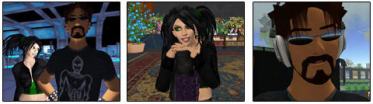
Sean went so far as to mention machinima and it’s place in this brave new world.
 Machinima is perhaps the extension of this newer wave in education. Digital movies made in online virtual worlds seem to be ‘the next big thing’ in youth created content these days.
For the uninitiated, machinima (muh-sheen-eh-mah) is filmmaking within a real-time, 3D virtual environment, often using 3D video-game technologies.
Machinima extends far beyond media creatives and youth though…With ‘Machinima for Dummies’ hot off the press, the first European Machinima Festival kicking off in October, and YouTube screening of the Global Kids’ year-long machinima project A Child’s War.
The video is based on research done by the youth about the situation of child soldiers in Uganda and the upcoming trial at the International Criminal Court.
You can watch their earlier piece about digital media and youth here and read the youth leaders blogs here.
3-D platforms like Teen Second Life (13-17 year olds) open up new ways of learning, identity exploration, behavioral experimentation and self-expression without stumbling into dicey terrain ‘outside the grid’ in SL’s larger virtual world. This makes initiatives such as Skoolaborate possible.
We love to customise our online spaces, don’t we?

After a request for help to find a way to display a book selection in the sidebar on an edublogs wordpress blog, I went hunting. WordPress doesn’t support the Library Thing widget right now, but that’s what we wanted to use.
Thanks to some code from the Library Thing forum and a bit of fiddling, we ended up with a My Book Collection widget on Danni’s The Butterfly Effect blog.
It has a static book jacket, and a random feed from the the profile’s catalogue. Basic for now, but does the job. You could do your own edits. Substitute your LibraryThing account name where I have inserted ‘accountname’, and of course your own image from your flickr account.
Code below:
<a href=”//www.librarything.com/catalog/accountname”><img src=”http://farm2.static.flickr.com/1415/1401347182_e689c40c0c_o.jpg”>
<a href=”http://www.librarything.com/catalog/accountname”>
<img src=”http://www.librarything.com/gwidget/widget.php?
view=accountname&&width=170&lheight=11;type=random&num=8&hbold=1
&ac=ac8834&tc=000000&bc=EEEEFF&fsize=8″>
</a>
 judyoconnell.com
