Don’t be afraid ~ give me Google Apps

It was really fun to read Head in the Clouds from friend and ICT integrator Michael, who works in a large secondary school here in Sydney. I always enjoyed visitng Michael, and admired the sensible way that he adopts Web 2.0 and cloud computing in great ways to support the learning of the students at his school.

Michael says:

Over the past few days, it’s been very hard to contain my excitement over Google’s recent moves to add all the applications from standard Google accounts to Google Apps for Education. While the core suite of applications – Mail, Docs and Calendar – are extremely useful and have put my school on the Web 2.0 map, I’ve been so disappointed that other Google apps like Reader, Picasa and Blogger have been off-limits for so long.

Sure, students can create their own Google accounts, you say? Having worked with frustrated teachers and students who all-too-easily forget usernames and passwords, I’ve really come to appreciate the ability to control accounts as the school administrator and have kids quickly online and using the tools they need to get ahead.

Now when all of my students log in, they get immediate access to an incredibly powerful set of Web 2.0 applications without the need to enter a single name or additional password! Exploring these is going to take some time, but it’s great to know they’re there for anyone to use.

As a technology expert/administrator, Michael  see this the use of these Web 2.0 Google tools as providing a level playing field for all teachers and students.

I also use Google Apps to power my own learning and my work with my PLN (though not at school).  Just last evening the invincible Teacherman79, popped up in my Gtalk, to chat briefly about some stuff he is preparing for a College class he is teaching in Virtual WorldsJeff is a middle school gifted and talented teacher in Montana, and he just wanted someone to run a ‘critical friend’s’ eye over  a handout he was preparing to facilitate kids  choosing  their  OWN way of learning pathway.

You guessed it – he shared his Google Doc with me, and within minutes we were editing that document together ~ and enjoying working! Realtime collaboration is very powerful.

Just one tiny example from me!

In case you didn’t know, here are some of the most interesting features of the new version of Google documents:

  • Real time collaboration: See updates from other collaborators as they edit the document.
  • Higher-quality imports: More consistent imports from your desktop into Google Docs.
  • Chat with other collaborators: As you make your edits, you can chat with other document editors about the changes, from within the document.
  • Ruler: Google documents have a ruler for setting margins, indentations, and tab stops.

There is  so much that teachers and students can do using Google tools these days to collaborate within their classrooms, and beyond their classrooms.

Too easy!

Now, if only more technology experts/adminstrators would take the view that Michael does ~ adapting to  and adopting cloud computing ~  instead of locking down machines and networks to proprietory systems and software within a walled garden.

Learning in a changing world series is out!

It’s been rather slow in the making, but finally the new series commissioned by ALIA and ASLA is available to order from the ACER shop online.

The Learning in a Changing World series addresses how the process of learning is evolving – including the array of resources available in the digital age, changing curriculum, and the different teaching strategies needed in order to use new media and technologies.

The Learning in a Changing World series presents the core areas for teacher librarians and school leaders to consider for 21st century learning: the digital world, virtual worlds, curriculum integration, resourcing, and the physical environment. All are essential elements to enable and empower our students to be lifelong learners and active participants in our society.

I was lucky to work on the first two books in the series with my good friend Dean Groom.  Books like the two we worked on can never stay completely current – but then they are not ‘how to’ guides so much as ‘why you should’  and ‘why you can’ guides. There is enough thought provoking information for readers to leverage and  help innovation and change in their own schools.

Connect, Communicate, Collaborate

Our students are involved in an ‘architecture of participation’ – creating, adapting and sharing content. While for them this learning is a comfortable multimodal conversation, for us this change is revolutionary. Schools and school libraries have many challenges to address to create a renewal of pedagogy and technology work practices. As we begin to understand the importance of these seismic shifts, we come to the realisation that we are being challenged to un-learn and re-learn in order to grant students access to 21st century learning.

Connect, Communicate, Collaborate is written to provide the knowledge, inspiration and motivation to get you started.

Many thanks go to  Michael Stephens for generously  contributing the Forward to this work.

Virtual Worlds

Each year there are more and more avatars in rich virtual environments. These immersive worlds – where the world within the screen becomes both the object and the site of interaction – are on the increase, matching the promise of technology with the creative minds of our students. Educators, keen to incorporate the evolving literacy and information needs of 21st century learners, will want to understand the opportunities provided by MUVEs, MMORPGs and 3D immersive worlds, so as to be able to create more interactive library, educational and cultural projects. The challenge is to accept that these interactive environments are here to stay and that schools can, and should, embrace learning in virtual worlds.

Virtual worlds will provide the knowledge, inspiration and motivation to get you started.

Many thanks to Peggy Sheehy for generously contributing the Forward to this work.

Join us in the Second Classroom: Educators Learning in Virtual Worlds and share your virtual learning journey!

Others in the series

Other volumes in the series include Curriculum Integration , Resourcing for Curriculum Innovation, and Designing the Learning Environment.

Enjoy!

Millenials and the Smithsonian commons

This video has great value in explaining not only what the Smithsonian commons has to offer millenials, but also the concepts that drive the learning environment of our students today!

Hybrid synergy – the future of school libraries

The Resources Centre

School has been busy – and so have I. Not many blog posts – but nevertheless  I’ve been busy mulling over the future of school libraries and how they should best be integrated into the education setting that we call “schools”.

Those of us who have been in ‘schools’ for many years remember when schools had no libraries!  Now it seems that some forward thinking people prefer to return to elements of schooling that were regarded as outmoded.  Get rid of libraries? Forget the role of libraries and teacher librarians? We don’t try and go backwards in other areas of education – so what’s the deal with this myopic view?

I have been busy watching the twitter stream #iwbnet10 where three of my colleagues are listening to some of Australia’s brightest talk about schools, schooling and the digital revolution at the Seventh National Interactive Teaching and Learning Conference.

By all accounts the conference has been brim full of ideas. But what strikes me about this and other conferences, such as ISTE2010 (that I very much enjoyed in Denver earlier this year) is the decided lack of discussion of what I see as an urgent need for a ‘new’ hybrid synergy between learning and libraries.  According to Designing for the Future of Learning

the school library remains one of them most symbolic, protected, and expensive ’spaces’ on any campus. But will future designers of school libraries be recreating sacred book spaces of the past or will technology and the ‘consumer’ inspire new design strategies for the future? For many, the library is the literal information bridge to the future.

It is very discouraging indeed to have conference attendees excited by one-eyed presentations of future learning needs.  Focussing on the digital revolution and ignoring the pivotal role that a good school library can play is to achieve only a percentage of what is possible – regardless of how good it seems , it’s just not good enough!

When I focus on my role as a teacher librarian, I ask myself a few leading questions:

Should we be immersed in new media and technology in our hyperlinked library?  Definitely.

Should we be working tirelessly to identify what is needed to think in ‘future tense’ and embrace the challenge of keeping ahead?  Most certainly.

Should we be leading the  conversation about social networking and digital identities? And how!

Should we be discussing the assessment problem in these media environments?  But of course!

I have the joy (and tears) of managing a school library that is open each week day from 8 am – 10 pm.

It’s a central hub for collaboration, technology, reading and writing.  It’s a place for change and about change. But with all that, it still has a long way to go  to achieve a hybrid synergy in our school. No different from most – we are evolving and responding to change!

This is important because  in an era of fast facts and short cuts kids have to become VERY literate in multimodal forms.

There are NO short cuts to literacy, and there is no replacement for the love of reading! No amount of gaming, movie making, sport, social networking etc can replace the cognitive gains to be made by allowing our students to become deep readers and deep researchers.  Technology has so much to offer in this thirst for deep knowledge and engagement with the ebook [r]evolution! However, technology is not a replacement for reading, researching, and the value that school libraries and school librarians can bring to our multimodal digital century.

Can you read this?

So while you get excited about technology rich schools, and while you focus on immersive and multimodal technology, don’t forget to focus on reading, literacy, information fluency and deep understanding.  What we need is a hybrid synergy between teaching, learning, technology, pedagogy, and the services of a school library/information services centre of learning and innovation.

Everything is a matter of degree. We do need to redesign our learning environments to address, leverage and harness the new media technology environment of our schools. We need to start redesigning our school libraries and the work of teacher librarians for these learning environments. We need to adopt learner centred e-teaching. We need to share, co-operate and collaborate because we now have an information ecology that can be open, self-managed, fostered and conducive to knowledge flow between content and connections.

As Michael Wesch explains,

Students need to move from being knowledgeable to being knowledge-able

Please look for ways to create a hybrid synergy in your school or academic institution. In terms of modern information and media skills, our practice demonstrates small, uneven pockets of best practice. We have no textbook for what 21st-century school library practice looks like.

Today I found a school that has grasped the need for hybrid synergy!  Not only do they have a school library that is the centre of learning and innovation – they will have in 2011 the perfect vehicle for synergy in 21st century learning by formalising the lead structures within their school.

Check out St Ignatius College, Riverview here in Sydney. They have realigned their library services to create a new hybrid synergy under the direction of the  Head of Digital Learning and Information Services, supported by several  Digital Learning Facilitators who will teach a subject, work with a faculty, as well as support students reading, learning, and research needs in the library.  Of course, with such a commitment to empowering student learning, there are other important roles such as a Library Manager, and library and media technicians.

Oh, but we can’t afford that at our school!

Maybe not – but you cannot afford to do without a library, nor can you afford not to adopt a hybrid synergy that will allow your teacher librarian to take charge of the digital revolution –  that is in danger of disenfranchising our students.

Let your students become ‘knowledge-able’ through literacy, reading and information fluency driven by teacher librarian experts embedded in your multimodal learning environments.

Body in the library – a murder mystery of our own!

Last term the Library Team at Joeys excelled themselves in launching an amazing “Body in the Library” investigative program in collaboration with the Science and English faculties. I promised to share this after talking about it at EduBloggerCon 2010 in Denver.  So here are some more of the details!

Boy’s body found in the Resource Centre! Year 8 suspected!

The focus of the project was to facilitate deeper learning in our students by creating an ‘authentic learning’ experience to strengthen writing and literacy skills across the curriculum. In English, students learned about the literary conventions of forensic fiction in their crime novel, Framed,  and how to use them to solve a crime.  In Science, students learned about how use a variety of scientific methods including analysing dental records, fragments and fibres, fingerprinting, shoeprinting and DNA samples in order to solve a crime.

These skills were then put to the test when boys were asked to solve a ‘body in the library’ type crime which the library team spent weeks preparing!

To solve the crime, students viewed the crime scene, looked at photographic evidence, read various ‘official’ forensic and crime  reports, watched video-taped evidence of the crime in action; watched interviews of the suspects; read  testimonies of different suspects; and analysed many forms of written and physical evidence!  Students employed deductive thinking skills, analysed all available evidence and established motives for the suspects in an attempt to determine who committed the crime. Lastly, each student submitted their own police report on the crime and its investigation.

This collaborative activity raised an astounding level of interest from all 150 boys – as well as raising a lot of  interest from boys from many other years.

Here’s  a brief overview of the scenario::
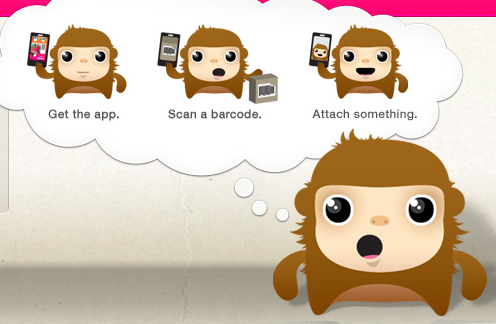
A body is found in the library at the end of Period 4 on Tuesday. It is a Year 9 boy who has been hit on the head with a blunt instrument.  The body is discovered by Mrs O’Connell in the Fiction area. A coroner’s report puts time of death at recess/Period 3.

The murderer is Mrs Smith. In a fit of rage, she has killed the student for not returning an overdue book.  There are two other prime suspects: Mr Smith, the Yr 9 Co-ordinator, who is annoyed by the behaviour of the student, and Jack, the boy’s friend, who had a fight with the victim.

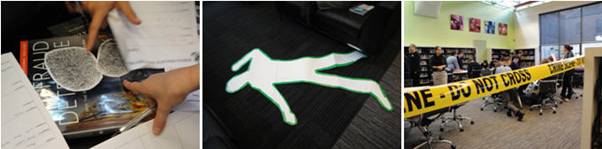
Each boy received a forensic workbook – containing a range of materials for examination such as crime reports, witness statements and a coroners report. In addition the ‘crime scene’ was taped off, with key evidence on display e.g. fingerprints, the location of the body, and places where DNA was found.  Photographic evidence included the injury reports (fake bruising and blood on the victim), video footage of the scene of the crime (staged by students and teachers) and also hard hitting interviews.  The students were able to go into our two discussion rooms (which have a plasma screen for collaborative work) and view the footage and interviews, and take notes about what they saw and heard.

All this analysis led to some fierce competition to solve the crime, and find the murder weapon – which was hidden amongst the library shelves.  You guessed it – a steel bookend (decorated with some fake blood).

If you want to prepare a scenario of your own, here is our  YEAR_8_FORENSIC_SCIENCE framework that set up the string of evidence and clues for our project.

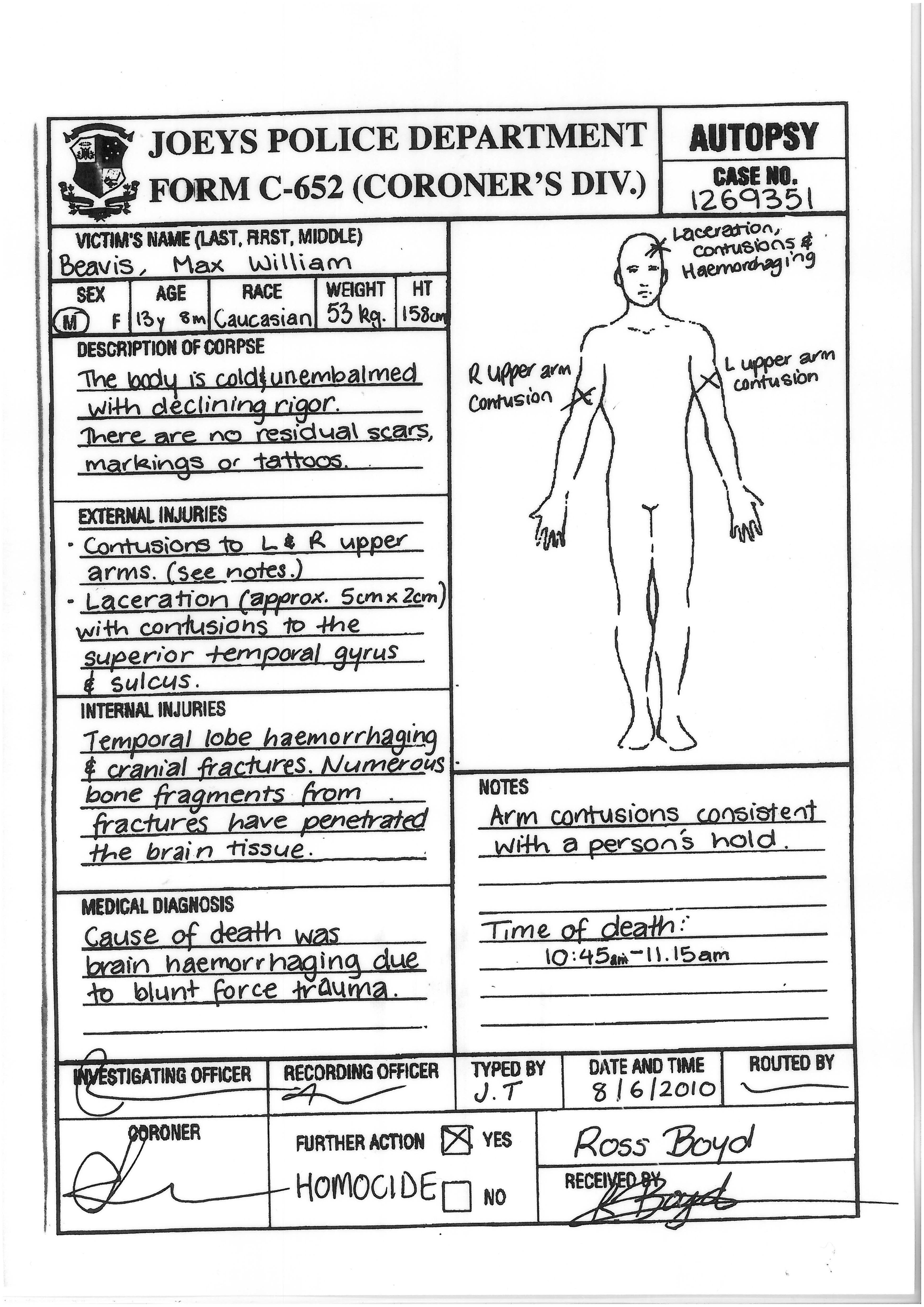
A copy of the coronor’s report below will give you an idea of the level of detailed evidence provided for the students to analyse.

The rest you’ll have to create for yourself! Did I mention I have the best Library Team on the planet?  This was just such a fantastic experience!

Don’t turn a digital blind eye…

Denver Convention Centre

So here we are  –  back at school again!  After the amazing ISTE2010 conference in Denver Colorado, I can honestly say that I came away packed with inspiration, and refreshed by the multiplicity of exciting approaches being tested and proved for their value in schools around the world.

There were many highlights, but above all, the message came across loud and clear from top to bottom  that we need to be proactive and adventurous in digital environments. Don’t guess  –  collaborate and learn from others! Build academic rigor through excellence in digital innovation.

I was so impressed with the schools that have a solid track record of integration of handheld devices such as the iTouch. They have shown us that it IS possible to have secure networks AND robust learning taking place that transforms opportunities for students. Even more exciting was hearing from those that are also exploring the added advantages that an iPad can bring to flexible learning. Of course, educators also reveled in the opportunity to explore and share Apps for the iPad. ISTE2010 was groundbreaking for me  – seeing so many iPads in one place was amazing!  Oh yes, the TL Learning Tools Smackdown was a real winner!

It was exciting to hear and see Howard Rheingold in person, in his Crapdetection 101 session. He has so much to offer us in understanding issues around good critical thinking in our digital environments. Take the time to watch his presentation, and then visit ISTEs critical thinking compendium.

So back to school for me  and the challenges of digital learning.

Thanks to our Powerful Learning Project initiative, our Digital Citizenship program delivered through a private Ning is once again alive and active with a plethora of curious, clever, colourful and amazing expressions of learning by our Year 7 boys. I know @snbeach will be pleased!

I love watching what happens in the first week!  Some boys are really excited (once again) to be working in an environment that to them ‘is like Facebook’ – which makes it cool! Others can’t help but use the Ning environment to ‘shout out’ about topics that are close to their hearts – who should win the next rugby game; should Ricky Ponting be dropped from the cricket team; and personal reflections on home and school. At the same time, boys are able to reflect on the topics being discussed in class, and sometimes amaze me with their  insights into their own digital world.

For example:

Cyberbullying is common  and mainly occurs because the person on the other side of the screen can’t see how hurt the victim is and they think it’s all a big joke to them. It is one of the largest forms of bullying because it doesn’t have any physical requirements, like conventional bullying does, but can be done by anyone. It is a major problem and is mainly based from social networking sites, not from SMS’ and phone calls because they are too intimate in communication.

One of the most annoying things about cyberbullying is anonymity and not knowing who is bullying you. It also is only effective in large groups so you feel excluded and like everyone is against you, unlike when you know you have friends to support you and back you up. If I experienced cyberbullying I would probably tell a teacher and document all the incidents so that the cyberbullies would get into trouble and hopefully learn a lesson.

Digital Citizenship cannot be ignored. Out of 160 + boys, only a few believe that they have had any help or guidance from parents or teachers in these digital environments.  So our digital initiative is being ‘rolled out’ via our English faculty – communicating in digital environments seems a very good reason to adopt this as our own (yes Darcy – I’m an English teacher too, so perhaps rank as a small part of your English Literati set perhaps in some small way?)

Other examples:

This is all well and good that the school’s IT group has put all this time and effort in to making this program but I have a an idea that this is just a trap for cyber bullyers. Because I’m gathering that school has no jurisdiction over our use of Facebook.

Ning is sooo cool, its just like a mini facebook, I can learn soo much from this!!

The important message  is that the world is changing really fast and in order to keep up with all the new and exciting things, we also need to no how to use these things in a responsible matter.

Cyberbullying = cowardice!

Very perceptive !

These environments are so important in both social and academic spheres.

Why do some educators continue to turn a digital blind eye?

The world is now a global village

Marshall McLuhan explores  the world as a Global Village in 1960 –  with extraordinary relevance to our 21st century reality!

Electronic media haven’t wiped out the book. It’s used, read and wanted now more than ever. But the role of the book has changed. It’s no longer alone. It no longer has sole charge of our outlook nor our sensibilities. Of course the trouble is, we act as if we were still solely in the age of the book.

Oh yeah!

Digital literacy across the curriculum

Digital Literacy across the Curriculum (pdf), from FutureLab, UK, is a 63-page handbook aimed at educational practitioners and school leaders in both primary and secondary schools who are interested in creative and critical uses of technology in the classroom. The handbook is supported by case studies (pdf) of digital literacy in practice and video case studies.

The handbook aims to introduce educational practitioners to the concepts and contexts of digital literacy and to support them in developing their own practice aimed at fostering the components of digital literacy in classroom subject teaching and in real school settings.

Developing digital literacy is important  because it supports young people to be confident and competent in their use of technology in a way that will enable them to develop their subject knowledge by encouraging their curiosity, supporting their creativity, giving them a critical framing for their emerging understandings and allowing them to make discerning use of the increasing number of digital resources available to them. p.10

Developing digital literacy in the classroom can allow students to apply their existing knowledge of creating with digital technology to learning in school and in the process be supported to think more critically and creatively about what it is they are doing. p.24

Fostering creativity in the classroom involves applying elements of creativity to subject knowledge. This can be done in all subjects across the school curriculum. p.25

This is an outstanding document that can be used as an information primer for helping schools develop a whole-school approach – particularly relevant in the current 1:1 laptop scenario in Australia.

Tag your world – share with Stickybits

What next you ask?  How about Stickybits!! With Stickybits we are now able to attach digital content to real life objects, and share this content with anyone else who accesses our Stickybits  barcodes.

The current phase of social media is all about location-based applications, such as Foursquare, Gowalla and Brightkite, to name a few. By downloading the Stickybits mobile application on an iPhone, users can scan the barcode and which provides the  videos, photos and text which have been added, which are referred to as “bits.”

Anyone that scans the barcode, can see the bits loaded from other users and also add their own content. Stickybits barcode locations can be identified on a map provided in the application and are tracked on the Stickybits website.
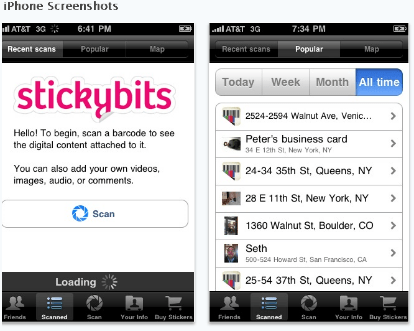
I think there are things we could do with this for professional or fun things, as well as develop ideas for school.

You can attach photos, videos, music, pdfs, and more to a barcode.

It is possible to print out your own barcodes, order some snazzy ones from Zazzle, or attach ‘bits’ to existing barcodes.

Here is where it could get interesting for schools – we already have barcodes on objects – now we could attach information goodies to items that are being used for reading, learning, playing, enjoying.  Would we?  This is definitely a whole new idea to explore.

Would you use Sticky Bits?  What would you attach to your barcode?

TechCrunch has a bit to say too:

Every place and object in the world has a secret past: who lived there, who passed by, who touched it. The secret lives of objects are filled with such details. If only you could make them talk. But what if you could give any physical object a story simply by sticking a barcode on it and appending a message to that barcode?

The barcode in a greeting card , for instance, could trigger a video message from the sender. One on a box of medical supplies could inventory what is inside. A business card with a code on it could link to a resume or LinkedIn profile. Museums and theme parks could use them for audio tours and maps. Local merchants could use the barcodes to track deliveries or place them in their storefront windows to distribute digital coupons and offers to passersby.

To get more ideas keep an eye on the StickiWiki, and please do let me know what you try.
Laura Gainor will be utilizing stickybits as a travel journal as she ventures to Disney World with her family from April 16 – 19, 2010 and also bring along stickybit stickers to attach to different real world objects

Laura Gainor used  stickybits as a travel journal for a Disney World trip with her family from April 16 – 19, 2010!

Vodpod videos no longer available.

Web of knowledge: the Semantic Web

Last week many Australian teachers & tech  educators travelled to Melbourne to participate in the ACEC 2010 Conference Digital Diversity, an Australian biennial national ICT education conference. Much has been written since then about the challenges we encountered, the message of the keynote presentations, and the interesting experiences and conversations we all enjoyed.

What struck me was the continued conversation about the same things – even the Keynote sessions offered no new insights into the future directions of learning, though there were some challenging messages thrown out to the participants as ‘take-aways’.  For me the absolute  highlight was the  Keynote by Oscar award-winning Australian  Adam Elliot. So refreshing to hear something beyond the usual Gary Stager message of gloom and doom which offered little in constructive strategies for the listeners.  Thanks to Chris Betcher for his Keynote and reflections on Gary’s presentation too. I liked Chris’ presentation much  more than I liked Gary’s – despite Gary’s apparent claim to  fame.

BUT where were the discussions about the future directions of the web?  No keynotes that explored the synergy between virtual worlds, augmented reality, or the Semantic Web.  Nothing that offered hands -on grass-roots understanding about information fluency and knowledge work in a globally connected semantic web.

We have to stop working/thinking in silos!!  It was the same at the Apple  ITSC2010 conference, held over the last two days in Sydney.  Nice stuff covered for sure, and fun hands-on workshops. But nothing that points the way forward. Nothing that deals with reading and  literacy (our inescapable way of cognitive engagement with multimodal texts) on a variety of devices from paper to e-devices. Nothing that acknowledges the virtual, augmented, semantic mashup of connection with the world.

You know, the journey is  just  become interesting – don’t stop now:-

•1980s – Desktop is the platform
•1990s – Browser/server is the platform
•2000s – Web services are the platform
•2010s – Semantic web is the platform
Humanity is being connected by technology – oh not just in a Web 2.0, connected/conversation way, but in the way that Tim Berner’s Lee actually envisioned.
Web 3.0 – the Semantic Web – will revolutionise knowledge discovery.  And here we are still talking about the same old stuff without so much as a’ doff of the hat’ towards the real future of the web.
Do not for a minute think that you have prepared you students to understand how to learn well if you are integrating a bit of fun  technology- whatever the platform you use!  What are the thinking strategies that are underpinning your work?  What are the information fluency tactics that your are deploying in your classrooms?
I presented a preliminary conversation starter about  Web 3.0 and the Semantic web at ACEC2010 – just because I know that too many teachers are not even now looking at the different search engines, and the strategies that can be applied in the current web. How on earth will we expect our students to query the value of the information flood of knowledge that will be more readily available once the Semantic web takes a hold?
Time to roll your sleeves up my friends, and go beyond current thinking to understand learning and teaching when the web is our personalised federated search engine!  Will our students know more? or will they become more easily swayed through biased popular opinion?
Get beyond  your 21st century learning bubble of Web 2.0 tools and technology integration, and start planning for the actual future of learning.