Shareaholic – always!

Thinking? Writing? BLogging?  Sharing?  That’s what Web 2.0 media is all about ~ it’s continually getting easier to share our online learning experiences with others 🙂

Thinking Beta – that’s what it is! Always thinking, always learning, always expecting change.

Rather later than others I know, I’ve discovered a useful addition to my Firefox suite of online tools in Shareaholic. I’m sure I’ve spotted @buffyhamilton using it!

Shareaholic supports 100+ destination services. Make sure you setup your favorite services from the options menu so that Shareaholic works exactly the way you want it to. The latest update tells me that the service is just getting better and better.

I recommend you give it a try. Perhaps you’d like to share your experiences if you’re an ‘old hand’.

Not just Twitter and Facebook ~ it’s a Poken!

Get the pokenPulse combination Poken device and USB Flash drive. Click for details.As John explains in his post on Integrating Social Media and Reality, we live in two separate, parallel worlds, with one foot in each. There’s the online world of text, email, online shopping, Internet search, Twitter, Facebook and LinkedIn. Then there’s the real world of food, shelter, family, friends, and work. The two intersect, but they’re not tied together in any robust way. Well, at least until now.

Enter Poken! a device you might keep on a lanyard around your neck or clipped to your jacket, backpack, or bag. Need to exchange information or keep up-to-date with a colleague? If you both have a Poken you can touch the hands of the Poken together and they’ll sense each other’s presence. After a wireless exchange of links, both hands will pulsate with a green glow to announce the successful transfer of information. The magic happens when the Poken is connected online to your personalized online portal.

Way better than a business card ~ amazing social networking! Is this new? Or have I been living under a rock?

Vodpod videos no longer available.

more about “Poken Explained on Vimeo“, posted with vodpod

Real and imagined ~ are the same!

Each school, each leadership team, each school library team and each teacher needs to learn how to restructure the core business of schooling in order to embrace learning in our changing online world.

We say this often and slowly the ship of state is turning ~ but fast enough for our students?

I came across two things today which brought a smile to my face. What we imagine is possible ~ is real these days!

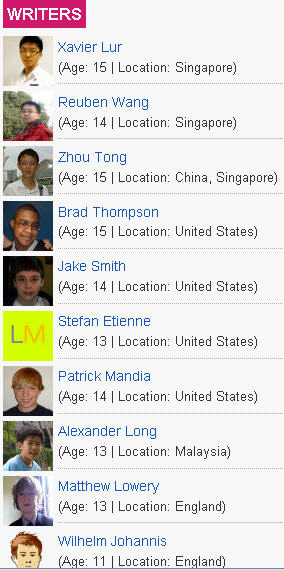
Take a look at TechXav –  seems to be as professional a website as any you might come across….. by 11-15 year old students?

TechXav is a technology blog written by a group of young and zealous teens, ranging from the age of 11-15.

Wait – they’re even located around the world!!

Right – and imagine what they think of being shown a powerpoint! or opening a text book!

I also read a post by Will Richardson about phones and about the disruption they are already creating for most schools (high schools at least) and about the huge brain shift we’re going to have to through collectively to capture the potential for learning in our kids’ pockets. I love the video he shared as well!

Yes, we’re facing a huge challenge ~ much bigger than just the roll-out of laptops in our schools in NSW. It’s a fundamental, seismic shift that likely will swallow some education institutions.

So this little promo video shared by Will also bought a smile to my face.

Making Twitter work for me – and you!

I’ve been using Twitter for what seems a long time – and in that time I have learnt that Twitter is an important part of  my whole toolkit of professional learning and sharing. I have also learnt that it is important to bend Twitter to the purpose I want to use it for!
Twitter has been growing and changing since it first arrived on the scene.  The advent of Twitter and other social networking sites, as well as the popularity of text messaging, have made short-form communication an everyday reality.  But expressing yourself clearly in short bursts-particularly in the 140-character limit of Twitter-takes special writing skill.
Carol L. Tilley, a professor of library and information science at the University of Illinois at Urbana-Champaign,  believes the character constraint of Twitter Texting can Enhance Writing Skills.
If renowned author Ernest Hemingway could write a full story in just six words (“For sale: baby shoes, never worn”), then teachers and librarians should encourage their students to use Twitter and text messages as part of their literacy lessons
For me, Twitter texting is about collaboration, sharing, and supporting my colleagues. My Twitter @heyjudeonline is a mix of information finds, queries, responses, and light chatter.
The information I  “put out there” is drawn from my RSS reading at Feedly and other sources. Twitter is the addition to my blog, and the quickest way I know to share!!  But thanks to Feedly, I can not only share on Twitter, but can (almost simultaneously) add important information to my delicious account for Heyjude, or post it on my Facebook profile.
For an evolving development  of Twitter, or to pick up the latest information, just take a peek at my Delicious link for Twitter.  I keep it all, and it’s certainly getting to be very extensive indeed!
The next key evolution has been the capability to keep lists!  At last – a way to organise the people you follow.   To be honest, I haven’t yet had time to organise mine. I’ve been busy thinking through other avenues.
I now run 3 Twitter accounts – the most recent addition being specifically for School Libraries.
@heyjudeonline Educator, learner, blogger, librarian, technology girl, book and library lover. Transforming education and libraries. Innovation for life.
@LibraryCloud Innovative ideas in one tweet for School Libraries everywhere!
@librarycloud is brand new – and really focussed on learning, teaching, and all things to help organise a fabulous school library.  I’m keeping this Twitter account clutter free – so that I can make a Twitter book out of it for you!

@Simplybooks Promoting reading and good literature, as well as providing links and information about quality approaches to reading education.

So you see, I’m keeping myself busy making Twitter work for me – and hopefully for you too!

Is there anything else I could do to help you?

Meanwhile – grab the Complete Guide to Twitter, or one of Tim Davies fabulous One Page Guides.

How to Score Full Marks

Everyone likes to score maximum points in each subject. It’s what the final public examinations in our country are set up for – to see who can get ‘full marks’!

Do you detect a cynical tone in my voice?  I love learning it’s true – but I also love learning and teaching to include an understanding of the online world that our students will be living and working in when they leave school.  So as the next round of marks are about to come out in NSW I wonder what these marks will tell us about the flexible and agile minds of our students and their potential to succeed in a world wrapped in new media.  New media? Social Media?  Is it really relevant? Do teachers need to know any more than the basics?  Perhaps it’s Business Studies that should take the most note of the shifts taking place, while other subjects should incorporate social media more into the whole learning process. Why?  Because from what I’m reading below – it’s driving a lot of change in the workplace and in marketing.

2009 was surely a banner year for new and social media. Fueled in large part by the impressive growth of Twitter and Facebook and the adoption of both by major brands and recognizable individuals, it’s safe to say that social new media truly went ‘mainstream’ this year.

The Center for Marketing Research at the University of Massachusetts Dartmouth recently conducted a new in-depth and statistically significant study on the usage of social media in fast-growing corporations. This new study revisits the Center’s study of Inc. 500 social media usage for the third consecutive year, making it a valuable and rare longitudinal study of corporate use of these new technologies. Questions probed respondents about their familiarity with six prominent social media (blogging, podcasting, online video, social networking, message boards and wikis) tools. This included the popular microblogging service Twitter and other popular social networking sites like Linkedin, Facebook, and MySpace.

Adoption and awareness continue to trend upward, with 91% of firms using at least one social media tool in 2009 and three-quarters describing themselves as “very familiar” with social networking. Social networking and blogging have seen the most growth in adoption, while other technologies have flattened or even declined in use, including wikis and online video. Twitter usage, of course, has caught on quickly—more than one-half of businesses reported tweeting in 2009. This was the first year respondents were polled about Twitter.


http://webnow4.files.wordpress.com/2009/12/g1.gif

One impressive change over time was in the percentage of Inc. 500 companies that did not use any form of social media. It dropped precipitously from 43% in 2007 to just 9% in 2009.

The Internet has provided us with the platform of information sharing. In the Web2.0 era of social media marketing and information – so much is FREE!!

Item Price Supplier
Courses & Tutorials FREE Youtube, Blogs …
Global Client Database FREE Facebook, LinkedIn, Twitter …
Market Insight & Trends FREE Twitter, Google Wave …
Customer Feedback FREE Facebook, Twitter, SurveyMonkey …
Global Talent Pool FREE LinkedIn …
Viral Marketing FREE All of the Above …
Infinite knowledge FREE All of the Above and more …

It’s like fishing where the fish are. Social media is where our consumers are at the moment. There’s no better way to amplify your message…..

…according to Michael Donnelly whose role in Coca-Cola’s global interactive marketing group is to help increase the understanding, testing, adoption and use of digital marketing and emerging media among the company’s marketers.

Coke used crowdsourcing to enable all of their consumers to vote on which team will travel the world for a year in search of what makes people happy. It’s a program that will be completely socially enabled. The team will blog, shoot video, conduct interviews and participate in events. Voting concluded and the three-person team of “Happiness Ambassadors” was announced online on November 16. The trip begins in January 2010.

Oh my!!  I feel as if we have a bit to learn don’t you think?

So I thought this study presented at Harvard University by the “Society For New Communications Research” (SNCR) in November 2009, was  a rather interesting read.

Amongst the findings that caught my eye (which should have relevance to educators) were:

Professional decision-making is becoming more social,  traditional influence cycles are being disrupted by Social Media as decision makers utilize social networks to inform and validate decisions.

The big three have emerged as leading professional networks: LinkedIn, Facebook & Twitter.

The average professional belongs to 3-5 online networks for business use, and LinkedIn, Facebook and Twitter are among the top used.

The convergence of Internet, mobile, and social media has taken significant shape as professionals rely on anywhere access to information, relationships and networks.

Reliance on web-based professional networks and online communities has increased significantly over the past 3 years.

Social Media use patterns are not pre-determined by age or organizational affiliation with younger (20-35) and older professionals (55+) are more active users of social tools than middle aged professionals.

There are more people collaborating outside their company wall than within their organizational intranet.

Connecting And Collaborating Are Key Drivers For Professional Use of Social Media.

So how are you as a teacher or teacher librarian using social media to help your students ‘score full marks’??

Innovations keep rolling out ~ Google Living Stories

Living Stories provide a new, experimental way to consume news, developed by a partnership between Google, the New York Times, and the Washington Post. In Living Stories, you can read the same reporting and analysis that you expect from the Times and the Post, delivered on a highly interactive platform.

Vodpod videos no longer available.

more about “Google Living Stories“, posted with vodpod

Teaching Privacy in a 2.0 World

[clearspring_widget title=”Animoto.com” wid=”46928cc51133af17″ pid=”4b24168b205436d3″ width=”432″ height=”240″ domain=”widgets.clearspring.com”]

….with thanks to a tweet from Michael Stephens @mstephens7

Is this the future of magazines?

Thanks to Daniel Pink for the heads-up on Apple Insider’s demo of the soon-to-be-launched digital edition Sports Illustrated.   Time Inc, the largest magazine publisher in the US,  has been plagued by declining subscription  revenue and layoffs according to Tech.Blorge, so it’s taking a new tact with its magazine content by testing this tablet-friendly version of Sports Illustrated.

Apparently Wired and others are also working on their own digital editions.

I know for sure that the boys at school will LOVE this!

A Decade of Databases: Where to from here?

On Friday the 7th August I was proud to participate in the annual UQL Cyberschool Seminar in Brisbane, Queensland: A Decade of Databases: Where to from here?   How lovely to escape cold weather, and to meet new faces in the Teacher Librarian profession. It was the 10th anniversay of the Cyberschool – a service to all schools in Queensland, and to other States in Australia, providing a wealth of information resources and online databases.

The Program of the day included Tanya Ziebell, UQ Library, Patricia Carmichael, a fabulously energetic TL from Concordia Lutheran College, Dan Walker, an inspirational Principal from Brisbane State High School, Dr Mandy Lupton, Lecturer in Teacher-Librarianship, QUT, Lea Giles-Peters, OLD State Librarian, Keith Webster, Director of Learning Services, Professor Phil Long, Centre for Educational Innovation, and of course – myself!

What a fabulous group of people to listen to before my turn came. It was great to have Phil Long talk in detail about the Horizon Project and together with Keith Webster, engage the audience with some interactive online trials using iTouch units on loan from Apple. Keith showed us his masterful way of presenting using CoolIris – loads of fun!

Here are the slides for my presentation. As always, the story is in the telling!  I hope I encouraged some people to think ‘out of the box’, be connected, be comfortable with social networking, and hopefully find ways suitable to their own context to transform school library learning services.

Tweet me now!

A colleague a few months ago asked, “so how do I know when you have send out a message on Twitter”?

Good question – especially if you are new to Twitter.

It’s  interesting to watch ‘newbies’ develop their own online etiquette and management of their Twitter use.  Lots of options, but there are a few key tips that we could all keep in mind as we ‘tweet’ away.

1. Profile: Decide on a private of public profile (I keep my public, as I am happy to share my information finds with anyone who is interested). Make sure to put some key information into you bio – nothing worse than non-information!

2. Discuss and Collaborate: Use the @ symbol to reply to anything of interest, or to have a conversation on a topic. Using the @ symbol  lets you know if someone has tweeted a message to you, started a conversation, or replied to a general query for help.  Ah hah, here’s the answer to my colleague’s question.

3. Direct Message: I set up my DM to come to my email anyway, so I know if I have received an important message that I might want to jump right over to Twitter to respond to. After all, I don’t share my email with everyone but it’s a communication tool that is always at my fingertips – especially at work!

4. Keeping the Conversation live: Each time you jump onto Twitter (some people keep a steady stream open in the background using TweetDeck or a similar tool) be sure to click on your @messages and your DM (Direct messages).

5. Favourites: Nothing beats the knowledge power of the crowd.  There are many good things to follow up at a later time. Just “favourite” the tweet – and when you have time later (weeks later sometimes)  you can revisit all your favourites for thorough investigation!!  I have to confess this gets away with me a bit – so the school hols are a good time to regroup and clear out your list 🙂

6. Digging deeper: Use the power of search to find tweets of interest on your area of interest. Of course, trending topics can be interesting too.

7. Bend it to your purpose: The power of the hashtag means you can keep a theme going, or focus on a workshop or conference presentation – sharing information with others.  For example #necc09 brings back all the wonderful thoughts, ideas, reflections and information links from the NECC (National Education Computing Conference) Washington this year!

8. Pushing the information further: Of course one of the wonderful things of interconnected personal networks is the capacity to distribute and share information. The power of RT is one to watch – “re-tweet” – and Twitter etiquette encourages us to attribute to the original message.  For example deangroom@heyjudeonline thanks for the link http://blabberize.com/ – is so funny – love the demo!

Is this all for real?

You bet!  Organisations the world over are communicating to educators and librarians with relevant and important information.  Libraries, Tech organisations, the Board of Studies NSW and other organisations,  Tertiary libraries, publishers, media news and more. I have a huge collection @heyjudeonline – feel free to browse.

I think it’s fab when schools begin to use the power of Twitter.  St Peter’s at Tuggerah @spcct are sending out updates to their school community.

I am running  a Twitter account for our library at  SimplyBooksPromoting reading and good literature, as well as providing links and information about quality approaches to boys reading education.

sportingMy school,  Joeys,  is trying out  Twitter for Live Sport Results on Twitter. Results will be updated regularly each Saturday throughout the season. The page will also include any last minute changes to fixtures and wet weather information.

Follow JoeysSport on Twitter and make sure you get SJC’s sports results as they happen.

For more insights into twittering for educators and librarians check out :-

Using Twitter to develop a PLN

Twitter Collaboration Stories

Nine Great Reasons why Teachers should Twitter

A Teacher’s Guide to Twitter

Twitter for Teachers

Top Librarian Tweeters

Twitter for Libraries and Librarians

I use HootSuite to manage more than one account – saves the login logout saga!   Use the secret weapon – a Hootlet! to send a tweet to one or more accounts as you surf the web!  Just use Tweetie on your iPhone to track and tweet!