ISTE…..and the unsung heroes!

International Society for Technology Education’s (ISTE) Second Life space provides a venue for educators to network and learn from each other about real-life education opportunities and best practices in Second Life.

ISTE sponsors an ‘in world’ group, hosts weekly networking socials and topical events, and sponsors a twice-monthly speaker series. At their recent meeting (1 pm Sydney time on Tuesday) Jo Kay aka jokay Wollongong was the guest speaker. Jo shared information about the various projects she is involved with in Second Life, including the Islands of jokaydia, where she is supporting a growing community of educators and artists in Second Life who are exploring various strategies for the use of virtual worlds in their practice.

Yep, I’m a resident of Jokaydia – so I went along help out, and to listen to Jo, to share with the ISTE colleagues, and to learn more about educational opportunities or events held on Jokaydia.

The Unsung Heroes

What I was amazed about was the fact that I could attend this meeting – on the third day of work in my new school. In my school district role last year, I was not able to get access to Second Life on the district network. Nor can most schools seem to get this organized. But sometimes we have unsung heros amongst us. The Joeys Head of ICT – Gary Evans – had me up and connected in 24 hours ! Fabulous work Gary. As a result he had time to drop by the meeting, and join Simon and Andy who I hope will assist me in some SL work later in the year. (Normally Gary is in his shirt and tie! like all staff at Joeys- this pic was taken on a frantic non-teaching day).

Perhaps it’s the Marist School that makes a difference. Back in my district of Catholic schools, it was Dean Groom, the Head of ICT at Parramatta Marist College, who made SL access possible – so that the students could join with the TeenLife project, Skoolaborate. Brother Pat at ParraMarist is as passionate about educational opportunities for his boys as my own Headmaster is for our Joeys boys!

In all this, its our IT managers who are the unsung heroes, without whom we could not do all that we do in our schools in all forms of e-learning.

Thanks Dean for all you did to help out last year. Won’t forget to keep reading your blog and learning from your work with your boys. PLUS your hacking of technology objects are the best 🙂

Thanks Gary for all you’ve done to help me out this year already. Joeys is very fortunate to have your leadership. Can’t wait to see what else is possible. Perhaps the sky’s the limit?!!

  • OpenOffice online with Ulteo

    Run OpenOffice.org 2.3 within your web browser with the Ulteo Online Desktop, manage your office documents online, share your OpenOffice.org sessions in realtime, share your prints and get PDFs……

    A fabulous addition to the web toolkit – particularly for all those who are already OpenOffice users.

    The open source environment has given us great alternatives to Microsoft Office. Will Ulteo’s connection with OpenOffice give us another strong alternative to the ever encroaching Google hegimony for desktop and web collaboration?

  • Hammering the holiday theme!

    Yes, I AM on holidays. (Some of my twitter friends are ‘making fun’ of me about that) So just to hammer home the idea that I am not really blogging, here’s another resource for you to try out. I haven’t got time – I’m on holidays!

    Does anyone even need this? Maybe. So try it out and tell us about it.

    PDF Hammer is a website that allows you to edit your PDF files online for free. You don’t need to install any additional software, you can edit PDF documents right now inside your browser. Once you start, you will be able to upload one or more PDF files into your project, arrange the pages in any order you wish, and delete any pages you don’t want.

    It’s in beta – of course!

    *

    Sweet stuff about powerpoint

    Oh no, I’m on holidays!! But I am reading and playing on line as you know…and guess what..I found a resource to share.
    Here it is. 70+ PowerPoint and Presentation Resources and Great Examples. A great combo list all in one place, and one that it looks as if it will be added too.  Sweet!

    Since I’m on holidays – no further comment 🙂

    Photo: Sweet Stuff

  • Wow! Edit your photos on Flickr

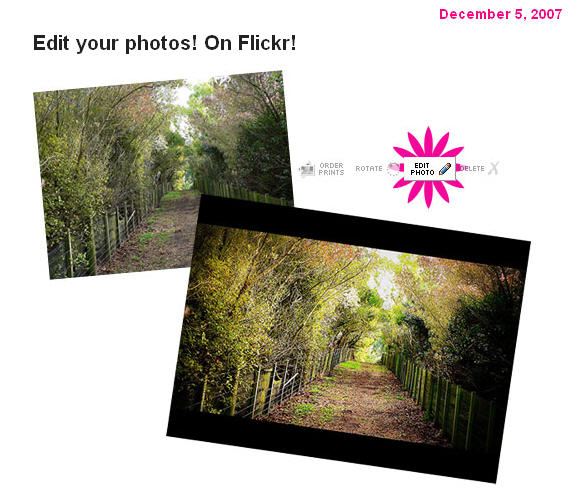
    Picnik’s awesome photo editing tools are now only a click away. If you’ve ever wanted to deal with the dreaded red eye or crop a photo just so, click on the new “edit photo” icon located above one of your photos and get started.

    The Picnik/Flickr collaboration works similarly to other 3rd party services who’ve built additional tools on top of the Flickr API: You’ll need to pass through the step of giving the Picnik service permission to edit and save your photos… It’s a little bit like you’re “installing” Picnik on your Flickr account, but with nothing to download.

    I rather like having access to this – especially when I am not always working on my own computer with my own suite of favourite tools. It’s all about being able to work quickly, efficiently, and ‘on the fly’ whenever and wherever – isn’t it?

    Rock on Web 2.0!

    picknik.jpg

  • File sharing – this is different!

    I must admit, this caught my attention. Seems to work quickly?

    FileURLS is a nifty online tool that quickly lets you share a file – no need to set up an account. It lets you set an expiry day up to 9 days.

    You may email the url created, or place it in your blog or wiki.

    Here’s a Factsheet on dietary sources of Omega 3 that I used to this tool – it quickly generated this URL – http://fileurls.com/carado

    This is too simple to be true! How did you go downloading the file?

  • Kindle: Amazon’s New Wireless Reading Device

    The slow drip of rumors about the Amazon Kindle e-book reader exploded into a full-blown flood over the weekend. As a result there have been lots of comments flooding the social networks about the newest wireless device from Amazon.com…. it’s the Kindle.

    Amazon’s new wireless reading device lets you read books, magazines, newspapers and blogs anywhere, anytime. Small as a paperback, Kindle will hold lots of goodies for book aficiandos. The screen technology seems to be impressive – but wait till someone tells us more.

    You really must watch the small video about Kindle. I wonder when we will have access to free download?

    A wonderful marketing strategy from Amazon – as well as a clear indication of future directions for teachers and librarians alike. This gadget is a ‘future’ must-have for me!

    View the video here. Get full product descriptions, reviews, and more information here.

    Nice one! I think! Maybe this is still not the ‘ultimate’ device – but with it’s link to Amazon, it sure is a peek into the future.

    However, according to the Sydney Morning Herald (20/7) it is unlikely Kindle will ever see the light of day in Australia.

    But the local book industry has jumped headlong into the digital age with Dymocks chain launch of Dymocks Digital Books online stocking about 120,000 ebooks that can be downloaded and read on a computer, mobile phone or other handheld device. They say that these digital formats are quick and easy to download so there will be no more waiting for shipping – read or listen within minutes. And with a growing list of over 135,000 titles to choose from, you’ll be spoilt for choice.

    EeePC – Super portable personal computing

    At last, personal computing is becoming portable ….
    isus.jpg
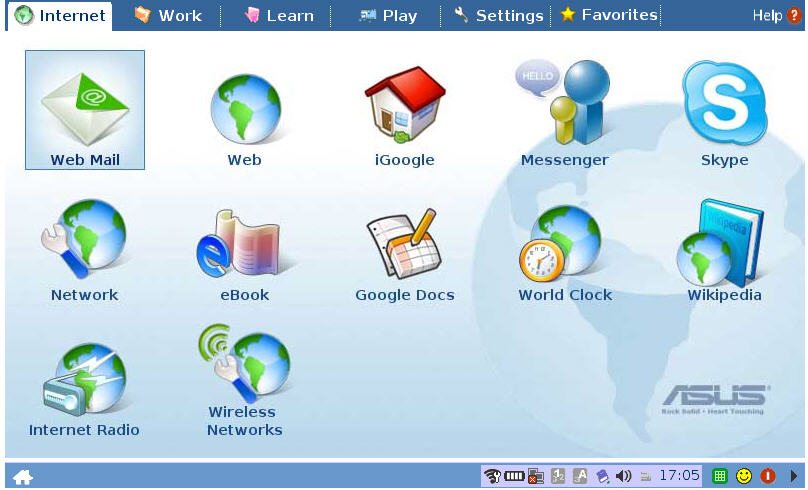
    and I don’t mean the hand-held palm mobile variety. I’ve been waiting to here about the release of the ASUS Eee PC $US399 with a compact and highly-readable seven-inch display. Running on a customized Linux operating system, it is said to respond far more speedily than its Windows counterparts, but it’ll run Windows XP quite happily, if you like.

    The EeePC offers two types of intuitive interface, to let you choose how you want to use it. Using either the “Easy” or full desktop mode, you can use the built-in WLAN connectivity to communicate on the run, share photos from your trip before you get home, or do almost anything else online. Flash storage keeps the weight low – without a hard drive, this micro-monster weighs in at 0.89 kilograms ! In a few weeks Asus will release the $US499 version that has more ram and an 8g drive

    With the 40 included applications, onboard webcam, high-speed internet capability, and exquisite sound, the EeePC finally heralds a shift in the way we can use small computing to work big!!

    I can’t wait till the day comes when I no longer have to lug a normal laptop computer around! This seems like a perfect tool for students and others ‘on the go’ – the tool to use when you are not at your desk!  This is a good addition to the small range introduced by the  One Laptop per Child program.

    Test drive the EeePC program interface online. Be impressed with the raft of tools and Web 2.0 type platform!

    isus-desktop.jpg

    Tumblr – new features are ready!

    Since I last wrote about Tumblr Write your thoughts….or stream that news! there has been a new version released.

    A write-up of the new features of Tumblr 3.0 at Read/Write web explains that it includes over 400 new features, fixes, and improvements. Beyond fixes, the features seem to cluster around four important themes for this release:

    • Supporting Audio Posts
    • Upgrades to Video Posting
    • Private Communication: Channels
    • Easier Integration Points (APIs)

    Looking good!

  • Ustream.tv

    ustream.jpgThe twittersphere is full of excitement as more and more ed tech bloggers give UstreamTV a try this week.

    Whether you broadcast live, chat live, or record your show for later, this has some interesting potential for teachers to experiment with in some way. Teachers like Coolcatteacher and Budtheteacher have a Ustream space already.

    A great addition to the professional learning toolkit for global educators.

    A post on Twitter, and there we all were (just before midnight) participating in some cool PD at Where the Dust Settles. Learnt about PollDaddy! Discovered how easy it is to use this tool to effectively share information and have fun!