PDF sharing online

What do you do when a graduated student  sends you a pdf (on the weekend), needing it for a reference file for uni accommodation application?

What do you do when you have no scanner or appropriate software on hand – and the silly form is meant for print use only?

You ask your contacts on Twitter for help of course!  I got lots of recommendations, but the one from @sandnsurf was the  one  that won the day.

FillAnyPDF free PDF Editor.

FillAnyPDF.com is a website where you upload your PDF form and link to it so other people can fill it out and sign it online. No software is needed. Any PDF form can be used, even if it’s not “interactive”, so you can get started right away. You can even invite a group to fill out your forms and track the results. Anyone that collects signatures or filled out forms will find FillAnyPDF.com to be a valuable time-saving resource.

I loaded then filled out the form – and then was given a link to either download the edited pdf or a url to send to the student. The link expires in 7 days. Pretty cool!
Open Source ethos

I have been spending a bit of time thinking about The World is Flat by Friedman in preparation for the first Flat Classroom Project in 2010. Amongst other things, I thought about Open Source thinking and flat world communications which I planned to share in the  Keynote kick-off.

Well, you now how it is – I just couldn’t share everything  I wanted to (lots out in the rough cuts), but the ‘finds’ are still inspirational.

You have to be inspired by the powerhouses of  Open Source software and Open Content. There is no doubt in my mind that an Open Source ethos is the best way to collaborate, create, share, and be empowered to inspire future learning.

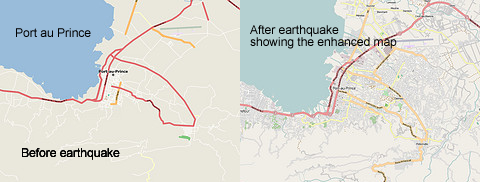
For example, during the crisis in Haiti, the Open Source community did amazing work in Haiti OpenStreetMap to assist aid and rescue workers to do their work and help the relief and reconstruction effort. It was a Flat Classroom Project in action – creating up-to-date  maps of  Port au Prince. Dozens of mappers and developers were able to lend a hand, coordinating on the OSM Haiti WikiProject.

Thanks to Paul Hamilton, I was inspired by yet another amazing example of the power of work taking place using Open Source Software to help people. The development of the  Eyewriter is inspirational. The Eyewriter uses low cost creative technology an free open source software to enable graffiti writers and artists with paralysis to draw using only their eyes.

Vodpod videos no longer available.
posted with vodpod

Unique (and amazing) PDF tool

This is amazing – absolutely amazing!

Nothing more to say really – except it also has a nifty bookmarklet that you can add to your toolbar.  Has website and server tools too!

LazyFeed – lazy and productive

I admit to being a web wanderer – lazy random browsing in the topic areas that interest me is wonderful,  and it’s amazing what new things you find, what you can enjoy, and what you can learn. My RSS reader is  ‘chockers’ – so I can’t just keep adding possible feeds for reading.

Rather belatedly  I’ve also discovered LazyFeed.  Perfect!

If you are more into tracking stories on a particular subject like technology, music etc rather than tracking specific blogs then LazyFeed could be the tool you need. You just need to sign up and add your favourite topic…. via MUO.

I’ve been using it for a few months now, and just love the flexible way of trawling on my favourite  topics. OK, it’s not going to aggregate and store the same way as my RSS reader (Google + Feedly) but it’s going to keep sifting and providing an online reading experience for me any day that I want to drop by!

According to the founder, LazyFeed is like instant messenger for your topics. It’s a tech tool that suits the slow adopters of technology! Got some nice enhancements in January too!

Another recommendation came my way via @RadHertz.

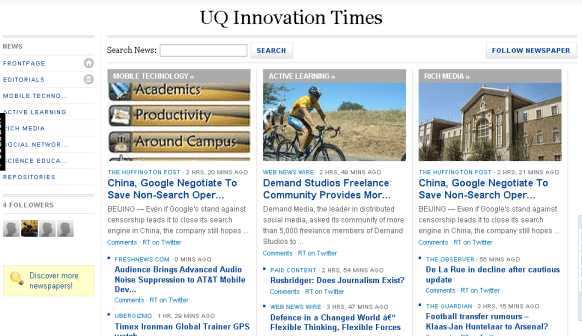
NewsCred lets you launch an online newspaper in minutes. Cool!  Read more about this from Louis Gray.

Here’s an example from UQ Innovation Times.  Nice :-).

Google Earth across the Curriculum

Many teachers hear “Google Earth” and think it’s only something that social studies or geography teachers can use.

But, in fact Google Earth can be used across the curriculum. Thanks to Richard Byrne, Free Technology 4Teachers, for creating and sharing this document!

Watch out for the next instalment – Richard is working further on this. Follow Richard on Twitter to hear his alerts or add his blog to your RSS reader.

UPDATE: An alert on Facebook from Stephen Heppell pointed me to Google Earth Lessons. Thanks Stephen!

Not just Twitter and Facebook ~ it’s a Poken!

Get the pokenPulse combination Poken device and USB Flash drive. Click for details.As John explains in his post on Integrating Social Media and Reality, we live in two separate, parallel worlds, with one foot in each. There’s the online world of text, email, online shopping, Internet search, Twitter, Facebook and LinkedIn. Then there’s the real world of food, shelter, family, friends, and work. The two intersect, but they’re not tied together in any robust way. Well, at least until now.

Enter Poken! a device you might keep on a lanyard around your neck or clipped to your jacket, backpack, or bag. Need to exchange information or keep up-to-date with a colleague? If you both have a Poken you can touch the hands of the Poken together and they’ll sense each other’s presence. After a wireless exchange of links, both hands will pulsate with a green glow to announce the successful transfer of information. The magic happens when the Poken is connected online to your personalized online portal.

Way better than a business card ~ amazing social networking! Is this new? Or have I been living under a rock?

Vodpod videos no longer available.

more about “Poken Explained on Vimeo“, posted with vodpod

It’s a picnic ~ being creative!

New Year ~ summer break ~ welcome to another year of change.  Some people will bury their heads, while others will hear the sounds of rustling and go and investigate 🙂
For me – it’s definitely a chance to catch up – and twitter tells the same story; @jokay is working on Aion prettiness. @betchaboy is dancing a wordpress tango (fill out his survey to help him); @Kim Cofino has made the big move to her own hosted domain.

A bunch of us started our photo journey through 2010 ~ for me a Year in Photos was born. I’ve placed an image link to it in my blog’s sidebar.

I’ve added Books I’m Reading to my blog as well ~  a link to my  professional reading from now on.  I always meant to do this..so along with my photo journey memories, this will keep tabs on the great things I read to inspire my professional work ( I’m also pleased to see that when Library Thing is down for scheduled maintenance I don’t get scrambled rubbish in the sidebar! Terrific).

And once again I was amazed at how much we do online. Being creative really is a picnic these days!! Don’t believe me? Check out how easy it is to play with images with Flickr and Picnic.

If you haven’t used it yet, Picnik is photo editing awesomeness, online, in your browser. It’s the easiest way on the Web to fix underexposed photos, remove red-eye, or apply effects to my photos.  The incredibly handy Firefox extension Picnic Tool not only adds an ‘Edit in Picnik’ option to my right-click menu, it even lets me screen capture an entire website and edit it right in Picnik.  I enjoy tools like this as I am no Photoshop expert!

Don’t forget Kwout either – I used it to make a new image link to Second Classroom for my blog’s sidebar, sending it straight to  Flickr from Kwout ready to embed. Too easy!

Welcome to my new banner!  Might make a new one tomorrow 🙂

Real and imagined ~ are the same!

Each school, each leadership team, each school library team and each teacher needs to learn how to restructure the core business of schooling in order to embrace learning in our changing online world.

We say this often and slowly the ship of state is turning ~ but fast enough for our students?

I came across two things today which brought a smile to my face. What we imagine is possible ~ is real these days!

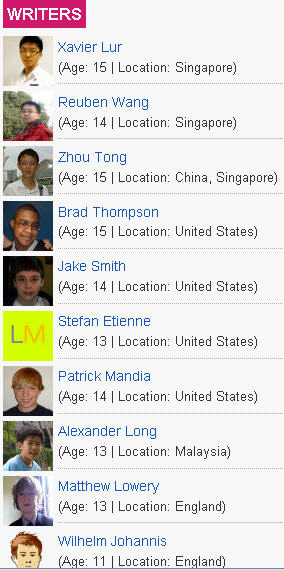
Take a look at TechXav –  seems to be as professional a website as any you might come across….. by 11-15 year old students?

TechXav is a technology blog written by a group of young and zealous teens, ranging from the age of 11-15.

Wait – they’re even located around the world!!

Right – and imagine what they think of being shown a powerpoint! or opening a text book!

I also read a post by Will Richardson about phones and about the disruption they are already creating for most schools (high schools at least) and about the huge brain shift we’re going to have to through collectively to capture the potential for learning in our kids’ pockets. I love the video he shared as well!

Yes, we’re facing a huge challenge ~ much bigger than just the roll-out of laptops in our schools in NSW. It’s a fundamental, seismic shift that likely will swallow some education institutions.

So this little promo video shared by Will also bought a smile to my face.

Videos on paper – the next thing!

Extraordinary!

The report at BBC news Video Appears in Paper Magazines tells me that the  first-ever video advertisement will be published in a traditional paper magazine in September.

The video-in-print ads will appear in select copies of the US show business title Entertainment Weekly. The slim-line screens – around the size of a mobile phone display – also have rechargeable batteries.

The chip technology used to store the video – described as similar to that used in singing greeting cards – is activated when the page is turned. Each chip can hold up to 40 minutes of video.

Embedded videos in books next perhaps? Imagine Skeleton Creek by Patrick Carman – how much easier to read that new combined format without having to jump onto Youtube.  A whole new picturebook format could emerge too!

I like that I read about all this on the same day that I discovered that TED.com released its 500th TEDTalk.

There’s a kind of synergy in that for me.

Teaching Naked – without Powerpoint

My friend and colleague Gary @chemedlinks, chemistry teacher and learning technology evangelist, pointed me to a fabulous article in the Chronicle of Higher Education: ‘Teach Naked’ – When Computers Leave Classrooms, so does Boredom.

This is a fabulous read.

Gary will be presenting a Keynote at the ASLA NSW PD day this coming Saturday, on the topic of “Pedagogical Powerpoint”.  His message is really the same at Mr Bowen -Gary urges us to add pedagogical value to your classes if you are using Powerpoint.  The idea is that we  should challenge thinking, inspire creativity, and stir up discussion with a Powerpoint presentation – not present a series of dry facts.  Of added value is Gary’s work on hunting down research papers that shed light onto the whole notion of how to use Powerpoint well.

There is so much that we can get involved in if we want to in schools – whether it’s podcasting or ‘powerpointing’ – its about driving deep learning through deep investigation and discussion.

Meanwhile, enjoy reading the article, and perhaps take it to your next staff meeting as a discussion starter.

More than any thing else, Mr. Bowen wants to discourage professors from using PowerPoint, because they often lean on the slide-display program as a crutch rather using it as a creative tool. Class time should be reserved for discussion, he contends, especially now that students can download lectures online and find libraries of information on the Web.