I’m not to sure if I have a need for this, but VozMe beta is a bit of fun. I dropped a bit of “Library and Web2.0” text into VozMe text box – it converted the text to an mp3 audio file, which I could then download, and add to this post.
You might think of a use for this.
What I found fun was that I could just drop some text in and create this . I don’t know how long the text can be either. Also, the audio output is not a good as Voki ….. which, last I looked, I couldn’t embed on WordPress!
The day will come when all of these tools will be more fluent in application. Just keep watching the developments and keep testing the beta tools.
Earlier this week, our network of teacher librarians were able to spend the day with one of Australia’s leading school library practitioners. Fabulous Suzette Boyd from Scotch College has been an inspiration to many of us during our careers, keeping us grounded on quality services, imaginative enterprises, exciting initiatives, and most important of all – customer focused!
Yes, the kids are what it is all about, and Suzette certainly knows how to manage a school library to achieve the best.
As Victor explained
Suzette was indeed different. I would have liked to have spent an entire day listening to her recount many of the things which she has tried over the years – her ideas are innovative, creative and above all real-world.
During the course of our day we looked at Suzette’s key points:
building connections and trust with students
communicating with and enlisting the support of all users
being positive, upbeat and enthusiastic
marketing and promoting the library through an extraordinary array of ideas and activities
influencing the Principal
becoming the cultural and educational hub of the school.
The best news of all is that Suzette’s inspiration is no longer a secret. She is sharing her vision with us all through her book The Connected Library: A handbook for engaging users.
John Marsden says
The Connected Library is a flight manual for librarians
Slim enough to be manageable in these days of information overload, I found this book affirmed many of my current practices but more importantly inspired me to reach a bit further. There are first all those things I always meant to do but didn’t quite get to and then the more difficult area of taking a few risks. I think what is obvious or correct or a risk will vary from one library to another, but Suzette’s book is an excellent place to find your next project.
In recent times librarians in schools have come to be considered technology experts, curriculum leaders, literature gurus, web masters and providers of on-line information and professional development. They are also expected to be human dynamos, with energy to burn, to have a huge capacity to absorb new information, to have the imagination to deliver exciting new programs, whilst at the same time having the ability to maintain an efficient and relevant library service.
Suzette Boyd believes this is probably still not enough and that the level of engagement with users is the real measure of success!
This book is good reading and very manageable. Go on, order it today, or borrow a copy. Your local public library will probably buy it if you ask.
Wetpaint wikis have now added fully integrated discussion forums into their wikis – which is already a wonderful wiki product!
Michael Arrington in a post at Techcrunch explains that they’ve put a lot of thought into the feature set around these message boards. Posts can be tagged, the view expanded/contracted, there are email notifications of new messages, and the search feature works well. Amazingly, any forum thread can also be turned into a wiki with a couple of clicks.
While the debate continues as to which wiki will now have the share of the Web 2.0 market, when it comes to education use of wikis – this has to put Wetpaint at the front of the pack.
Read the next post to make sure you grab the wiki loaded with benefits for education, or retro-engineer your current wiki to take advantage of the new offer.
Thanks to a Twitter alert from Jeff Utecht and his recent post over at Thinking Stick, I am thrilled to discover that WetPaint wikis go ad-free for education.
Wow – this is great news!
Wetpaint is by far my most favourite wiki software, but I have not promoted it because of the problem of advertising. Now I believe that Wetpaint should be the ‘wiki of choice’ for school staff – it has a great interface, is easy to use, and has all the features you need to make wikis a part of everyday learning online.
To find out more about qualifying to get ads removed and find great tips for creating education wikis, visit: www.wetpaint.com/education. Then follow the instructions to apply for your ad-free wiki.
She’s included heaps of information and ideas – no excuse now for not understanding Twitter. Even if you don’t use Twitter, you have to stop and take notice of Twitter – because it’s where lots of good educators are sharing – ripping through the global information repository and picking the best just for you and me!
I get the chance to do many exciting things within my work – and each year brings exciting new challenges. Last year it was Web 2.0. This year it is virtual learning!
Some of our teachers have been involved in the NSW Learnscope project. This has been a great inspiration, and exciting because it has opened new doors and new opportunities. Melinda and Dean regularly write about the project. The Learnscope eLearning2007 conference was held 1/2 November in Sydney, and some 35 teams have taken a journey into using Web2.0 and Virtual Learning – each with it’s own focus. The details of the teams and their projects are available on the Wiki.
Dean wrote some great comments about this event and what he’s learned this year. He seriously challenges our ideas about Web 2.0, because he has challenged his own.
Has it worked – hell yeah. The students achieve more in less time and the quality of the work is excellent – they love a challenge and rise to it again and again. Will I go back? No.
Dean and I have taken up a small residence each in Jokaydia (an Australian education island managed by Jo Kay), so as to fast-track our knowledge of learning possibilities in SecondLife. This is hard going right now, as we are working late at night meeting with educators from Australia and around the world – all committed to moving learning into the 21st century – as the kids understand it!
If you’d like to explore Jokaydia with its the education facilities, then drop in via my place at Heyjude Hall. Thanks to Dean for the design of the sign!
I haven’t got anything ‘happening’ yet, but membership of Jokaydia means I can learn, share, and use the facilities on the island, as well as provide information at my own residence. Dean will also be putting up a great showcase of teaching ideas from his classroom at his residence.
Most importantly, Dean will be linking from those ideas directly into Skoolaborate and the superb initiatives underway there. Skoolaborate is a serious education initiative taking place in the Teen Grid, and which will (I believe) show us the real 21st century learning futures of our kids! All thanks to our own Sydney master of innovation, Westley Field. Good one!
I’ve added a few videos about Second Life. The last one, Seriously Engaging from New Media Consortium, was first seen by me ‘in world’ during the eLearning07 conference, after being taken on a tour of the fantastic virtual NMC facilities by that famous dog CDB Barkely, whom I wrote about recently.
Introduction to Second Life
Educational Uses of Second Life
History of Global Kids in Teen Second Life
National Media Consortia Campus: Seriously Engaging
This is old now (in a Web 2.0 world 6 months is old!) but this video about the The Transformation Lab, funded by The Danish National Library Authority and Bill & Melinda Gates Foundation (and The Main Library in Aarhus), is well worth watching to provoke discussion about future ideas and options for libraries.
Comments added to the YouTube video:
“There will be books in the physical library of the future – but I think they will be connected to digital material. In this way they can be enriched with relevant digital information that will be exposed, when the book gets near a mobile phone, interactive table or an info coloumn as in the video”.
“In another project at the Main Library in Aarhus – The Children’s Interactive Library – they made som prototypes showing how books can be tagged with digital information using RFID-chips”.
“One of the prototypes was a Bib Phone – A “phone” that allows you to talk to books and hear what other people have told them! This is a new, funny and different way of reviewing, commenting or even hiding secret messages in books. The messages are inherited in the particular book allowing the next person access to hear it”.
“Actually there were books in the labs. One of the ideas was to bring various types of media in closer contact with each other – combining words, images and sound – increases the user’s qualitative experience of the media. The Literature Lab presented successive literary topics. In connection with each topic – such as poetry — all types of media related to the topic were brought together and combined to increase the user’s qualitative experience and sense of coherence in the library”.
You’ve got to love the pace of change…now it’s OpenSocial!
For those of you who don’t eat, breathe, and sleep web standards, OpenSocial is a new open web API being spearheaded by Google. OpenSocial applications will be able to run easily and reliably inside social networks, and be able to be tailored by the user to create personalisation of their social space.
Now Ning has released OpenSocial across their now 115,000 social networks. This means that you can enable OpenSocial“Apps” or “Gadgets” on your social network on Ning today!
So if you are a Network creator, you have the choice to add OpenSocial Gadgets to your network- it is entirely optional. If you don’t choose the OpenSocial Gadget option from the Features page, then your members will not have the option to add OpenSocialOpenSocial Gadgets to their profile page. It’s up to you. If you do decide to enable Gadgets on your network, your members can add any OpenSocial Gadget of their choice to their member profile page.
Keep up to date with ongoing Ning changes and developments at the Ning Blog.
I think there is a rumbling in the firmament again! Facebook – hang on!
Here’s a quick screencast which describes how to get started with OpenSocial Gadgets on your social network right now.
At last, personal computing is becoming portable ….
and I don’t mean the hand-held palm mobile variety. I’ve been waiting to here about the release of the ASUS Eee PC $US399 with a compact and highly-readable seven-inch display. Running on a customized Linux operating system, it is said to respond far more speedily than its Windows counterparts, but it’ll run Windows XP quite happily, if you like.
The EeePC offers two types of intuitive interface, to let you choose how you want to use it. Using either the “Easy” or full desktop mode, you can use the built-in WLAN connectivity to communicate on the run, share photos from your trip before you get home, or do almost anything else online. Flash storage keeps the weight low – without a hard drive, this micro-monster weighs in at 0.89 kilograms ! In a few weeks Asus will release the $US499 version that has more ram and an 8g drive
With the 40 included applications, onboard webcam, high-speed internet capability, and exquisite sound, the EeePC finally heralds a shift in the way we can use small computing to work big!!
I can’t wait till the day comes when I no longer have to lug a normal laptop computer around! This seems like a perfect tool for students and others ‘on the go’ – the tool to use when you are not at your desk! This is a good addition to the small range introduced by the One Laptop per Child program.
A write-up of the new features of Tumblr 3.0 at Read/Write web explains that it includes over 400 new features, fixes, and improvements. Beyond fixes, the features seem to cluster around four important themes for this release:

 I’m not to sure if I have a need for this, but VozMe beta is a bit of fun. I dropped a bit of “Library and Web2.0” text into VozMe text box – it converted the text to an mp3 audio file, which I could then download, and add to this post.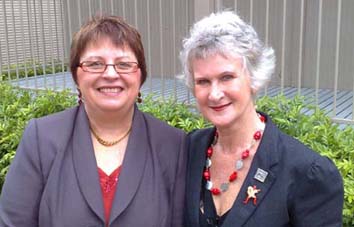
 In recent times librarians in schools have come to be considered technology experts, curriculum leaders, literature gurus, web masters and providers of on-line information and professional development. They are also expected to be human dynamos, with energy to burn, to have a huge capacity to absorb new information, to have the imagination to deliver exciting new programs, whilst at the same time having the ability to maintain an efficient and relevant library service.
 Wetpaint


 For those of you who don’t eat, breathe, and sleep web standards, OpenSocial is a new open web API being spearheaded by Google. OpenSocial applications will be able to run easily and reliably inside social networks, and be able to be tailored by the user to create personalisation of their social space.
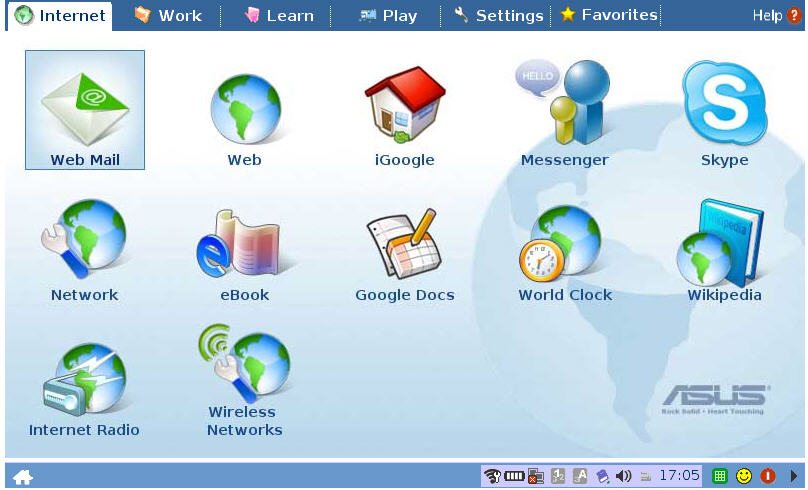
 Looking good!
  judyoconnell.com