Podcasting in plain English
2

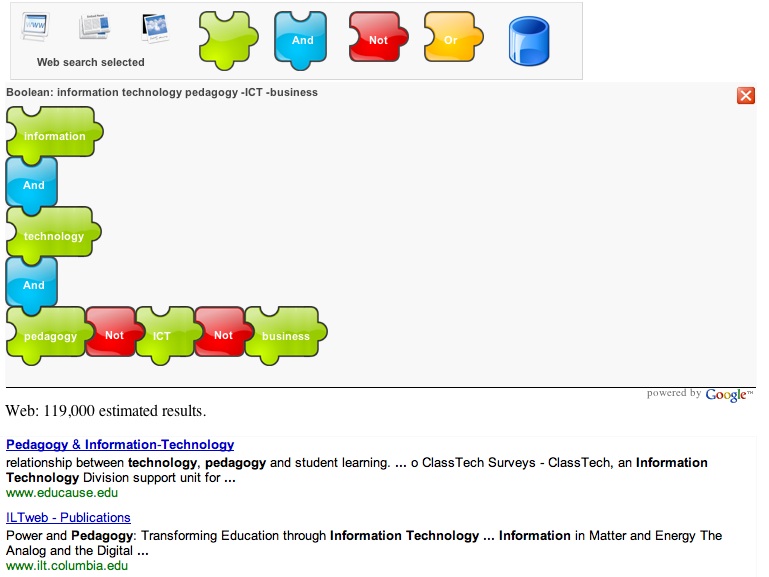
At last, an opportunity to show kids the impact of boolean searching in a very visual way with this excellent tool from Boolify. Build your search query like a jigsaw puzzle, and see the impact of varying your search strategy.
Here’s a very interesting way to demonstrate the way boolean searching works, particularly for younger students. Cleverly via Miguel Guhlin.
Stephen Downes says:
… I think that this sort of approach to creating queries could be extended a lot – my first thought was that it could function as a generic sentence constructor, which in turn would be really usefuil for language learning and logic. There are also curriculum resources.
 Logged into Facebook after coming home from the movies, to discover that my Facebook had acquired a Chat function.
Yet another thing to think about and integrate into my online communications and organisational tools.
Actually, I use Facebook quite a bit one way or another – not for the silly game things, but more as a way of quickly staying in touch, and organising meetings, events etc. Using standard email just doesn’t seem to ‘cut it’ for everything anymore.
Let’s see how it all pans out.
Facebook says:
We’ll be rolling this out slowly going forward, but fairly soon you’ll notice our new Chat bar at the bottom of your browser—no installation or assembly required. From this bar you can view your list of online friends and open conversations with any or all of them. There’s no need to setup a “buddy list.” Unlike the Wall or Inbox, the messages are delivered and displayed to your friend as soon as they’re sent, so you should expect a response right away and without any page loading.
We’re working on pulling other features of the site into the real- time Chat world. Your notifications will now arrive in the Chat bar, and while chatting you’ll see your friend’s Mini-Feed activity thrown into the conversation, as it occurs.
Chat is by no means a new concept, as instant messaging systems have been around for over a decade. But just as other features on Facebook have allowed friends to communicate more efficiently than before, we hope Facebook Chat will make it easier to connect instantly
So I’m looking forward to my first chat 🙂 with this new tool.
It’s a chance for jokaydia Community members and friends to get together to share and support each other…. and of course have some fun!
Come for a newbie tour!
Find out about the Virtual Classroom project, featuring the project’s first Educator-in-Residence, Leigh Blackall (SL: Leroy Goalpost) working with Konrad Glogowski (SL: Konrad March) , who is inviting individual educators like Leigh to design and build their ideal learning space for use as either a virtual classroom in Second Life or as a prototype for a real-life classroom.
Join us for a social event and announcement of the winning entries in the Annual Jokaydia photo competition.
…..and lots more!
For full details, check out April Events on the Islands of Jokaydia. Looking forward to seeing lots of my friends there – and to making new ones too!

Nice!
From Paul Anderson of Intelligent Content Ltd comes the announcement of the latest JISC report. Understanding metadata – the possibilities, purposes, and functioning in a Library 2.0 world, or even the information architecture world of any online information source, is crucial. If you want to keep up-to-date, or find out what this ‘metadata’ talk is all about, then now is as good a time as any to grab a coffee and start reading.
Paul Anderson says:
The Web is having a profound impact on the role and function of libraries. This goes way beyond ‘the demise of the book’, which is, quite frankly, a very simplistic way of looking at things. It’s actually more about having a vision for the future and how you realise that v
ision. For example, one of the problems facing librarians is how to create high quality ‘digital objects’, as they are called. If you think about a book, you might judge its quality in terms of the jacket design or the type of paper used or whether or not you can see guillotine marks on the edge of the pages. You probably wouldn’t think about some of the very obvious quality factors unless they were missing. If you opened a book and, say, the pictures were missing or all the pages were in the wrong order, you’d probably want your money back.
The problem for librarians is that when you are creating things like e-books, you have to think about a different set of ‘quality’ criteria because these digital objects will not be used in the same way that physical books are. They will need to designed so that they can be searched, for example, or delivered as separate pages. For the average library user, accessing information that spans multiple digital sources is increasingly a messy process and for those who are used to search tools such as Google and Yahoo this new and highly fluid environment can be a considerable barrier to accessing information from digital libraries and online collections. What is concerning about this is, unless we are careful, people will increasingly see the search results thrown up by Google, Yahoo etc. as the be-all and end-all of a particular area of interest or subject.
 Bling For Your Blog – a wow resource!
I just have to share this fabulous resource (better late than never) put together by another great New Zealand teacher from “across the ditch”.
Allanah shared this link in Twitter – so I found out about it!
If you need step by step instructions about how to set up and manage your blog at Blogger – then this is the ‘instruction manual’ for you!!
Allanah is a NZ primary school teacher taking a year’s leave to be ICT facilitator in Tasman. Add her blog Life is not a Race to be Finished to your RSS feeds and learn heaps about technology integration from a super Web 2.0 teacher.
 Web 2.0 technologies have been seen by many information professionals as critical to the future development of library services. This has led to the use of the term Library 2.0 to denote the kind of service that is envisaged. There has been considerable debate about what Library 2.0 might encompass, but, in the context of information literacy, it can be described as the application of interactive, collaborative, and multimedia technologies to web-based library services and collections.
These developments challenge librarians involved in information literacy with more complex and diverse web content, a range of exciting new tools with which to teach, and a steep learning curve to adjust to the constant change of the Web 2.0 world.
Of course my passion in this scenario is trying to understand what this all means for schools and school libraries.
 So in case you haven’t heard Facet have recently published a new book, to which I contributed the School Library 2.0 chapter!
Godwin, P. and Parker, J. (eds) (2008) Information Literacy meets Library 2.0. London: Facet. ISBN 978-1-85604-637-4.
I have my own copy now, and the various chapters are jam packed with fantastic information for anyone involved in Library Services. It’s a fantastic roundup and the editors Peter Godwin and Jo Parker are to be congratulated on this excellent compilation.
“This edited collection from an international team of experts provides a practically-based overview of emerging Library 2.0 tools and technologies for information literacy practitioners; addresses the impact of the adoption of these technologies on information literacy teaching; provides case study exemplars for practitioners to help inform their practice; and examines the implications of Library 2.0 for the training of information literacy professionals.
Key topics include:
It’s available from the Facet book shop and all good retailers.
Better still, the book is being updated via the Information Literacy meets Library 2.0 blog.
Buy the book and grab the RSS feed to stay in the conversation.
Thanks to Jo Parker and Peter Godwin for all the work they put into getting the book together
I’m currently on school holidays which means time to do fun things online as well as offline – in between ongoing commitments to school or my professional associations.
Watching twitter, I saw this post from Amy,
a librarian tweet friend, writing about funky Art Toy USB flash drives.

Mimobot Art – Leading the creative revolution in personal electronic accessories and functional designer toys, These toy USB Flash Drives are little friendly data fiends available in 512MB up to 4GB capacities, that hold all your essential data (tunes, pics, etc.). They come preloaded with removable bonus content like games, music, and animations!
Well off I went, and checked it out!
Yes, my fun holiday purchase coming right up! Couldn’t get the Star Wars ones that I wanted, so settled for Owlbert – ’cause, well, I am a librarian (as well as a teacher geek).
Check the video – very cute! Hope FedEx is fast 🙂
Have always loved using Flickr, and loved when they added picnik image editing. Now I love that they are going to let us have ‘long photos’ – snippets from our visual lives (rather than whole videos or indeterminate length).
From the Flickr blog:
The rumours are true and “soon” is now. We’re thrilled to introduce video on Flickr. If you’re a pro member, you can now share videos of up to 90 glorious seconds in your photostream.
Here’s a cute example to demonstrate.
Vodpod videos no longer available. from heyjude.vodpod.com posted with vodpod
Fantastic!
 I’m way behind in reading my RSS feeds – which makes me very glad that RSS actually exists! Imagine if I still had to save all the magazines, books, journals, and newspapers to read when I had time …. like we did in the old days.
Actually, I have to get smarter about ways to keep up with my reading 🙂
Why? because no matter what they say, we are still enjoy reading for relaxation, reading for information, reading for knowledge, reading for…well, lots of things.
I’ve always kept an eye on the various electronic readers that are around, like the Amazon Kindle, but have never actually gotten into reading with those gadgets. I like my books and journals and magazines. But I also like my technology!
One of my favourite pieces of small technology is my mobile phone. You know how it is! Communicate, track events, take pictures, even manage your online connections. I don’t moblog, or sent images or videos online just because that costs ‘big bickies’ here in Australia. I do treat myself to a “tweet” or two (write a post on Twitter), and weather or sport updates. My other favorite piece of small technology is my iPod. This is great for music, podcasts, even videos.
BUT my totally constant companion is my mobile phone. Don’t always have my iPod handy. So thanks to a post at aRKive, I’ve discovered a cool new application for my mobile from BooksInMyPhone.
Now I can have Classic books to read on my mobile phone. Convenient (sort of), with hundreds of titles to choose from. Now I can an ebook with me all the time!!
Granted my mobile screen is tiny – but I can increase the font size to make it more readable. The thing is (like all technology improvements) the screens on our phones are getting bigger as on the iPhone. I’m happy with my newly acquired ebooks – so many times I have been caught out with time to kill and wished I had something to read. Now I have! My mobile now has some Twain, Checkov, Elliot, Tolstoy and Shakespeare on hand – just for fun!
Studying classic books at school? Well, perhaps we should get students to grab a copy to their mobile – maybe the different medium will appeal to them.
Somehow this fits with the success of books being published to mobile phones – a trend so popular in Japan.
….. it is Rin’s rather less challenging Moshimo Kimiga (If You …), a 142-page hardback book about a high-school romance, that has caused the bigger fuss.
“I typed it all on my mobile phone,” Rin explains matter-of-factly over the same device. “I started writing novels on my mobile when I was in junior high school and I got really quick with my thumbs, so after a while it didn’t take so long. I never planned to be a novelist, if that’s what you’d call me, so I’m still quite shocked at how successful it’s turned out.”
So successful that one volume of her book, which began its life in a series of instalments uploaded to an internet site and sent out to the phones of thousands of young subscribers, has sold more than 420,000 copies since it was converted into hardcopy format in January.
In just a few years, mobile phone novels – or keitai shousetsu – have become a publishing phenomenon in Japan, turning middle-of-the-road publishing houses into major concerns and making their authors a small fortune in the process.

 judyoconnell.com