
Created by Online Education
A Day in the Internet ~ roughly speaking
4
Created by Online Education

Created by Online Education
 Each school, each leadership team, each school library team and each teacher needs to learn how to restructure the core business of schooling in order to embrace learning in our changing online world.
We say this often and slowly the ship of state is turning ~ but fast enough for our students?
I came across two things today which brought a smile to my face. What we imagine is possible ~ is real these days!
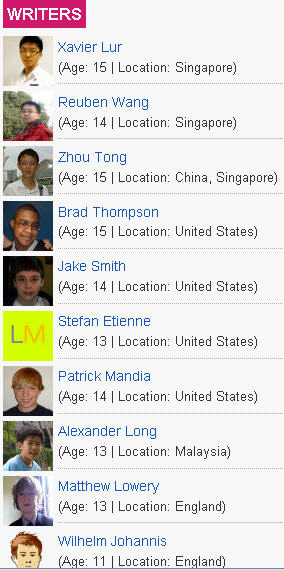
Take a look at TechXav – seems to be as professional a website as any you might come across….. by 11-15 year old students?
TechXav is a technology blog written by a group of young and zealous teens, ranging from the age of 11-15.
Wait – they’re even located around the world!!
Right – and imagine what they think of being shown a powerpoint! or opening a text book!
I also read a post by Will Richardson about phones and about the disruption they are already creating for most schools (high schools at least) and about the huge brain shift we’re going to have to through collectively to capture the potential for learning in our kids’ pockets. I love the video he shared as well!
Yes, we’re facing a huge challenge ~ much bigger than just the roll-out of laptops in our schools in NSW. It’s a fundamental, seismic shift that likely will swallow some education institutions.
So this little promo video shared by Will also bought a smile to my face.
I’m sure there’s a bigger list somewhere ~ but it’s handy to have this Scrib document from James Greenwood. Perhaps you have another source to share?
Mobile visual search signals a very interesting shift in product marketing. Perhaps this is also a introducing a significant shift in information search for students too?
Right now we can ask: What is the object? Where can I get it? What it is useful for? What do others say about it? Does it help me understand (something I’m learning about ) a little better?
In the future?
Vodpod videos no longer available.
 Extraordinary!
The report at BBC news Video Appears in Paper Magazines tells me that the first-ever video advertisement will be published in a traditional paper magazine in September.
The video-in-print ads will appear in select copies of the US show business title Entertainment Weekly. The slim-line screens – around the size of a mobile phone display – also have rechargeable batteries.
The chip technology used to store the video – described as similar to that used in singing  greeting cards – is activated when the page is turned. Each chip can hold up to 40 minutes of video.
Embedded videos in books next perhaps? Imagine Skeleton Creek by Patrick Carman – how much easier to read that new combined format without having to jump onto Youtube. A whole new picturebook format could emerge too!
I like that I read about all this on the same day that I discovered that TED.com released its 500th TEDTalk.
There’s a kind of synergy in that for me.
My friend and colleague Gary @chemedlinks, chemistry teacher and learning technology evangelist, pointed me to a fabulous article in the Chronicle of Higher Education: ‘Teach Naked’ – When Computers Leave Classrooms, so does Boredom.
This is a fabulous read.
Gary will be presenting a Keynote at the ASLA NSW PD day this coming Saturday, on the topic of “Pedagogical Powerpoint”. His message is really the same at Mr Bowen -Gary urges us to add pedagogical value to your classes if you are using Powerpoint. The idea is that we should challenge thinking, inspire creativity, and stir up discussion with a Powerpoint presentation – not present a series of dry facts. Of added value is Gary’s work on hunting down research papers that shed light onto the whole notion of how to use Powerpoint well.
There is so much that we can get involved in if we want to in schools – whether it’s podcasting or ‘powerpointing’ – its about driving deep learning through deep investigation and discussion.
Meanwhile, enjoy reading the article, and perhaps take it to your next staff meeting as a discussion starter.
More than any thing else, Mr. Bowen wants to discourage professors from using PowerPoint, because they often lean on the slide-display program as a crutch rather using it as a creative tool. Class time should be reserved for discussion, he contends, especially now that students can download lectures online and find libraries of information on the Web.
 I encourage you to read this report from the MacArthur foundation, published by MIT Press The Future of Learning Institutions in a Digital Age (.pdf).
The project began as a draft document posted on a collaborative Web site developed by the Institute for the Future of the Book (http://www.futureofthebook.org) in January of 2007. The draft remained on the Institute’s site for over a year (and still remains there) inviting comments by anyone registered to the site. This recent Report is a redaction of the argument in what is a book-in-progress, currently titled The Future of Thinking: Learning Institutions in a Digital Age, which is to be published in 2010, after the culmination of extensive research and collaboration face to face and virtually.
Quotes that attracted my attention which have immediate relevance to our planning in schools – both formal and informal:
Since the current generation of student has no memory of the historical moment before the advent of the Internet, we are suggesting that participatory learning as a practice is no longer exotic or new but a commonplace way of socializing and learning.
This puts education and educators in the position of bringing up the rearguard, of holding desperately to the fragments of an educational system which, in its form, content, and assessments, is deeply rooted in an antiquated mode of learning.
Most fundamental to such a change is the understanding that participatory learning is about a process and not always a final product.
According to the report, there are ten principles which are foundational to rethinking the future of learning institutions.
Some wonderful reading and professional discussion could ensue if you can get your school’s leadership team to consider these ten Pillars of Institutional Pedagogy.

I am particularly interested in the focus on virtual learning. For example, Quest to Learn: New York, is scheduled to open in the fall of 2009. Quest to Learn, a school using game-inspired methods to teach traditional and multimedia literacies, is a joint venture between the Transformative Media at Parsons The New School for Design in collaboration with the nonprofit organization New Visions for Public Schools (See http://www.q2l.org/).
I know that while it is difficult for schools and education authorities to fast-track their thinking and to be strategic in changing cultures and educational practices, this report, and the book that will follow should provide an opportunity to mandate future developments.
Last term some of our students were working on movie trailers with a colleague. A perfect opportunity to introduce ideas about open source, creative commons, or royalty free image and music for use by schools. There are a number of strategies that teachers should be familiar with – time to make a nice list!
 I was pleased to get a ‘heads up’ from Barry Starlin about Soundzabound. Just in time for our next batch of movie work.
Here’s what the site tells us:
Soundzabound Royalty Free Music supersedes Fair Use in that we fully license the music with unlimited rights for education and sign off that you are protected. Fair Use has limitations in use and states the you are liable should there be a claim. Soundzabound also provides the solutions for:
What this tells me is that it is safe to let students jump onto the site and grab what they need to enliven their productions. Soundzabound shows how their sites works, and the multitude of contexts that sound bites can be used in.
This is where the site comes into its own. The movie trailers our students made could not be put onto the web safely – fair use didn’t cover publication of the end products on Youtube. Had the students used files from Soundzaboud we could have shared their magical creations.
My next move, when the school term starts, is to make available a school list of resources for such productions. Should have done it ages ago – but the time is now right.
Here are some sources I have already collected. There will be others I know, so if you have a favourite site, list or collection, and have time please let me know.
 My – how times have changed! When I began to write this blog connecting online was a new thing, and it was all about creating a social focus for information exchange.
Now I connect and reconnect, share, distribute, collect, throw away – live and breath online to empower my day to day work, and enliven my friendships and opportunities for professional learning. The speed around this has also changed – as has the fluidity of daily interactions.
Take this blog – I don’t have to write nearly as much as I used to – even though there is more to write about! Why? Well, I don’t have to write paragraphs to share – that was blogging of a couple of years ago – I TWEET to share!! I DELICIOUS to share!! I FACEBOOK to share!! I VODPOD to share!! All this is fast, effective, and what’s more, it’s easy.
As I read my RSS feeds in my favourite reader Feedly, I can quickly tweet anything I come across that I know will interest others, and will often send the same information to my Delicious account, and off to Facebook as well. Similar thing happens when I add a video to my Vodpod collection, only the places I can distribute information at a click are even more extensive. Admittedly,it could get pretty crowded out there online as more and more people move to this style of thinking and connecting …so let’s see how the next couple of years go with these tools.
We all have our own favourite ways of navigating our online spaces and sharing information – the great thing about it all is the flexibility and speed of this information gathering and distribution. The downside is that there is a LOT out there!!

A really nice tool that fits into this new mode of skimming is the Article Skimmer by The New York Times, recently highlighted at Free Technology for Teachers.
The New York Times has tons of great content everyday, but trying to sort through even a portion of it can be very time consuming. The New York Times now has a new way for readers to browse its content. The New York Times Article Skimmer is a grid of headlines and article stubs that enables you to quickly skim many articles from your choice of sixteen article categories.
It’s a lovely interface. Perfect for keeping up with the latest information, and reading it right within the skimmer interface. This is a great tool to introduce to senior students who need to keep informed of the latest developments in areas such as business, technology and world events. In terms of tracking (understanding) reader interests, it is interesting to be able to view the ‘most emailed’ articles. Another feature of the skimmer is the option for personal customization of how you access the articles. Loads of schemes and lots of different ways to view the content.

All this connecting needs words, words and more words. I really enjoyed finding out about Save the Words, and viewing the astonishing collection of words that are falling out of favour. From Oxford Dictionaries, we are encouraged to introduce a new word a day into our vocabulary. I spotted a great word to adopt – my friends often tell me I should obacerate myself!
obacerate, v, 1656 -1658. to stop one’s mouth. “”When Kermit saw the huge swarm of flies, he did not say a word, but simply obacerated himself.
 I am delighted to be in Cairns at a full day workshop organised by the Catholic Education office for the schools in this area. “Contemporary School Library Design” – the whole day is designed to help schools look at their school libraries and to build or renovate school libraries that meet the needs of 21st century learners.
The first session of the day to set the scene was provided by Kevin Hennah. Kevin is a wonderful inspiration to many in Australia, using design and marketing ideas to repackage school libraries. Many of our teacher librarians are familiar with his work, and have already made transformations to their libraries – with either a lot of money or on a shoe-string budget.
80% of your loans are generated by 20% of your collection. Yes!! Kevin urges us to weed, weed, weed. Don’t pride yourself on the size of your collection – pride yourself on the quality and presention of your collection. No question, part of Kevin’s focus is to remind us of the hugely relevant focus of reading and literacy that our school libraries MUST retain in the age of digital learning. 
The trick of great ‘merchandising’ is to cater for kids needs. First impressions count! Remember your visit to Boarders? The presentation of so many ‘front facing’ books is essential, as our kids are so image conscious. We must market ourselves. We must entice. So grab the flavour of this conversation and make your transformations. Kevin always talks about “prime real estate” – don’t put a big table in that space, with a tablecloth and some books. Think Borders and think clever.
School libraries have way too much signage. Return shute? make a list of all the things that frustrate you! Make sure you have lots of front facing books – and put them on the ends of your aisles.
Kevin loves the creative use of slat wall. But remember, to be careful what acrylics you buy and where you place these display units. Image Plastics are developing excellent perspex holders.
What we are aiming for – walking into a school library and thinking “wow”!! First impressions are so important! Retail book stores provide a powerful marketing ideas – take the ‘good stuff’ from retail, and package it into 21st century pedagogy. Use the base line of clean design, and a colour palette that allows you to change in the future.
Remember, don’t display your magazines by displaying them in alphabetical order!
My view for the future? I believe we have to renovate to innovate – to make books and digital engagement our prime focus, to sell our passion for learning by ‘marketing’ to each new audience! Clean, creative, gorgeous!
Kevin’s message is to take the flavour of possibilities – and translate them into your own setting. Make an impression – don’t be generic. Think outside the circle of traditional libraries. Be bold – and don’t let your teachers hold you back. Yes, it’s about change, and pedagogical innovation. Love life, love your library, love change!!
 judyoconnell.com