Digital Education Revolution

The Digital Education Revolution: Realising the possibilities, Managing the Realities. ACER and supported by DEEWR. 26 May, Sydney.

What is the digital education revolution? The context of the symposium was presented by Daniel Owen from DEEWAR – aiming for sustainable change in schools. Commonwealth Government objectives are: long term productivity growth; economic growth; and social inclusion. Teachers are at the absolute centre of making this work. Australian Council of Governments is behind this initiative and it is more than just bringing computers to schools, and is intended to be a constructive process. Teachers Advisory group has just been formed, and will be active in broad consultation.

Five key policy elements:

  • National Secondary School Computer Fund -this is being rolled out now.
    • currently targetting schools in need, and supporting schools to make the decisios.
  • Fibre Connections to Schools Initiative
    • getting broadband capability into schools to create rich learning environments
  • Online Curriculum content
    • investing 32 million over two years to access digital content
    • Portals for Parents
    • better ICT “Better Practice Guide” –
  • Professional Development

You can monitor the implementation of the Digital Education Revolution at:

www.digitaleducationrevolution.gov.au

Photo, photo, photo on your mobile phone

Have always loved using Flickr, and loved when they added picnik image editing. Now I love that they are going to let us have ‘long photos’ – snippets from our visual lives (rather than whole videos or indeterminate length).

From the Flickr blog:

The rumours are true and “soon” is now. We’re thrilled to introduce video on Flickr. If you’re a pro member, you can now share videos of up to 90 glorious seconds in your photostream.

Here’s a cute example to demonstrate.

Vodpod videos no longer available. from heyjude.vodpod.com posted with vodpod

Fantastic!

Emerging technologies for learning

Some excellent research and commentary is available from BECTA in the UK in the recent publication

Emerging technologies for learning: volume 3 (2008)

The various chapters explore the ‘net generation’ who can seamlessly move between their real and digital lives; examine the implications for education of the convergence of mobile devices, pervasive wireless connectivity, and internet applications and services; discuss the development of virtual worlds and ‘serious games’ and how we can make best use of these technologies to support better learning; analyse the problem of finding and searching digital content on the web and the limitations of current systems; and considers the potential of some emerging display and interface technologies to improve interaction with computers and facilitate collaborative activities in more natural and intuitive ways.

These are excellently presented too, and make good professional reading handouts for staff discussion.

Digital media and learning

The MacArthur Foundation launched its five-year, $50 million digital media and learning initiative in 2006 to help determine how digital technologies are changing the way young people learn, play, socialize, and participate in civic life.

Just how does growing up with these tools affect young peoples sense of self, how they express themselves, and their ability to learn, exercise judgment and think systematically?

Since then we’ve seen a number of initiatives emerge from this funding.

I like to use the video threebillion fact’n’stats to teachers.

We all crave stats ‘n facts about what is happening; research and information about youth, digital media developments, gaming and more. A new series of publications from MIT Press provides quality content to keep our minds focussed on this field!

Thanks to the generous support of the MacArthur Foundation, open access electronic versions of all the books in this series are available.

Civic Life Online
Digital Youth, Media and Credibility
Digital Youth, Innovation and the Unexpected
The Ecology of Games
Learning Race and Ethnicity
Youth Identity and Digital Media

Photo: World connection in blue

Creative Commons

Thanks to Mark for this very nice presentation on Creative Commons. An excellent discussion starter with students and teachers alike!

Information and knowledge alert!

There is a bit of a thing happening with Campus Editions. First I learnt about Edublogs Campus, a nice new offering…. and then rather belatedly I  heard about Firefox Campus Edition.

The Firefox campus edition comes pre-installed with StumbleUpon (for discovering websites, photos and videos), FoxyTunes (lets you control almost any media player and find lyrics, covers, videos, bios and much more with a click right from your browser) and Zotero (for clipping web notes and to help you collect, manage, and cite your research sources.

Providing this tool will make it imperative for us that students have good information and critical literacy skills to navigate successfully in this environment in order to think deeply, creatively and fairly rather than plagiarising or operating outside a creative commons approach to online media.

It’s marketed as being everything you need for a well-rounded College Life!

According to Mashable

It’s probably fair to say this is a marketing drive to get Firefox installed on student laptops before they head back to school.

I wonder, did anyone actually install this on their student machines? I like to be quite choosy about the Firefox addons I use – some of which are great. I think I would prefer to apply the same approach to customizing student delivered web browsers.

  • Flickr project to host Library of Congress photos

    Here’s a really interesting opportunity for some visual literacy and historical analysis work with your history students!

    Hot update: PhotosNormandi thanks to a quick comment to this post from Patrick Peccatte. This is another stunning collection for history students.

    The Library of Congress and photosharing site Flickr today announced a partnership that will put photos from the LoC’s collection online. These are public-domain, copyright-free photos from the Farm Security Administration/Office of War Information and The George Grantham Bain Collection, for which no known copyright exists. The collections will be housed on the LoC’s Flickr page.

    Interesting project – and they are relying on ‘us’ to provide tags for the images!

    So Flickr has launched a new tagging initiative called The Commons – “your opportunity to contribute to describing the world’s public photo collections.”

    The Commons – our chance to tag or comment on images!

    The photos, which are already available on the Library’s photo and prints page (along with over 1 million others), may not be on Flickr permanently. The length of the pilot program will be determined by the amount of interest and activity shown by Flickr users, according to the LoC.

    Read more at ReadWrite Web, WebWare, Alan Poon’s Blog.

    Photo: Mrs Loew (LOC)
  • Tell the teachers they have to ‘get it’!

    Now that our online newspapers also include social networking tools, it is clearly too late for any teachers to hide in the classroom and pretend that Web 2.0 isn’t here to stay.

    I was thrilled to see a while back that the Australian Herald Sun (widest circulation in Australia) added some tag tools.

    heraldsun.jpg

    Now our own Sydney Morning Herald also shows it’s style!

    smh.jpg

    BUT you’ve got to love The Australian!

    aust.jpg

    So teachers – add some new tricks to your toolkit and get the kids involved with networked media services. Teacher Librarians – it’s also time for you  to make sure that you harness the power of these tools to aggregate useful topical information too 🙂


    Wow! Edit your photos on Flickr

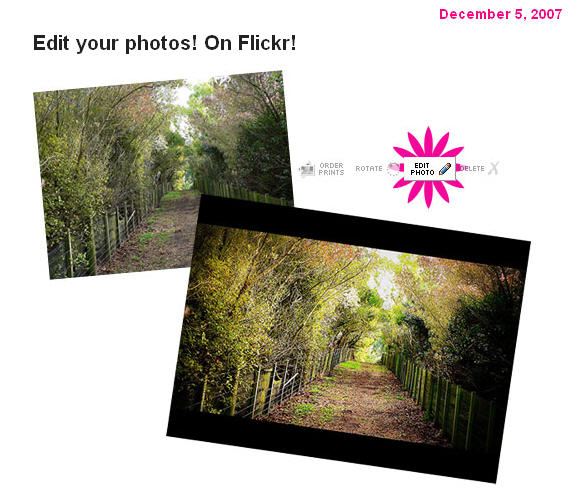
    Picnik’s awesome photo editing tools are now only a click away. If you’ve ever wanted to deal with the dreaded red eye or crop a photo just so, click on the new “edit photo” icon located above one of your photos and get started.

    The Picnik/Flickr collaboration works similarly to other 3rd party services who’ve built additional tools on top of the Flickr API: You’ll need to pass through the step of giving the Picnik service permission to edit and save your photos… It’s a little bit like you’re “installing” Picnik on your Flickr account, but with nothing to download.

    I rather like having access to this – especially when I am not always working on my own computer with my own suite of favourite tools. It’s all about being able to work quickly, efficiently, and ‘on the fly’ whenever and wherever – isn’t it?

    Rock on Web 2.0!

    picknik.jpg

  • Find free images online – my list!

    Images are an important part of the creative side of any teacher’s work.

    We need to make use of good image sources that are good, free, and easy to search through. The trick is to know what sources to recommend to students.

    It’s not just about copyright – its about being practical, and showing students the wonderful world of possibilities beyond Google images or taking anything they find that is not actually in the public domain – a vital point as more students and teachers move into online environments of blogs, wikis and more. Including images with postings enriches the experience for the reader and can also help to illustrate or support the writer’s viewpoint.

    So adapting the Search Engine Journal collection of 10 Places to Find Free Image, here’s a bit of a list of ones I like.

    FlickrCCmy top favourite – and Australian too. This tool searches Creative Commons images from Flickr – no need to use the Flickr advanced search option (though you can do that too). What I love about it is the way it displays a large selection in one view, and the way it randomly chooses a different word to display images each time you visit. That has thrown up some real favourites for me too. FlickrCC lets you edit images right away – though I don’t make use of that function. Flickr itself is free, though you will have to register if you want to upload and edit your own images.

    Catch something really amazing – watch the world in action at FlickrVision! Here you will see the images as they are being uploaded to Flickr – superimposed on a map of the world (classic view) or a rotating globe (3D view).

    Others worth a try:

    1. Bigfoto.com offers pictures from around the world, including America, Asia, Europe, Africa, and Pacific.
    2. Clip Art for foreign/second language instruction. Basic but still valuable.
    3. EveryStockPhoto is a search engine for creative commons photos, located in Vancouver, BC. They aim to be a community for designers, developers, photographers and other media publishers who want better, easier access to license-specific media on the web. This is a single integrated search, allowing users to bookmark their photos with private and public tags, and increasingly we will be offering advanced searching options, rating systems and other tools.
    4. FreeDigitalPhotos.net has over 2000 free images that you can use in commercial and noncommercial work. You are not allowed to sell, redistribute, or claim these images as your own. You can browse by category or search for exactly what you need.
    5. FreeMediaGoo.com has a large collection of images, audio, textures, and other visual mediums that you can use for free with some restrictions. You do not even have to credit the images. The site also features some amazing digital images if you are looking for something different.
    6. FreeFoto.com says it is the largest collection of free photographs on the Internet (link back and attribution required).
    7. FreePhotosBank.com allows users to have non-exclusive, non-transferable license to images. You can search for photos, see which photos are the most popular, and which ones have the highest ratings or the most downloads.
    8. Fotogenika.net has photos for free download for personal, educational, and nonprofit use. The site is well organized, and it includes categories such as architecture, animals, people, and textures.
    9. The Geo-Images Project attempts to make images (mostly photographs) that are useful in teaching geography more widely available. Navigate via map points on the globe, and capture images around common themes. Love the one on transport! and community is cool too!
    10. MorgueFile.com offers stock photographs in high resolution digital. With over 55,000 images, divided into several categories, they are sure to have something you can use. The thumbnails are small, but your search results display quickly, and the photos are of top quality. (The term “morgue file” is popular in the newspaper business to describe the file that holds past issues flats. Although the term has been used by illustrators, comic book artist, designers and teachers as well The purpose of this site is to provide free image reference material for use in all creative pursuits. This is the world wide web’s morgue file)
    11. Pics4Learning collection is intended to provide copyright friendly images for use by students and teachers in an educational setting. Lesson plans also included.
    12. Stock Exchange offers high quality images taken around the world by amateur photographers. If you have an interest in photography, you can even submit your own pictures. There are various searching options and over 100,000 images. The photographers establish the terms, so read the fine print, but most pictures can be reused immediately.
    13. TurboPhoto provides free stock images from 10 categories all of which are in the public domain.
    14. UVic’s Language Teaching Library consists of about 3000 images useful in the teaching of basic vocabulary in a variety of languages. Its purpose is to provide a set of those graphics most basic and useful for low-level language-teaching, and at the same time, to make them as easily searchable as possible. Transparent an matte images included.
    15. Riya – Visual Search provides royalty free images. Riya contains images of People and objects. Each of these also contain subcategories.
    16. Wikipedia: Public domain image sources – though in this case you will need to check the copyright.
    17. Yotophoto is now indexing well over a quarter million Creative Commons, Public Domain, GNU FDL, and various other ‘copyleft’ images.

    For a full Photography Toolbox you shouldn’t go past Mashable’s 90+ Online Photography Tools and Resources.

    If you have other reliable favourites, I would be glad to add them to this list.

    Photo: Are you ready?